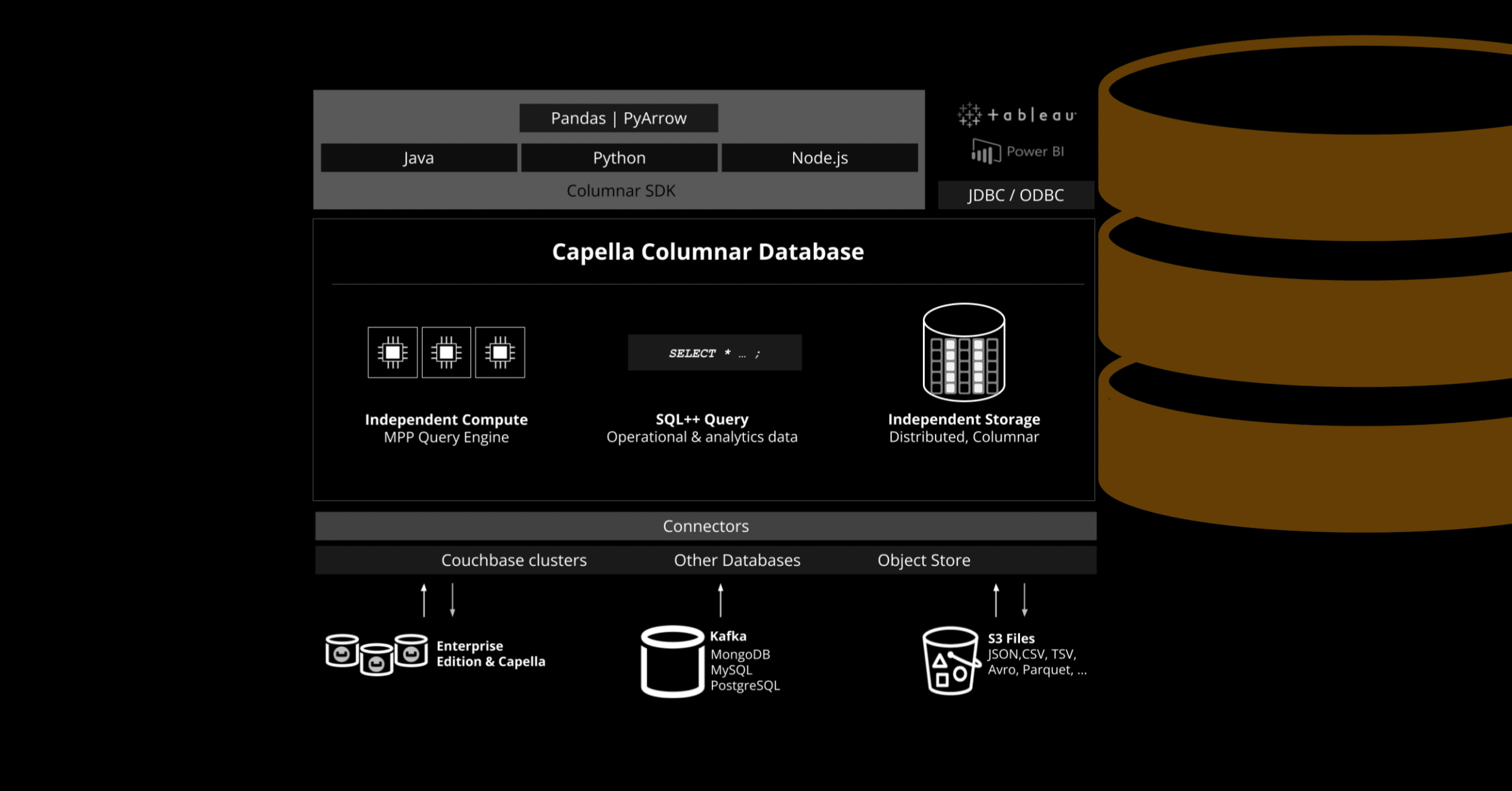
Couchbase는 SDK를 통한 고성능 데이터 분석 기능을 도입함으로써 계속 선도적인 위치를 유지하고 있습니다. 카펠라 주상절리, 실시간 JSON 분석을 위한 최첨단 분석 데이터베이스로, ETL 없이도 즉각적인 데이터 분석이 가능하며 운영상 백업 기능도 제공됩니다. 열형 데이터베이스에 대한 빠르고 안정적인 액세스가 필요한 개발자에게는 이 SDK를 통해 여러 프로그래밍 언어 간 원활한 통합이 가능합니다. 자바, 파이썬, 또는 노드 이에스, Capella Columnar SDK를 사용하면 최소의 노력으로 Couchbase의 분석 데이터베이스의 고급 기능을 활용할 수 있습니다.
이 블로그 게시물에서는 새로 출시된 이 제품의 주요 기능, 이점 및 사용 사례를 살펴보겠습니다. Capella Columnar SDKs—데이터 집약적인 애플리케이션을 개발하는 개발자들을 위해 데이터 작업의 단순화를 어떻게 실현하는지 보여줍니다. 또한, 당사의 접근 방식의 단순성과 일관성을 보여주는 코드 예시도 제공합니다.
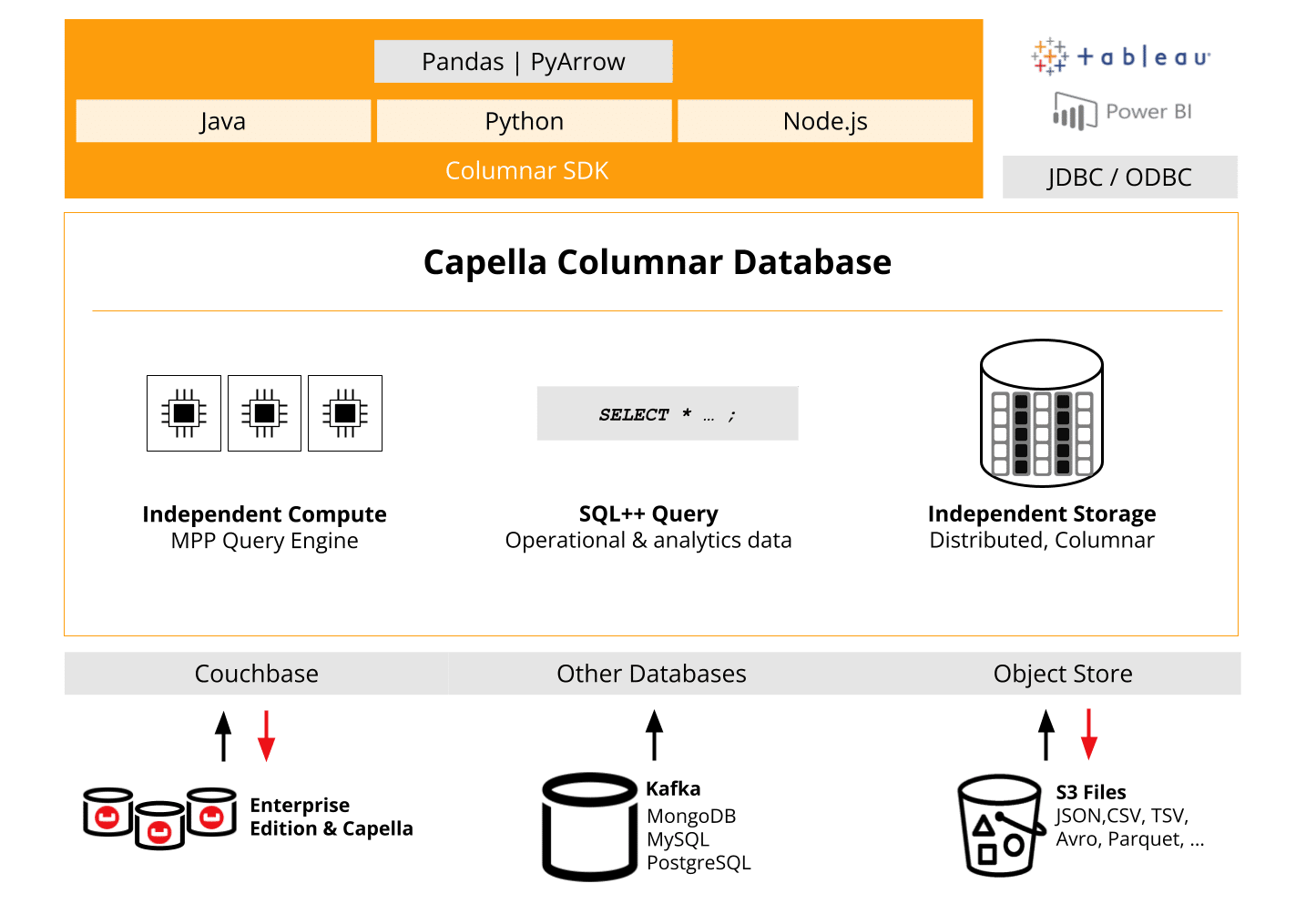
실시간 분석을 위한 특별히 제작된 SDK
Capella Columnar SDK의 핵심 강점 중 하나는 데이터 액세스 및 쿼리 성능을 최적화할 수 있는 능력입니다. 이를 통해 대규모 애플리케이션에 이상적인 솔루션이 됩니다. 분석 작업 부하. 조직들이 실시간 데이터 분석 및 일괄 처리에 점점 더 의존함에 따라 효율적인 쿼리 및 리소스 관리는 매우 중요해지고 있습니다.
Capella Columnar SDK는 이러한 요구 사항을 염두에 두고 설계되었으며, 개발자들이 데이터 상호작용을 세밀하게 조정하고 까다로운 조건에서도 높은 처리량을 보장하는 다양한 기능을 제공합니다. 이 SDK는 API 위변조(wrapper 등)를 사용하지 않고 전적으로 처음부터 고성능과 안정성을 위해 설계되었습니다.
Capella Columnar SDK의 핵심은 세 가지 핵심 요소로 구성됩니다.
- 개발의 용이성
개발자는 추가 도구나 구성 없이 기존 기술 스택 내에서 Couchbase의 열형 데이터베이스와 상호작용할 수 있습니다. SDK는 각 언어를 기본적으로 지원하며, 이를 통해 표현주의적 API들 개발자들에게는 자연스러운 느낌이 들게 합니다. - 발견 가능한 API
SDK는 완전히 검색 가능한 API로 설계되었습니다. 즉, 여러분의 앱 내에서 IDE, SDK는 자동 완성 기능과 함수, 클래스 및 파라미터에 대한 제안을 제공하므로 개발 주기를 단축할 수 있습니다. 더 이상 올바른 메서드를 찾기 위해 헤매지 마세요. SDK는 빌드하는 동안 여러분을 안내해 드립니다. - 강성성
성능을 고려하여 개발된 SDK는 다음과 같은 고급 기능을 제공합니다. 연결 관리, 오류 처리, 타임아웃, 그리고 재시도. 이러한 기능은 애플리케이션이 높은 부하 또는 오류 허용 환경에서도 안정적으로 유지되도록 보장합니다.
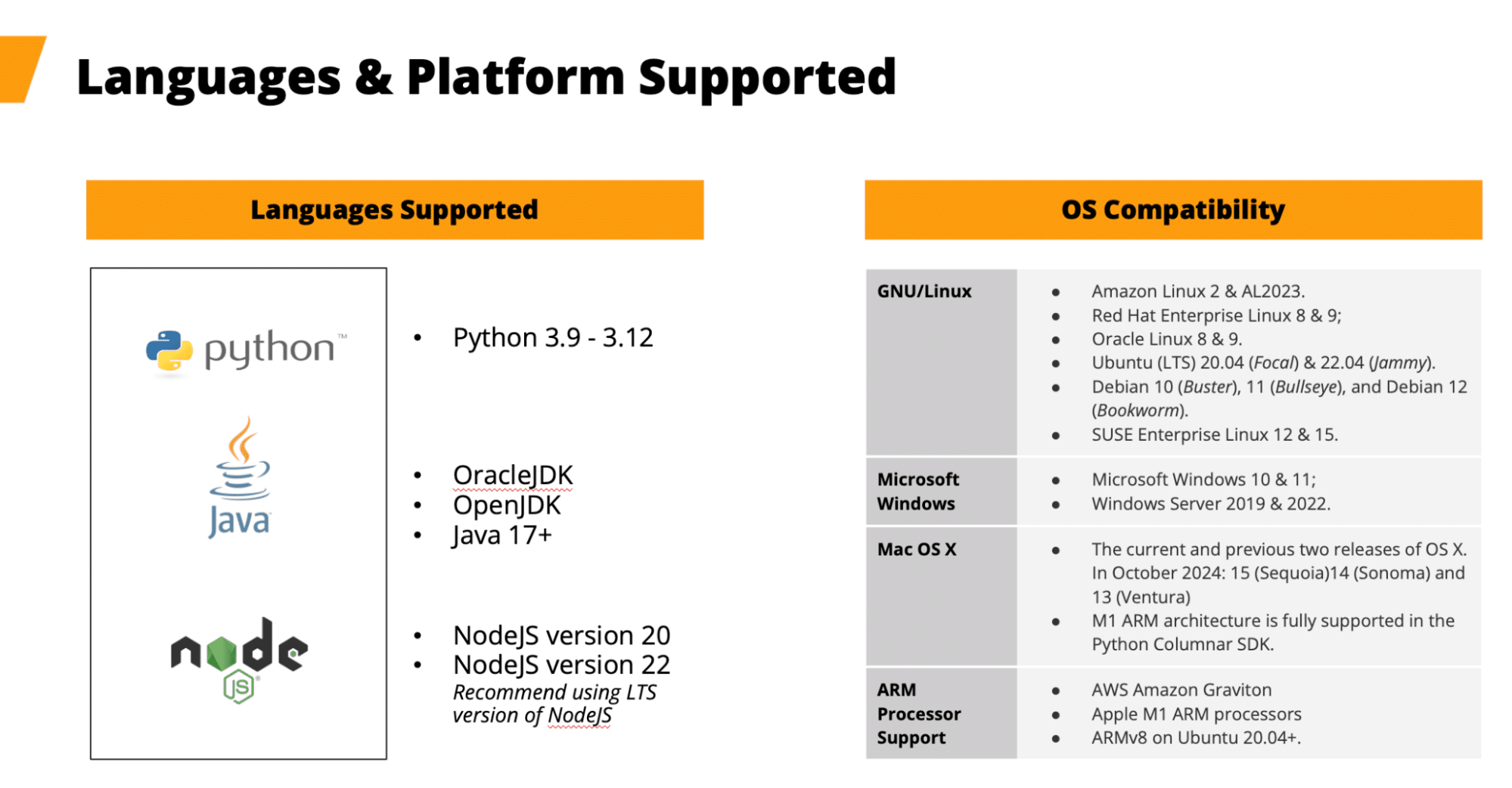
플랫폼 및 언어 지원
Capella Columnar SDK는 다음과 같은 다양한 플랫폼 및 언어를 지원합니다.
- 언어자바(17+), 파이썬(3.9-3.12), 노드.js(v20, v22)
- 운영 체제: 리눅스, 윈도우, macOS(AWS Graviton 및 Apple M1 같은 ARM 프로세서 지원 포함)
Couchbase는 이러한 플랫폼 전반에 걸쳐 지원을 제공함으로써 개발자들이 클라우드 인프라에서 온프레미스 시스템까지 다양한 환경에서 애플리케이션을 배포할 수 있도록 합니다.
Couchbase는 SDK 버전 간의 역호환성을 유지하여 미래에 대비하는 것을 최우선으로 여기며, 개발자들이 변경 사항을 깨뜨릴까 봐 두려워하지 않고 애플리케이션을 업그레이드할 수 있도록 합니다. 이러한 약속은 새로운 기능과 개선 사항이 도입될 때 기존 기능이 그대로 유지되도록 보장하여 조직이 최신 기능을 활용하면서도 기존 기능을 보존할 수 있도록 합니다. 기존의 워크플로우를 정립했습니다.
Capella Columnar SDK가 대규모 데이터 관리 지원하는 방법
그 Couchbase Capella Columnar SDKs 규모가 큰 데이터 분석을 효율적으로 관리하기 위한 종합적인 도구 세트를 제공하며, 일관성, 성능, 확장성을 중시합니다.
다음은 핵심 기능의 개요입니다:
언어별 통합 API
Capella Columnar SDK는 다음과 같은 기능을 제공합니다. 일관된 API 언어 간의 차이들 자바, 파이썬, 그리고 노드 이에스, 이 기능은 팀 간의 협업을 간소화하고 개발자들이 통합된 개발 환경을 유지하면서 언어를 전환할 수 있도록 해줍니다.
간소화된 데이터 관리 및 쿼리 실행
이 SDK들은 직관적인 액세스를 제공합니다. 범위 및 컬렉션, 두 가지 지원 기능이 포함된 동기식 및 비동기식 API 호출. 쿼리 실행을 위해, 이들은 옵션이 있는 유연한 SQL++ 쿼리를 지원합니다. 버퍼드 리드 (메모리 내 데이터 세트의 경우) 그리고 스트리밍 리드 (for real-time processing of large datasets), optimizing performance based on operational needs.
Resilient connection management and error handling
The SDKs automatically adjust to database topology changes, ensuring smooth performance during failovers 또는 rebalances. They also feature automatic query retries and provide clear error messages aligned with Couchbase’s Analytics Error Codes to aid in fast issue resolution.
Cross-Platform support and versioning flexibility
With support for multiple environments like Linux, Windows, MacOS, 그리고 ARM processors, the SDKs offer flexibility across infrastructures. Their versioned API framework ensures compatibility with new Couchbase features, allowing developers to integrate updates without compatibility concerns.
Scalability and distributed architecture
Capella Columnar SDKs leverage Couchbase’s distributed architecture for automatic data partitioning and 크로스 데이터 센터 복제. This enables seamless scaling across multiple nodes and regions, ensuring high availability and efficient global data distribution as applications grow.
Use cases for Capella Columnar SDKs
Real-Time data analytics
For organizations handling real-time analytics, the Capella Columnar SDKs simplify data processing. With streaming query support, developers can process incoming data row-by-row, which is perfect for scenarios like log analysis, IoT sensor data, 또는 real-time financial transactions.
Ad targeting example use case
A real-time analytics use case with Capella Columnar SDKs could involve integrating clickstream or web interaction data from, for example, an S3 bucket to drive just-in-time ad delivery. In this scenario, clickstream data, which captures real-time user interactions on a website, is streamed into Capella Columnar using external link configurations. The SDKs enable fast, efficient querying of this data as it arrives, using flexible SQL++ queries to analyze user behavior on the fly.
At the same time, user profile data stored in a NoSQL or relational database is fed into the system through Kafka connectors, allowing for a unified view of each user’s preferences and history. By combining these data streams with code used from Columnar SDKs, businesses can optimize their ad targeting strategy, delivering personalized ads based on the user’s latest interactions and historical preferences—all processed quickly and at scale using Capella Columnar’s distributed architecture.
Data science models could be applied using other tools, to find trends and build analytical results that drive appropriate experiences for the end user. This allows for timely, relevant ad delivery, maximizing engagement and conversion rates via applications built on the SDKs.
Batch data processing
For more traditional analytics workloads where data is processed in bulk, the buffered query mode ensures efficient memory usage while loading datasets into memory. Use cases like ETL processes, business intelligence, 그리고 data warehousing can benefit from this capability. Using the power of SQL++, BI tools can extract high value information quickly without needing to rely on as many 3rd party analytical tools.
Cross-language data operations
그 unified API enables development teams to switch between programming languages easily without needing to learn new patterns. This is particularly useful for teams working on microservices architectures, where different components might be written in different languages (e.g., Java for backend services, Node.js for real-time APIs).
Technical overview: getting started
To give you a sense of how easy it is to get started with the all of the Capella Columnar SDKs, here’s an example of connecting to a Capella Columnar cluster using the Python SDK, see the docs for Java and Node.js examples:
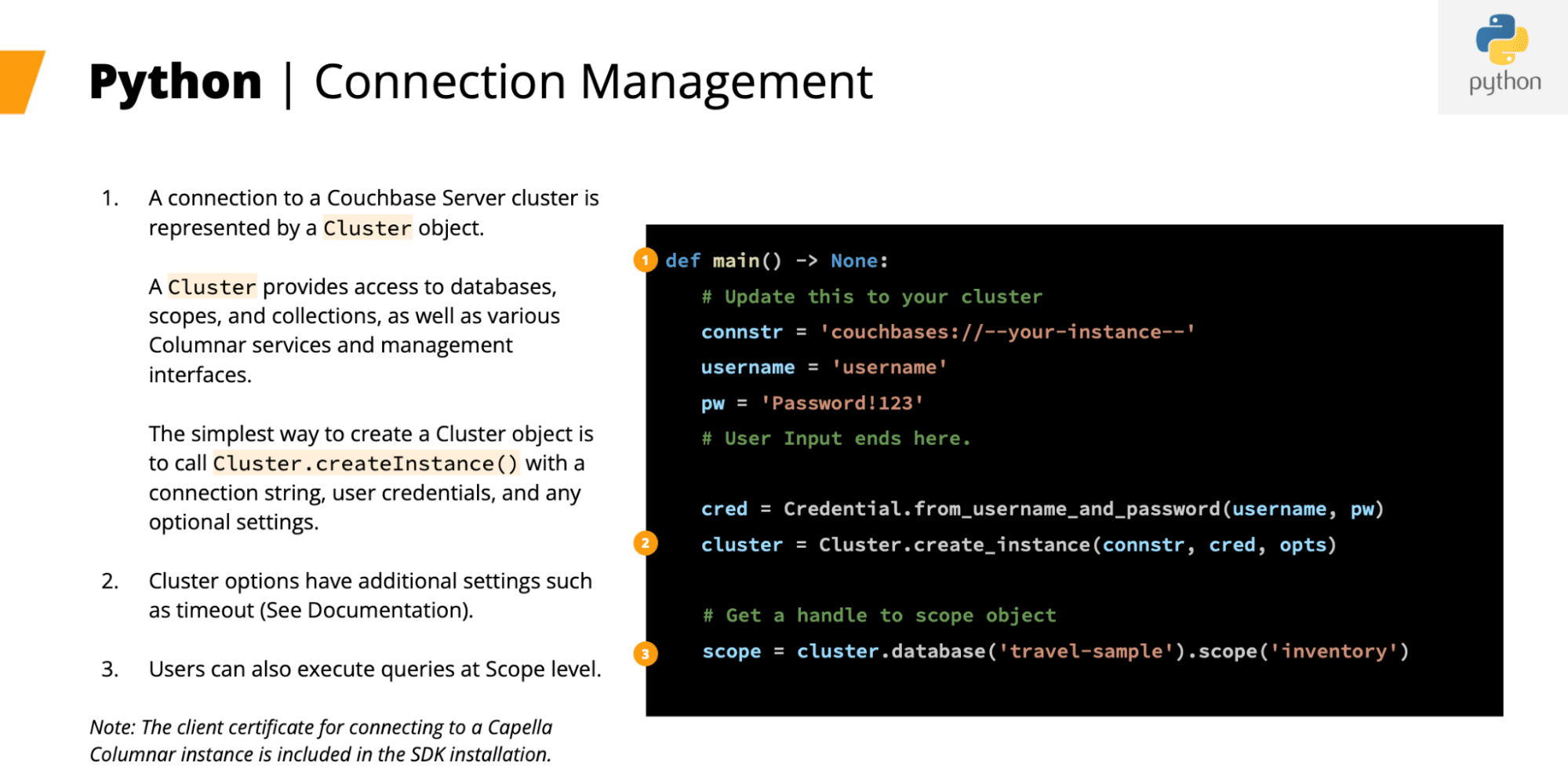
The process is similar across all SDKs, ensuring a consistent experience regardless of the language. Once connected, you can execute SQL queries, manage scopes, and work with collections.
Asynchronous query execution
The Python SDK supports both Sync and Async Streaming APIs. Applications that need non-blocking operations can also perform asynchronous queries using Python’s asyncio framework. This allows you to run queries without waiting for them to finish, increasing throughput, especially when handling large datasets or slow operations. This example also shows buffered vs. streaming data access.
|
1 2 3 4 5 6 7 8 9 10 11 12 13 14 15 16 17 18 19 20 |
에서 acouchbase_columnar 가져오기 get_event_loop 에서 acouchbase_columnar.클러스터 가져오기 AsyncCluster 질의 = “”” SELECT airline, COUNT(*) AS route_count, AVG(route.distance) AS avg_route_distance FROM `travel-sample`.inventory.route GROUP BY airline ORDER BY route_count DESC “”” 응답 = await 클러스터.execute_query(질의) # Buffered: Execute a query and buffer all result rows in client memory. all_rows = await 응답.get_all_rows() # NOTE: all_rows is a list, _do not_ use `async for` ~를 위해 열 안으로 all_rows: print(f‘Found row: {row}’) # Streaming: Execute a query and process rows as they arrive from server. 응답 = await 클러스터.execute_query(진술서) 비동기 ~를 위해 열 안으로 응답.rows(): print(f‘Found row: {row}’) |
In this example, the asyncio event loop is used to handle queries asynchronously, allowing the application to perform other tasks while waiting for the query results.
Parameterized queries
Parameterized queries help protect your application from SQL injection attacks by separating query logic from data inputs. This is especially important when handling user-provided data.
|
1 2 3 4 5 6 7 8 9 10 11 12 13 14 15 16 17 |
# Positional Parameters 질의 = “”” SELECT airline, COUNT(*) AS route_count, AVG(route.distance) AS avg_route_distance FROM route WHERE sourceairport=$1 AND distance>=$2 GROUP BY airline ORDER BY route_count DESC “”” 응답 = 범위.execute_query(질의, 쿼리 옵션(positional_parameters=[‘SFO’, 1000])) # Named Parameters 질의 = “”” SELECT airline, COUNT(*) AS route_count, AVG(route.distance) AS avg_route_distance FROM route WHERE sourceairport=$source_airport AND distance>=$min_distance GROUP BY airline ORDER BY route_count DESC “”” 응답 = 범위.execute_query(질의, 쿼리 옵션(named_parameters={‘source_airport’: ‘SFO’, ‘min_distance’: 1000})) |
In this example, we pass the airport code as a parameter, ensuring that the query remains safe and avoids the risks associated with SQL injection.
Using query results in data analytics libraries
Couchbase Columnar SDK integrates seamlessly with popular Python data analytics libraries like Pandas 그리고 PyArrow, common tools of choice for data science and AI/ML projects, making it easy to incorporate query results into your analytics workflow.
Importing query results into a Pandas DataFrame
This example shows how Couchbase query results can be easily converted into Pandas DataFrames, enabling data manipulation and exploration.
|
1 2 3 4 5 6 7 8 9 10 11 12 |
가져오기 pandas as pd 응답 = 범위.execute_query(질의) df = pd.DataFrame.from_records(응답.rows(), 색인=‘airline’) print(df.head()) # airline route_count avg_route_distance # AA 2354 2314.884359 # UA 2180 2350.365407 # DL 1981 2350.494112 # US 1960 2101.417609 # WN 1146 1397.736500 |
Importing query results into a PyArrow Table
For performance-intensive tasks, Couchbase results can be used in PyArrow tables, facilitating in-memory analytics and integration with columnar storage systems.
|
1 2 3 4 5 6 7 8 9 10 |
가져오기 pyarrow as pa 응답 = 범위.execute_query(질의) table = pa.Table.from_pylist(응답.get_all_rows()) print(table.to_string()) # pyarrow.Table # route_count: int64 # avg_route_distance: double # airline: string |
By supporting both Pandas and PyArrow libraries, the Couchbase Columnar Python SDK simplifies integration into existing data science and data analytics pipelines, enabling efficient data analysis and processing.
These examples showcase how to execute buffered, streaming, asynchronous, and parameterized queries using Couchbase SDKs, allowing you to tailor query execution to your application’s requirements.
결론
The Capella Columnar SDKs are a powerful addition for developers working with large-scale data analytics. With robust support for multiple languages, streamlined query execution, and cross-platform compatibility, these SDKs provide the flexibility, performance, and reliability needed to handle modern data workloads. Whether you’re processing real-time data streams or executing complex analytical queries, the Capella Columnar SDKs are designed to enhance your development experience.
Explore the possibilities and start building smarter, faster applications with Capella Columnar today!
자원
- Documentation and install instructions: 파이썬 – 노드 이에스 – 자바
- 자세히 알아보기 카펠라 주상절리 and its use cases
- Start using Capella, for free, today: sign up

댓글 남기기
댓글을 달기 위해서는 로그인해야합니다.