Migrating large, complex datasets from Hugging Face to Couchbase just got easier. Whether you prefer working from the command line or within your favorite IDE, our new Hugging Face to Couchbase migration toolkit—featuring the Couchbase VS Code Extension 그리고 씨비마이그레이트 CLI —simplifies and streamlines the process.
Introducing the Hugging Face-to-Couchbase migration tools
Our toolkit for migrating Hugging Face datasets to Couchbase includes two core components, optimized for different development workflows:
- Couchbase VS Code Extension
- CLI Tool (cbmigrate hugging-face)
Whether you’re a command-line purist or an IDE enthusiast, we have you covered!
1. Couchbase VS Code extension
Prefer a graphical interface within VS Code? Our Couchbase extension enables seamless dataset migration directly from your IDE.
주요 기능
- Integrated migration: Perform dataset migrations within VS Code, streamlining your workflow.
- User-friendly interface: Use a graphical UI to configure and monitor data migration processes effortlessly.
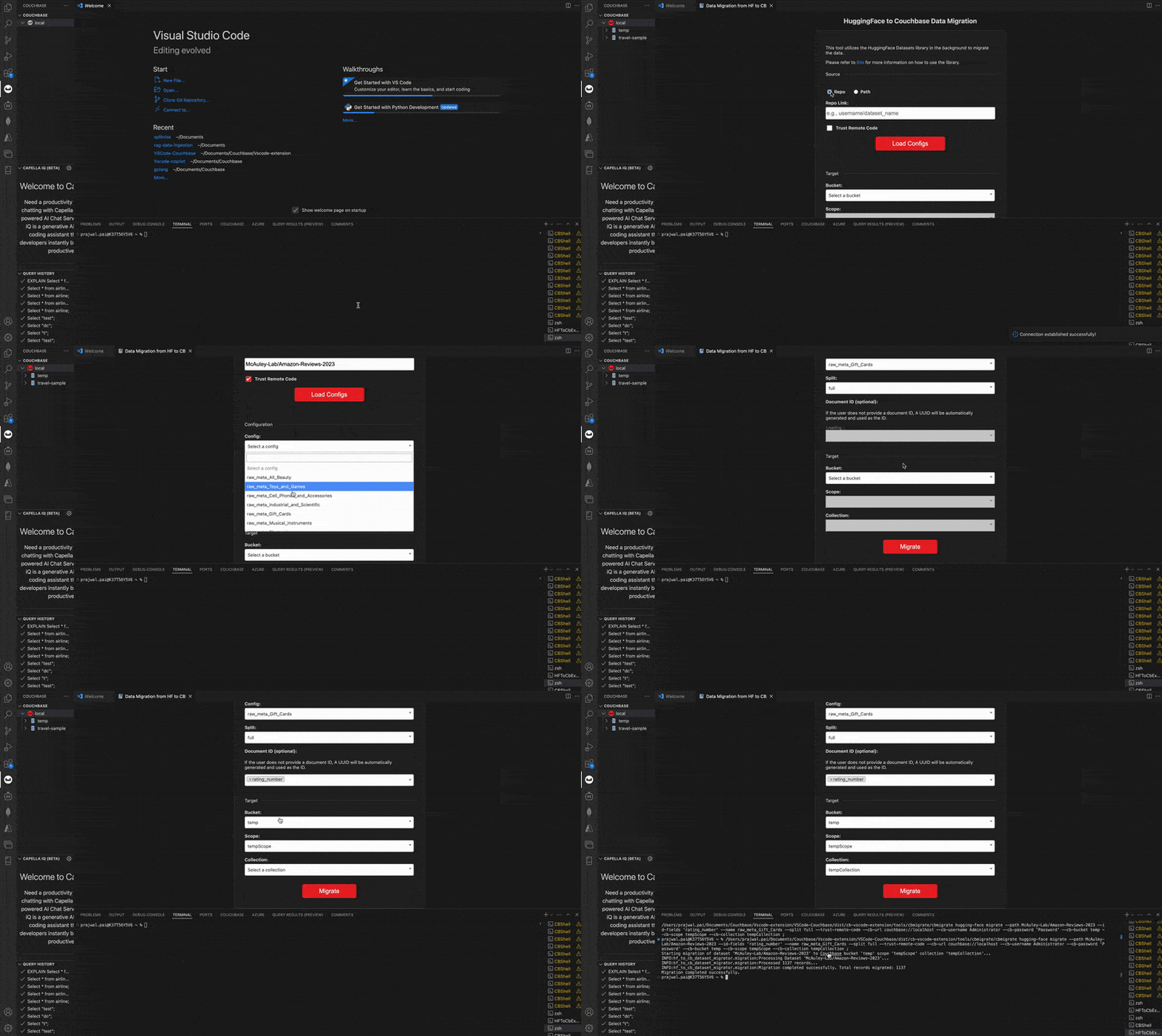
For more details, refer to the Couchbase VS Code plugin repository.
2. Command-line tool: cbmigrate hugging-face
For developers who prefer the terminal, the hugging-face subcommand of 씨비마이그레이트 provides a powerful and efficient way to migrate Hugging Face datasets to Couchbase.
주요 기능
- Easy dataset exploration: List configurations, splits, and fields within Hugging Face datasets before committing to a migration.
- Flexible migration: Supports streaming, batch processing, and custom document ID generation.
- Security & privacy: Supports authentication for private datasets and secure Couchbase connections.
Usage
List dataset configurations
|
1 |
씨비마이그레이트 hugging–face list–configs —경로 <DATASET_PATH_OR_NAME< |
List dataset splits
|
1 |
씨비마이그레이트 hugging–face list–splits —경로 <DATASET_PATH_OR_NAME< |
List dataset fields
|
1 |
씨비마이그레이트 hugging–face list–fields —경로 <DATASET_PATH_OR_NAME< |
Migrate dataset to Couchbase
|
1 2 3 |
씨비마이그레이트 hugging–face migrate —경로 <DATASET_PATH_OR_NAME< —아이디–fields <FIELD1,FIELD2,...< —씨비–URL 카우치베이스://<HOST> –cb-username <USERNAME> –cb-password <PASSWORD> —씨비–양동이 <BUCKET_NAME< —씨비–범위 <SCOPE_NAME< —씨비–컬렉션 <COLLECTION_NAME< |
Example: simple migration of a public dataset
|
1 2 3 |
씨비마이그레이트 hugging–face migrate —경로 glue —분할하다 train —아이디–fields idx —씨비–URL 카우치베이스://localhost –cb-username Administrator –cb-password password —씨비–양동이 sample_bucket —씨비–범위 sample_scope —씨비–컬렉션 sample_collection |
For more information, visit the cbmigrate GitHub repository.

댓글 남기기
댓글을 달기 위해서는 로그인해야합니다.