
To help .NET developers better use Couchbase in their applications, there is a collection of community-supported Couchbase Extensions. These include extensions for caching, session, multiop, compression, and locking. And there are some officially supported extensions for dependency injection, open telemetry, and transactions.
The main extension for discussion today is Couchbase.Extensions.Caching, which implements the .NET Distributed Cache interface using Couchbase. This can be added to your project with NuGet (dotnet add package Couchbase.Extensions.Caching).
Recently, I was working with a customer in the cruise industry that is managing several applications, and wants to store caching data separately for each application. However, creating an entirely new bucket for each application is overkill. They were wondering how to specify a scope/collection when using the Couchbase.Extensions.Caching library.
Session and Caching Extensions
In recent years, the shift from Couchbase SDK 2 to SDK 3 introduced many new features and improvements, including scopes/collections support. . Couchbase.Extensions family has also been updated to support SDK 3.
However, the 기본값 usage of this library uses the _default scope and _default collection, with no built-in option to specify anything else.
To see this in action, here’s the line of configuration to add Couchbase as a distributed cache (taken from the GitHub example project):
|
1 |
builder.서비스.AddDistributedCouchbaseCache(“myproject”, opt =< { }); |
In that code, myproject is a bucket name. The opt object doesn’t have an option for scope/collection name.
Using the sample project, you’ll end up with cached information like this:
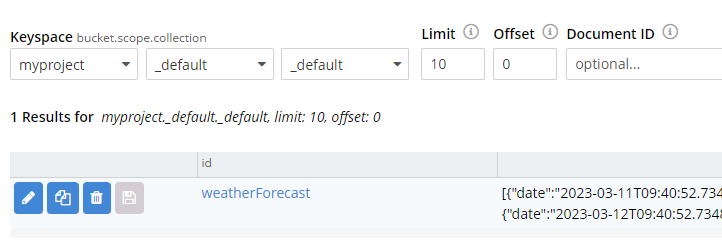
(Notice the bucket, scope, and collection names are myproject, _default, 그리고 _default).
Extending the Extension
Thankfully, the library is extensible enough that with a little bit of code, it can be pointed to whatever collection you’d like.
Let’s look a little deeper at the project, specifically ICouchbaseCacheCollectionProvider.cs 그리고 DefaultCouchbaseCacheCollectionProvider.cs
- ICouchbaseCacheCollectionProvider contains one method, GetCollectionAsync.
- DefaultCouchbaseCacheCollectionProvider’s implements that method with: return bucket.DefaultCollection();
But what if you don’t want to use the default collection?
In that case, create a custom implementation of ICouchbaseCacheCollectionProvider. I’ll call mine CustomCouchbaseCacheCollectionProvider:
|
1 2 3 4 5 6 7 8 9 10 11 12 13 14 15 16 17 18 19 20 21 22 23 |
using 카우치베이스.KeyValue; namespace 카우치베이스.Extensions.Caching.예시.Caching; 공공의 클래스 CustomCouchbaseCacheCollectionProvider : ICouchbaseCacheCollectionProvider { 사적인 readonly ICouchbaseCacheBucketProvider _bucketProvider; 사적인 readonly 문자열 _scopeName; 사적인 readonly 문자열 _collectionName; 공공의 CustomCouchbaseCacheCollectionProvider(ICouchbaseCacheBucketProvider bucketProvider, 문자열 scopeName, 문자열 collectionName) { _bucketProvider = bucketProvider; _scopeName = scopeName; _collectionName = collectionName; } 공공의 비동기 ValueTask<ICouchbaseCollection< GetCollectionAsync() { 변수 양동이 = await _bucketProvider.GetBucketAsync().ConfigureAwait(거짓); 변수 범위 = await 양동이.ScopeAsync(_scopeName); 반환 await 범위.CollectionAsync(_collectionName); } } |
Consider this a starting point. In your implementation, you can set it up however you’d like, add additional logic, etc.
The next step is to add that as a service (in Program.cs typically), specifying the scope/collection names:
|
1 2 3 4 5 |
builder.서비스.AddSingleton<ICouchbaseCacheCollectionProvider<(x =< 새로운 CustomCouchbaseCacheCollectionProvider( x.GetRequiredService<ICouchbaseCacheBucketProvider<(), “mycachingscope”, “mycachingcollection”)); |
If you’re concerned about this being overwritten by the default provider, note that TryAddSingleton 이다 used inside of AddDistributedCouchbaseCache. This means that it won’t override your custom provider with the default provider.
Custom Provider in Action
This extension will not actually create the specified scope and collection, so make sure you’ve created them ahead of time.
Run the app, and try out the Weather Forecast API with the OpenAPI interactive page. The first time executing the endpoint will result in a “cache miss”, at which point the weather forecast data will be written to the collection specified:
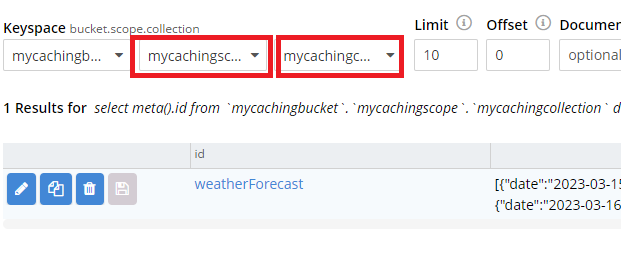
(Notice the bucket, scope, and collection names are myproject, mycachingscope, 그리고 mycachingcollection).
요약
With a custom implementation of an interface, and one extra line in Program.cs, you can specify whatever scope/collection you want to store cached data into.
Further, the Couchbase.Extensions.Session extension uses the caching extension as the underlying storage mechanism.
- Happy caching! Source code is available in GitHub.
- For more on .NET, check out the Couchbase .NET forum 그리고 .NET SDK documentation.
- If you’ve got questions on caching, session, or architecture in general, check out the Couchbase Discord.

댓글 남기기
댓글을 달기 위해서는 로그인해야합니다.