
우리는 Couchbase에서 고객 360 솔루션을 구축하는 데 수반되는 내용과 그에 필요한 모든 고차원적인 개요를 살펴보았습니다. 여기...
그 후 이질적인 소스에서 데이터를 가져와 카우치베이스(Couchbase)에서 결합하는 통합 부분을 파고들었고, 이것이 어떻게 ETL 프로세스로 이어지는지 설명했습니다. 여기 (입 좀 씻고 올게요)…
자, 이제 결합된 데이터의 이 멋진 세계로 무엇을 할 수 있는지 그 한 가지 측면을 살펴보겠습니다.
상상해 보세요, 당신에게 어카운트 이행큐티브가 있다고…
실제로 시간을 내어 고객들과 소통하는 사람...
단순히 골프장에서 시간을 보내는 대신에.
글쎄요, 골프장에서 고객과 어울리며 시간을 보내는 사람들도 있긴 하죠…
좋습니다. 그럼 “계정 담당자(AE)가 있다고 상상해보세요”라는 부분에서 멈추죠.
이 AE(계정 담당자)가 다양한 고객들을 만나며 시간을 보낼 테니, 그 고객들에 대한 모든 정보를 손쉽게 파악할 수 있게 된다면 정말 좋지 않을까요?
휴대전화로 손가락 몇 번만 탭하면 바로 이용할 수 있는 그런 것을 말하는 겁니다…
그들의 모든 구매...
그들의 모든 지원 문의들…
귀하의 전문 서비스 팀과의 모든 워크숍 및 상호작용은…
모두 AE의 휴대폰에…
7번 도로에 나와 있을 때조차도th 초록색, 휴대폰 신호가 닿지 않는 곳…
솔직히 말해서...
없음!
음료 카트를 불러서 리필을 받을 수도 없네…
자, 드디어 여러분을 위한 해결책이 있습니다!!!
오프라인 모바일 동기화
봐요, 우리 모바일 스택은 연결 상태가 엉망이라는 태도로 설계되었습니다!
필요할 때는 절대 없지...
안테나 칸이 전부 다 차는 경우는 자동응답 전화를 거는 로봇이 당신에게 전화를 걸어올 때뿐이다…
티샷을 하려고 막 백스윙을 시작하려는 찰나에…
너의 리듬을 흐트러뜨리기 딱 좋은 시간이네…
샷을 쳐서 물에 빠뜨리게 만들다…
하지만 고객의 최근 주문에 대해 논의하고 싶을 때면...
바는 없다!
도착할 리 없는 데이터를 기다리며 계속 돌아가는 로딩 아이콘뿐일 때…
하지만 티박스로 돌아가서, 수신 표시가 5개 다 뜰 때, 여러분의 스마트폰이 필요한 모든 데이터를 조용히 수집할 수 있다면 어떨까요?
그래서 막상 필요할 때는 검색할 게 아무것도 없습니다.
기다림 없음!!!
그리고 당신은 아무것도 할 필요가 없었죠.
보세요, 지금까지 모바일 앱들은 데이터를 가져오기 위해 REST 호출이라는 것을 사용하여 작성되었습니다.
휴식
내 휴대폰이 낮잠이라도 자고 있다는 말씀이신가요?
아닙니다.
REST는 REpresentational State Transfer의 약자입니다.
그래, 약간의 기술적인 허튼소리지.
동네 너드에게 그게 무슨 뜻이냐고 묻지 마세요.
그는 “대표…제에에”라고 말하기도 전에 여러분을 재워버릴 것입니다.”
아, 죄송합니다, 제가 어디까지 얘기했었죠?
아 맞다, REST…
The short answer is that it’s a web site for apps.
Let’s just leave it at that.
To summarize, every time the app on your phone needed data, it had to go to a web site to retrieve it.
And we’ve all tried to pull up web sites on our phones…
Sometimes they load fast…
And sometimes they load s…l…o…w…
That is, if they load at all.
And on the 7th green, with no bars, guess what kind of response you’re going to be getting…
Yep, none at all.
So we eliminated the need for REST calls in our mobile apps.
Your app just interacts with a small database loaded on the phone, and your data just magically appears!
Well, it’s not really magic…
Just a lot of technical mumbo-jumbo where the database automatically pulls the data when it can…
So it already has it when you need it.
It’s like it’s predicting your future, anticipating your needs and wants…
Automatic Data Sync
So how does this work? What’s involved?
If you take another look at our Customer 360 reference architecture diagram again, you’ll notice in the upper-right corner a rectangle labeled “Mobile” with a couple of lines going from databases to something called “Sync Gateway”, and then on to the Couchbase Data Platform.
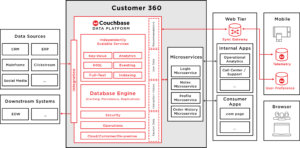
This is a piece of magic sauce that goes between the database on your phone and our Couchbase Data Platform.
Magic sauce?
Yes, it is the key to our mobile database, which we call Couchbase Lite, retrieving data from the Couchbase cluster in the background.
See, the last thing you want to do is try to push all of the data in your Couchbase cluster down to your phone.
It just won’t fit.
Not to mention the massive amount of pseudo-5-G bandwidth that would be required.
So, we need some way of designating which data goes to what user.
Or rather, to their phone.
Traditionally, this would be done with some sort of query, which would have been run as part of the REST call mentioned above…
이런 식의…
SELECT *

FROM Customer360

WHERE AccountExec = “Me”;
And then the wheel would spin as all that data is gathered and returned to the phone.
Hope you’re not in a hurry…
We have a better way…
What we do is to organize the data into “channels”, and then assign the channels to users.
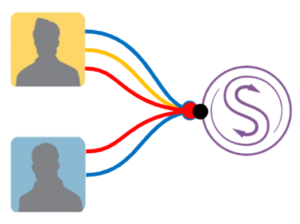
And we do this organization when the data is written to the database.
Why? Why not wait?
Well, because this enables our Sync Gateway product to look ahead and queue up all the data updates each users is going to need.
That means, when your phone goes from zero bars to five, Sync Gateway already has the data ready for you to receive.
No running of any queries to select it.
Kinda like a beer bong for data…
OK, I seem to have wandered from the golf course over to spring break at Daytona Beach…
Either that or the drink cart is unlike any I’ve seen…
It could explain all the bad golf cart driving videos we’ve all seen…
Anyway, back to how Sync Gateway works…
So what we do is we put the organization of your data in your hands.
Sync Gateway has what we call a “sync” function, written in JavaScript.
And you can modify it to use whatever logic (or lack thereof) to assign documents to channels.
function(doc){

      if (doc.type == "Customer360") {

            channel(doc.acct_exec);

      }

}
Simple, isn’t it?
Well, at least until someone turns it into the JavaScript equivalent of War and Peace…
So now, because your Account Executive had five bars back at the first tee, he now has the data he needs to discuss his customer’s issues when he has zero bars on the 7th green…
Keeping Things Simple
So, I have a few rules that I try to code by…
Have most of my professional life…
At least, since it was hammered into my head by an early boss…
Keep things as simple as possible.
The simpler I keep anything I build, the easier it is to maintain and update it…
The fewer bugs it has…
And the easier my life is.
Makes it easier to make my tee times…
And that’s what we strive for here at Couchbase…
Not to make our tee times…
To keep things as simple as possible.
See, the more systems you have to plug together to build your Customer 360 Solution, the more complex your solution will be.
The more headaches you’ll have…
The fewer tee times you’ll make…
I mean, with our integrated Full Text Search, Analytics, Eventing, N1QL querying, and Key/Value data service, with built-in data caching, it’s all pre-integrated out of the box.
Keeps your life simple.
After all, we can’t have our Account Executives out on the golf course by themselves…
That just wouldn’t be right.

댓글 남기기
댓글을 달기 위해서는 로그인해야합니다.