
정식 출시(GA)를 발표하게 되어 매우 기쁩니다. 카우치베이스 셸 (cbsh), 의 위에 구축된 강력한 명령줄 도구인 누쉘 Couchbase와의 상호작용을 더 쉽고 효율적으로 만들도록 설계되었습니다. Couchbase 쉘은 강력한 기능을 지원합니다. 벡터 검색 기능 이를 통해 애플리케이션이 의미론적으로 유사한 항목을 검색할 수 있도록 함으로써 생성형 AI 애플리케이션의 구동에 사용할 수 있는 벡터 임베딩 다차원 공간에서의 항목 표현. 이번 출시를 통해 cbsh은 벡터 검색 사용자가 명령줄에서 직접 벡터 인덱스를 생성하고 (유사도 검색과 같은) 벡터 검색을 수행할 수 있도록 지원합니다. 이를 통해 사용자는 모델 파라미터 테스트 및 수정, 애드혹(ad hoc) 벡터 쿼리, 간단한 명령줄 인터페이스를 통한 스크립팅 등 다양한 유스케이스를 활용할 수 있습니다.
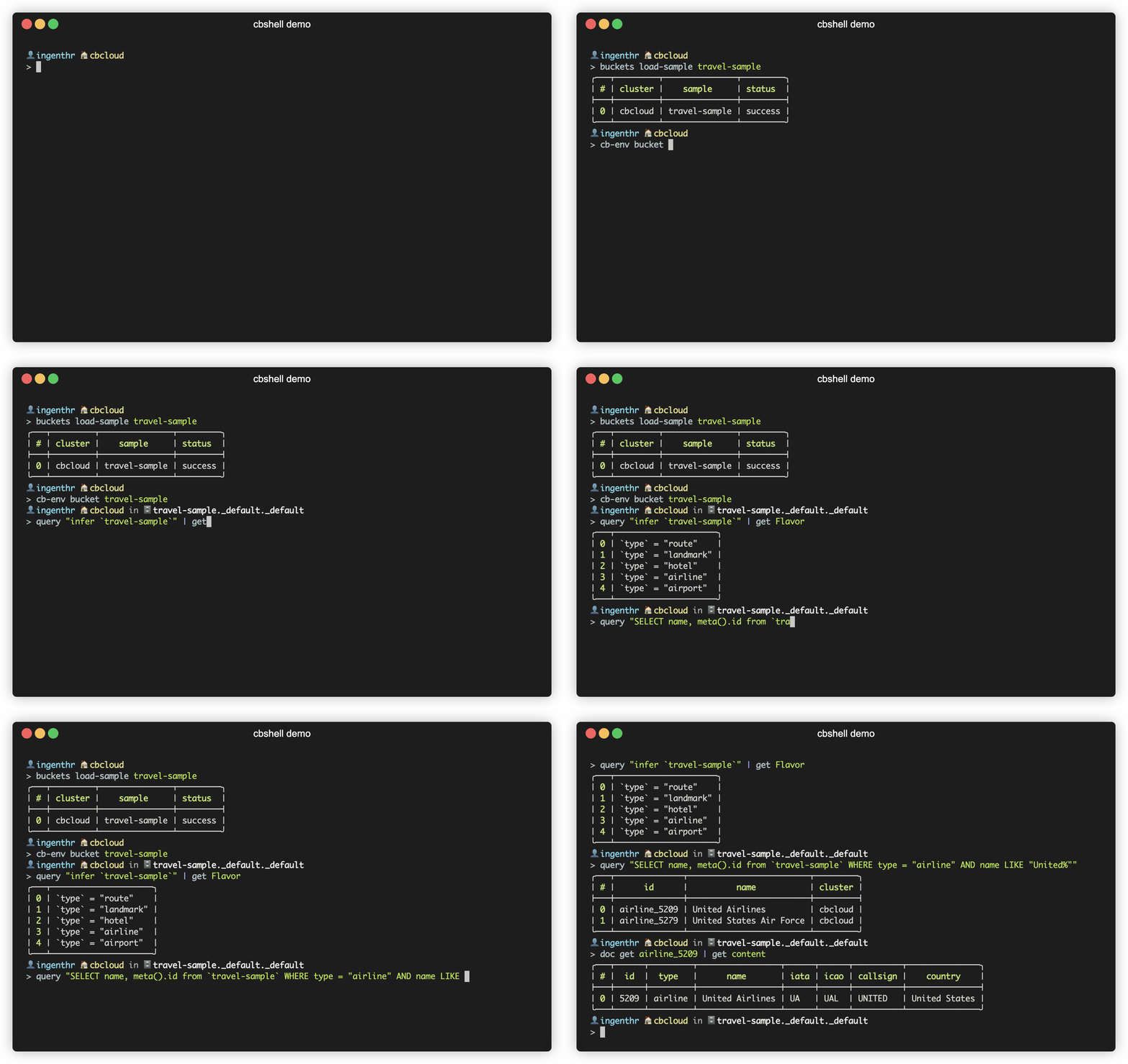
카우치베이스 셸(Couchbase Shell)은 무엇인가요?
Couchbase Shell은 Couchbase를 사용하는 개발자와 관리자를 위해 맞춤화된 오픈 소스 CLI 도구입니다. 카우치베이스 카펠라 그리고 Couchbase Server. 이 도구를 사용하면 사용자는 쉽게 확장할 수 있는 간단한 명령 라인 도구를 통해 신속하게 모니터링, 쿼리, 데이터 로드, 데이터 내보내기, 전체 벡터 검색을 수행할 수 있으며, 구문 강조, 지능형 자동 완성, 문맥별 도움말, 오류 메시지 등의 최신 기능을 제공합니다.
이 도구는 Couchbase로 사용할 수 있습니다 커뮤니티 지원 프로젝트.
리눅스, 맥, 윈도우 호환 (방문 설치 (전체 목록은 문서 참조).
주요 기능
- 명령어 파이프라인, 구문 강조 및 자동 완성 기능
- 연결 관리
- 데이터 로딩 중
- 데이터 내보내기
- 벡터 검색
- 키-값(KV) 연산 지원
- SQL++을 사용하여 데이터 쿼리하기
다음은 카우치베이스 셸의 주요 기능 중 일부입니다.
명령어 파이프라인, 구문 강조 및 자동 완성 기능
누셸(nushell)에서, 파이프라인 Linux 파이프(|)와 유사하게 여러 명령의 조합을 허용합니다. Cbsh은 클러스터와 상호 작용하기 위한 사용자 정의 Couchbase 명령을 추가하여 이를 기반으로 구축됩니다. 또한 사용 중인 셸에 따라 구문 강조를 활성화하고 자동 완성을 제안합니다. 예를 들어, 다음은 기본 nushell 명령을 사용하여 로컬 JSON 파일을 연 다음 테이블로 형식화합니다.
사용하는 셸에 따라 구문 강조(syntax highlighting)가 다를 수 있습니다.
|
1 2 3 4 5 6 7 8 9 |
< 열다 사용자.JSON | 포장하다 콘텐츠 | 삽입하다 아이디 {$안으로.콘텐츠.아이디} ╭─────────┬─────────────────────────────╮ │ │ ╭────────────┬────────────╮ │ │ 콘텐츠 │ │ 아이디 │ 20397 │ │ │ │ │ 사용자 이름 │ 찰리 │ │ │ │ ╰────────────┴────────────╯ │ │ 아이디 │ 20397 │ ╰─────────┴─────────────────────────────╯ |
한 번 이런 방식으로 서식화된 결과를 커스텀 cbsh로 파이프할 수 있습니다. 문서 업서트 명령 to insert the JSON into your Couchbase cluster. The full pipeline to open the doc, format and then upsert is:
|
1 |
< 열다 사용자.JSON | 포장하다 콘텐츠 | 삽입하다 아이디 {$안으로.콘텐츠.아이디} | 의사 업서트 |
연결 관리
카우치베이스 셸은 간소화합니다 연결 관리, 최소한의 노력으로 Couchbase에 대한 연결을 설정하고 관리할 수 있습니다. 사용자는 Couchbase에 연결하기 위한 두 가지 옵션이 있습니다.
커맨드 라인 연결 관리 (CLI 인수)
CLI 인수를 통해 Couchbase 셸에 연결하는 것은 간단하며, 명령줄에서 Couchbase 클러스터 작업을 빠르게 시작할 수 있도록 해줍니다. 제공해야 하는 주요 인수는 클러스터 연결 문자열, 사용자 이름, 그리고 비밀번호입니다. 또한 작업하고자 하는 버킷, 특정 스코프 및 컬렉션, 그리고 필요한 경우 인증 메커니즘과 같은 다른 매개변수도 지정할 수 있습니다.
기본 연결 예제
~에게 Couchbase 클러스터에 연결, 다음 명령어를 사용할 수 있습니다:
|
1 |
< ./cbsh —사용자 이름 관리자 —연결 문자열 127.0.0.1 –p 비밀번호 —비활성화–TLS |
특정 버킷에 연결하기
Couchbase 클러스터의 버킷에 연결하려면 다음 명령을 사용할 수 있습니다:
|
1 |
< ./cbsh —사용자 이름 관리자 —연결 문자열 127.0.0.1 –p 비밀번호 —비활성화–TLS –양동이 마이버킷 –컬렉션 내 컬렉션 |
설정 파일을 통한 연결
처음 실행할 때 ./cbsh 구성 파일을 생성할 것인지 묻는 프롬프트를 받게 됩니다. “예”를 선택하면 셸에서 기본 클러스터에 대한 정보를 제공하기 위한 일련의 프롬프트를 제공합니다. “아니오”를 선택하면 “Administrator” 사용자 이름과 “password” 비밀번호를 사용하여 localhost에서 실행 중인 로컬 클러스터에 연결을 시도합니다. 구성 파일의 이름은 다음과 같아야 합니다 설정 그리고 에 배치됩니다 .cbsh 홈 디렉토리 또는 셸이 실행 중인 디렉토리에 있는 닷 파일. 더 자세한 내용은 다음에서 확인할 수 있습니다. 문서 사이트.
아래 설정 예제는 두 개의 서로 다른 클러스터(하나는 Capella에, 다른 하나는 로컬 Couchbase 클러스터에)를 정의하는 방법을 보여줍니다. 선택적으로 사용자는 벡터 검색 섹션에서 나중에 설명할 대형 언어 모델(LLM) 설정을 추가할 수도 있습니다.
|
1 2 3 4 5 6 7 8 9 10 11 12 13 14 15 16 17 18 19 20 21 22 23 24 25 26 27 28 29 30 31 32 33 |
버전 = 1 [[클러스터]] 식별자 = “카펠라” 연결 문자열 = “couchbases://uri.cloud.couchbase.com” 사용자–디스플레이–이름 = “비샬 디만” 사용자 이름 = “비샬” 비밀번호 = “비밀번호” # 이 부분을 데이터베이스 접속 자격 증명의 비밀번호로 대체하십시오. [[클러스터]] 식별자 = “로컬” 연결 문자열 = “couchbase://127.0.0.1” 기본값–양동이 = “트래블 샘플” 사용자 이름 = “비샬” 비밀번호 = “비밀번호” 데이터–시간 초과 = “5초” 연결하다–시간 초과 = “1분 15초” 검색–시간 초과 = “1분 15초” 분석–시간 초과 = “1분 15초” 관리–시간 초과 = “1분 15초” 거래–시간 초과 = “1분 15초” TLS–활성화됨 = 거짓 [[대규모 언어 모델]] 식별자 = “OpenAI-small” 제공자 = “오픈에이아이” 임베드 모델 = “text-embedding-3-small” 채팅 모델 = “gpt-4o-mini” API 키 = “모델_키” #[llm] #provider = “Gemini” #api_key = “gogetyourown” |
Loading data
Loading data into Couchbase using Couchbase Shell is a straightforward process that allows you to quickly populate your database with options to load data:
- Single document JSON files
- Multiple documents JSON files
- CSV files
- Any call to CLI that will output structured text supported by nushell
Users can use 열다 또는 에서 command to first load data into Couchbase Shell which can then be sent to Couchbase Server using doc import 또는 doc upsert commands.
Visit our documentation for code samples 그리고 load data recipes.
Exporting data
Exporting data from Couchbase using the Couchbase Shell is a powerful way to back up your data, move it between environments, or simply extract it for analysis. The cbsh tool provides a straightforward command to export data directly from your Couchbase cluster into JSON files, making it easy to handle data outside of the database environment. The export counterparts to 열다 그리고 에서, are 저장 그리고 -로. You can use both commands to take tabular data from the shell and store it in files of the needed target format.
Visit our documentation for code samples 그리고 export data recipes.
벡터 검색
The headline feature of this release is the support for 벡터 검색. This capability allows you to perform similarity searches on a given corpus of document, all from a command line (CLI) interface. This is super useful to try and test your models and conduct ad-hoc vector searches easily via command line.
Vector search in Couchbase is powered by the integration of AI/ML models that convert text, images, or other data types into vectors. These vectors can then be compared to find similar items, providing a more relevant search experience compared to traditional keyword-based approaches.
Before users can start vector search, users need to define which large language model (LLM) they want to use. Currently, cbsh supports the following LLMs:
- OpenAI
- Gemini (Google)
- Bedrock (AWS)
방문하기 LLM documentation for configuration samples.
Typically, vector search is a three step process:
1 – Generate embeddings for fields in a collection
This is typically done when documents are created or updated, or if already have an existing dataset, do it as a bulk operation. With cbsh, this can be accomplished using the vector enrich-doc command. For example, the following example has 3 parts piped together:
- Query for documents in landmark collection.
- Send the 콘텐츠 field from the previous part’s resultset to LLM to generate vector embeddings. In this step the specified field is sent to LLM’s endpoint and the response is captured. Note that you must have LLM definition configured in the config file. If you have multiple models you want to experiment with, you can define multiple LLM in the config file and switch the LLM using cb-env LLM <identifier> command. All the LLM’s return back a default number of dimensions but you can override it using the –dimensions options. This command, by default, stores the vector in a field called fieldVector, which is contentVector in our example since the name of our field is 콘텐츠. You can override the default name of the vector field by using the –vectorField option.
- Save the vector embeddings by upserting it back to the database.
This command sends the specified field (content) to the LLM defined in the config file which generates and returns vector embeddings. The returned vector embeddings are saved in the document, assuming the piped document has an id and content field. If not, user can specify a custom ID and content field.
Note that this command assumed that default bucket is set to travel-sample.
|
1 2 3 4 5 6 7 8 9 10 |
< 질의 ‘SELECT * FROM `travel-sample.inventory.landmark`’ | 벡터 풍부하게 하다–의사 —dimension 1024 콘텐츠 | 의사 업서트 —양동이 “트래블 샘플” —범위 “재고” —컬렉션 “landmark” Batch size limited -로 2047 임베딩 배치 1/3 임베딩 배치 2/3 임베딩 배치 3/3 ╭───┬───────────┬─────────┬────────┬──────────┬─────────╮ │ # │ processed │ success │ failed │ failures │ cluster │ ├───┼───────────┼─────────┼────────┼──────────┼─────────┤ │ 0 │ 4495 │ 4495 │ 0 │ │ 카펠라 │ ╰───┴───────────┴─────────┴────────┴──────────┴─────────╯ |
2 – Create a vector index for saved embeddings
This is always run after step 1. With cbsh, this can be accomplished using the create-index command The following command will create a new vector index named landmark-contentVector-index over vectors with dimension 1024. Note that the dimensions specified here must match the dimensions value in step 1. If you use the default value of dimension from your LLM, you can check this number from LLM’s documentation or just count the number of vector elements that were generated in step 1:
|
1 |
< 벡터 만들다–색인 —양동이 “트래블 샘플” —범위 “재고” —컬렉션 “landmark” landmark–contentVector–색인 contentVector 1024 |
3 – Generate vector embedding for search keyword
3단계: Generate vector embedding for a search keyword using vector enrich-text command and conduct a vector search against the vector index using the 벡터 검색 command:
|
1 2 3 4 5 6 7 8 9 |
< “physical activities” | 벡터 풍부하게 하다–텍스트 —dimension 1024 | 벡터 검색 landmark–contentVector–색인 contentVector 임베딩 배치 1/1 ╭───┬────────────────┬────────────┬─────────────────────╮ │ # │ id │ score │ cluster │ ├───┼────────────────┼────────────┼─────────────────────┤ │ 0 │ landmark_11956 │ 0.92583716 │ 카펠라 cbshtesting │ │ 1 │ landmark_37999 │ 0.81547827 │ 카펠라 cbshtesting │ │ 2 │ landmark_22054 │ 0.81547827 │ 카펠라 cbshtesting │ ╰───┴────────────────┴────────────┴─────────────────────╯ |
Finally, the result of a vector search can be piped into a doc or subdoc 얻다 to retrieve the contents of the found documents. Additionally, we can make the output prettier by only printing relevant fields:
|
1 2 3 4 5 6 7 8 9 10 11 12 13 14 15 16 17 18 19 20 21 22 23 24 25 26 27 28 29 30 31 32 33 |
< “physical activities” | 벡터 풍부하게 하다–텍스트 —dimension 1024 | 벡터 검색 landmark–contentVector–색인 contentVector | subdoc 얻다 —컬렉션 landmark [title, 이름, phone, 이메일, hours, address, 콘텐츠] | 선택 아이디 콘텐츠 임베딩 배치 1/1 ╭───┬────────────────┬──────────────────────────────────────────────────────────────────────────────────────────────────────────────────────────────╮ │ # │ id │ content │ ├───┼────────────────┼──────────────────────────────────────────────────────────────────────────────────────────────────────────────────────────────┤ │ 0 │ landmark_11956 │ ╭─────────┬─────────────────────────────────────────────────────────────────────────╮ │ │ │ │ │ title │ London/Hornchurch │ │ │ │ │ │ 이름 │ Hornchurch Sports Centre │ │ │ │ │ │ phone │ │ │ │ │ │ │ 이메일 │ │ │ │ │ │ │ hours │ │ │ │ │ │ │ address │ Hornchurch Road, Hornchurch, RM11 1JU │ │ │ │ │ │ 콘텐츠 │ 당신 할 수 있다 찾다 several activities like swimming, squash, cricket 그리고 gym. │ │ │ │ │ ╰─────────┴─────────────────────────────────────────────────────────────────────────╯ │ │ 1 │ landmark_22054 │ ╭─────────┬────────────────────────────────────────────────────────────────────────────────────────────────────────────────╮ │ │ │ │ │ title │ Pembrokeshire │ │ │ │ │ │ 이름 │ Celtic Quest Coasteering │ │ │ │ │ │ phone │ +44 1348 881530 │ │ │ │ │ │ 이메일 │ info@celticquestcoasteering.com │ │ │ │ │ │ hours │ Open 모두 year, 9.30am & 2pm daily (Booking 이다 essential) │ │ │ │ │ │ address │ │ │ │ │ │ │ 콘텐츠 │ Water–based adventure activity that 할 수 있다 포함하다 cliff jumping, adventure swimming, scramble climbing 그리고 더. │ │ │ │ │ ╰─────────┴────────────────────────────────────────────────────────────────────────────────────────────────────────────────╯ │ │ 2 │ landmark_37999 │ ╭─────────┬────────────────────────────────────────────────────────────────────────────────────────────────────────────────╮ │ │ │ │ │ title │ Abereiddy │ │ │ │ │ │ 이름 │ Celtic Quest Coasteering │ │ │ │ │ │ phone │ +44 1348 881530 │ │ │ │ │ │ 이메일 │ info@celticquestcoasteering.com │ │ │ │ │ │ hours │ Open 모두 year, 9.30am & 2pm daily (Booking 이다 essential) │ │ │ │ │ │ address │ │ │ │ │ │ │ 콘텐츠 │ Water–based adventure activity that 할 수 있다 포함하다 cliff jumping, adventure swimming, scramble climbing 그리고 더. │ │ │ │ │ ╰─────────┴────────────────────────────────────────────────────────────────────────────────────────────────────────────────╯ │ ╰───┴────────────────┴──────────────────────────────────────────────────────────────────────────────────────────────────────────────────────────────╯ |
Key-Value (KV) operation support
Couchbase shell natively supports performing key value operations. Key-value operations are unique to Couchbase and provide very fast CRUD operations for documents stored in Couchbase.
cbsh command to read documents via KV service
You can retrieve a document with doc get:
|
1 2 3 4 5 6 7 8 9 10 11 12 13 14 |
< 의사 얻다 —컬렉션 항공사 항공사_10 ╭───┬────────────┬──────────────────────────────┬─────────────────────┬───────┬─────────╮ │ # │ id │ content │ cas │ error │ cluster │ ├───┼────────────┼──────────────────────────────┼─────────────────────┼───────┼─────────┤ │ 0 │ 항공사_10 │ ╭──────────┬───────────────╮ │ 1722951864428789760 │ │ 카펠라 │ │ │ │ │ 아이디 │ 10 │ │ │ │ │ │ │ │ │ 유형 │ 항공사 │ │ │ │ │ │ │ │ │ 이름 │ 40–Mile Air │ │ │ │ │ │ │ │ │ iata │ Q5 │ │ │ │ │ │ │ │ │ icao │ MLA │ │ │ │ │ │ │ │ │ callsign │ MILE–AIR │ │ │ │ │ │ │ │ │ country │ United States │ │ │ │ │ │ │ │ ╰──────────┴───────────────╯ │ │ │ │ ╰───┴────────────┴──────────────────────────────┴─────────────────────┴───────┴─────────╯ |
To distinguish the actual content from the metadata, the content is nested in the content field. If you want to have everything at the toplevel, you can pipe to the flatten command:
0
And you can get multiple documents by using a command like below:
1
cbsh command to write documents via KV service
Documents can be mutated with doc insert, doc upsert 그리고 doc replace.
All those three commands take similar arguments. If you only want to mutate a single document, passing in the ID and the content as arguments is the simplest way:
2
Documents can be removed with doc remove.
3
There are many more KV operations you can do such as subdoc get. Please visit our documentation to learn more about KV operations.
Query data using SQL++
Running SQL++ queries using the 카우치베이스 셸 is one of the most powerful features of the tool, enabling you to interact with your Couchbase data in a flexible and efficient manner. SQL++, an extension of SQL designed for JSON data, allows you to perform complex queries, including joins, aggregates, and subqueries, directly from the command line with cbsh.
For example, we can see how many airlines are operating in ‘France’ in travel-sample data:
4
SQL++ is even more powerful as users can use named parameters and also use piping (|) to redirect the query command resultset to other commands. Visit our 문서화 자세한 내용은.
Get started
To help you get started with cbsh, we’ve prepared a detailed getting started guide on our 문서화 website. Here’s a quick overview of how to begin:
- Getting cbsh: Download cbsh for your operating system from the Couchbase shell website.
- Connect to Your Cluster: Recommended way is to create a config file as specified in config file documentation.
- Perform CRUD operations, run queries, 또는 벡터 검색, and leverage Couchbase’s powerful features. To get you started very quickly, our documentation provides existing recipes for some common use cases.
Community and open source support
We believe in the power of community and open-source development. Couchbase cbsh is open source, and we encourage you to contribute, provide feedback, and join the conversation. Join the 카우치베이스 포럼 또는 Couchbase Discord.
Further reading
To learn more, check out our 문서 사이트. It goes into more detail on various supported commands and configurations, especially around connection credentials, and examples of piping commands together to achieve desired results.
- Download and install Couchbase Shell – cbsh
- Supported operating systems are listed on our documentation website
Happy command shell!
카우치베이스 팀

댓글 남기기
댓글을 달기 위해서는 로그인해야합니다.