소개
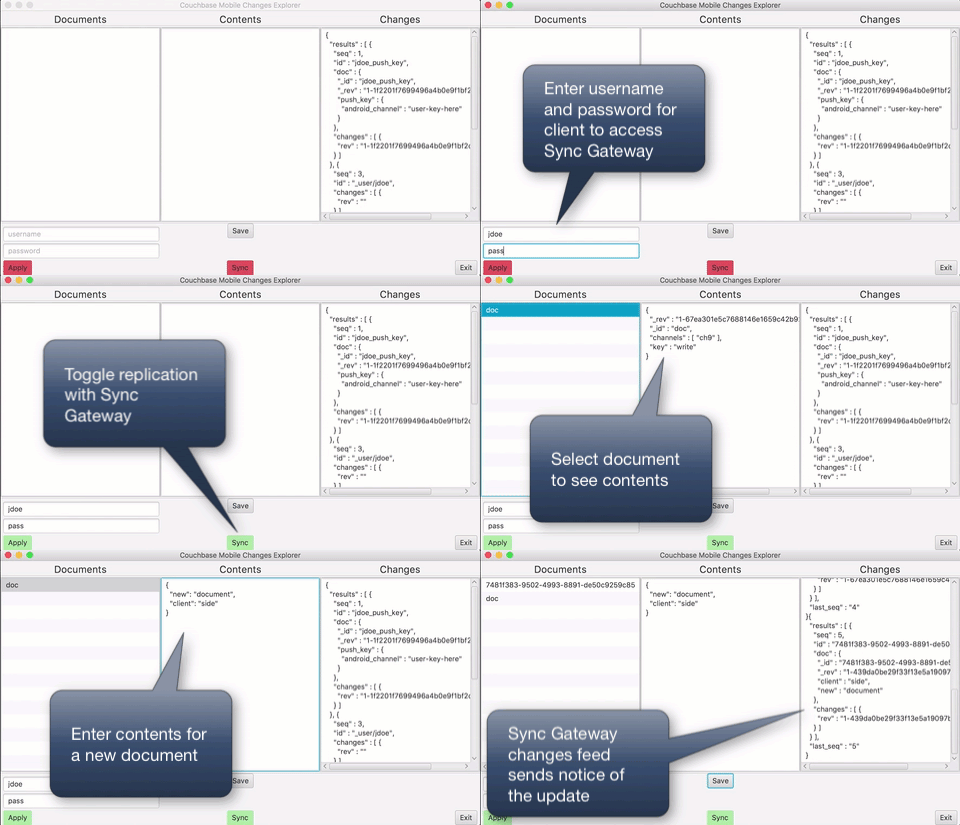
그 코우치베이스 모바일 싱크 게이트웨이 changes feed provides a way to monitor events in a mobile deployment. The feed makes it feasible to write sophisticated business logic. I wrote a tool to help examine and understand the feed. You can read an introduction and description in part one of this two part series. The code also serves as an example of listening to the feed.
The code
I’ve included the major classes from the app code here. This is the first version, so it can use plenty of enhancements. The parameters are all hard-wired. Check the project here on GitHub for updates. You can also find instructions for building, running, and packaging the app there.
JavaFX: The Controller class
JavaFX breaks simple apps into a controller class and a declarative UI. Let’s walk through the controller.
|
1 2 3 4 5 6 7 8 9 10 11 12 13 14 15 16 17 18 19 20 21 22 23 24 25 26 27 28 29 30 31 32 33 34 35 36 37 38 39 40 41 42 43 44 |
패키지 com.카우치베이스.모바일; 가져오기 com.카우치베이스.lite.*; 가져오기 com.fasterxml.jackson.핵심.JsonProcessingException; 가져오기 javafx.응용 프로그램.플랫폼; 가져오기 javafx.beans.가치.ChangeListener; 가져오기 javafx.beans.가치.ObservableValue; 가져오기 javafx.컬렉션.FXCollections; 가져오기 javafx.컬렉션.ObservableList; 가져오기 javafx.event.ActionEvent; 가져오기 javafx.fxml.FXML; 가져오기 javafx.scene.control.*; 가져오기 javafx.scene.control.TextField; 가져오기 자바.io.IOException; 가져오기 자바.네트.MalformedURLException; 가져오기 자바.네트.URL; 가져오기 자바.util.지도; 가져오기 정적 com.카우치베이스.모바일.Runtime.매퍼; 공공의 클래스 Controller 구현한다 LiveQuery.ChangeListener, ChangeListener, SGMonitor.ChangesFeedListener, DBService.ReplicationStateListener { 사적인 정적 final 문자열 SYNC_GATEWAY_HOST = “https://localhost”; 사적인 정적 final 문자열 SG_PUBLIC_URL = SYNC_GATEWAY_HOST + “:4984/” + DBService.DATABASE; 사적인 정적 final 문자열 SG_ADMIN_URL = SYNC_GATEWAY_HOST + “:4985/” + DBService.DATABASE; 사적인 정적 final 문자열 TOGGLE_INACTIVE = “-fx-background-color: #e6555d;”; 사적인 정적 final 문자열 TOGGLE_ACTIVE = “-fx-background-color: #ade6a6;”; 사적인 정적 final 문자열 TOGGLE_DISABLED = “-fx-background-color: #555555;”; @FXML 사적인 ListView documentList; 사적인 ObservableList documents = FXCollections.observableArrayList(); @FXML 사적인 TextArea contentsText; @FXML 사적인 TextArea changesFeed; @FXML 사적인 TextField usernameText; @FXML 사적인 TextField passwordText; @FXML 사적인 ToggleButton applyCredentialsBtn; @FXML 사적인 ToggleButton syncBtn; 사적인 DBService service = DBService.getInstance(); 사적인 데이터베이스 db = service.getDatabase(); 사적인 SGMonitor changesMonitor; 사적인 LiveQuery liveQuery; |
This first listing shows a bunch of boiler plate code. I implement several listeners for the UI within the class itself to cut down of files. This is for illustration purposes.
그 @FXML annotations mark all the fields that the framework will automatically bind to portions of the UI.
Next comes initialization. JavaFX calls this method as part of its standard lifecycle.
|
1 2 3 4 5 6 7 8 9 10 11 12 13 14 15 16 17 18 19 20 21 22 |
@FXML 사적인 무효 initialize() { documentListInitialize(); documentList.setItems(documents); setState(applyCredentialsBtn, 거짓); setState(syncBtn, 거짓); service.addReplicationStateListener(이것); changesMonitor = 새로운 SGMonitor(SG_ADMIN_URL, “false”, “true”, “0”, “all_docs”, 이것); changesMonitor.시작하기(); } 사적인 무효 documentListInitialize() { 질문 질의 = db.createAllDocumentsQuery(); 질의.setAllDocsMode(질문.AllDocsMode.INCLUDE_DELETED); liveQuery = 질의.toLiveQuery(); liveQuery.addChangeListener(이것); liveQuery.시작하기(); documentList.getSelectionModel().selectedItemProperty().addListener(이것); } |
I’ve broken out the document list initialization into its own routine. The document list gets bound to the documentList variable. In turn documentList will update the UI whenever the item list we pass in changes.
I set up a live query to monitor the client database for any changes. This happens through an “all docs” query. An all docs query doesn’t require an associated view. I set INCLUDE_DELETED so the tool can show what a deleted document looks like in the database.
With the other bindings in place, we just have to update the documents list. We’ll see the live query listener that does that further along.
The next few lines set the initial state of a couple of toggle buttons. I need an extra listener to keep the Sync button consistent with the actual state of the replications. More on this further along in the article.
I wrote a separate class to monitor Sync Gateway. The initialization code finished by creating a new monitor instance and kicking it off.
The next section contains several listeners.
|
1 2 3 4 5 6 7 8 9 10 11 12 13 |
// LiveQuery.ChangeListener @Override 공공의 무효 changed(LiveQuery.ChangeEvent event) { 만약 (event.getSource().같다(liveQuery)) { 플랫폼.runLater(() -> { QueryEnumerator rows = event.getRows(); documents.clear(); rows.forEach(queryRow -> documents.추가(queryRow.getDocumentId())); }); } } |
Here’s the live query listener that gets called whenever the local database changes. I didn’t design the tool for working with massive databases. So, whenever the data changes, I just took the brute force approach of rereading every document. The getRows method returns an enumerator that will index doing just that. JavaFX takes care of updating the UI when documents changes.
|
1 2 3 4 5 6 7 8 9 10 11 12 13 14 15 16 |
// ListView ChangeListener @Override 공공의 무효 changed(ObservableValue observable, 문자열 oldId, 문자열 newId) { 만약 (null == newId) 반환; 지도 properties = db.getDocument(newId).getProperties(); 시도하다 { 문자열 JSON = 매퍼.writeValueAsString(properties); contentsText.setText(prettyText(JSON)); } catch (JsonProcessingException ex) { ex.스택 추적 출력(); Dialog.디스플레이(ex); } } |
This listener takes care of tracking when a user clicks on an entry in the document list. The entries are the document IDs, so we can use a selection to pull the document directly from the database.
|
1 2 3 4 5 |
// SGMonitor.ChangesFeedListener @Override 공공의 무효 onResponse(문자열 몸) { changesFeed.appendText(prettyText((문자열) 몸)); } |
I used a callback approach to get the results of the changes feed. The interface is defined in the SGMonitor class. It has just the one method. In this implementation I simply take the body of the feed response and tack it on to the existing text in the changes feed text pane. There’s a little formatting done to make it easier to read, too.
|
1 2 3 4 5 |
// DBService.ReplicationStateListener @Override 공공의 무효 onChange(boolean isActive) { setState(syncBtn, isActive); } |
Finally I added a listener for replication activity. The interface comes from the DBService helper class. I wrote a bit about detecting the state of a replication 여기. For this app I just need to know whether a replication is running or not to keep the Sync button state consistent. This handles cases where a user tries to start a sync but it fails. This can happen if they need to provide authentication credentials but haven’t, for example.
Next we have several methods bound to UI elements. JavaFX handles much of the wiring.
|
1 2 3 4 5 6 7 8 9 10 11 12 |
@FXML 사적인 무효 applyCredentialsToggled(ActionEvent event) { 문자열 사용자 이름 = null; 문자열 비밀번호 = null; 만약 (applyCredentialsBtn.isSelected()) { 사용자 이름 = usernameText.getText(); 비밀번호 = passwordText.getText(); } DBService.getInstance().setCredentials(사용자 이름, 비밀번호); applyCredentialsBtn.setStyle(applyCredentialsBtn.isSelected() ? TOGGLE_ACTIVE : TOGGLE_INACTIVE); } |
Here I set the use of authentication credentials whenever the corresponding button gets toggled.
|
1 2 3 4 5 6 7 8 9 10 11 12 13 14 15 16 17 18 19 20 21 22 23 24 |
@FXML 사적인 무효 saveContentsClicked(ActionEvent event) { 지도 properties = null; 문서 문서; 시도하다 { properties = 매퍼.readValue(contentsText.getText(), 지도.클래스); } catch (IOException ex) { ex.스택 추적 출력(); Dialog.디스플레이(ex); } 만약 (properties.containsKey(“_id”)) { 문서 = db.getDocument((문자열) properties.얻다(“_id”)); } 그 외 { 문서 = db.createDocument(); } 시도하다 { 문서.putProperties(properties); } catch (CouchbaseLiteException ex) { ex.스택 추적 출력(); Dialog.디스플레이(ex); } } |
This code shows a couple of interesting items. I use a Jackson ObjectMapper instance to convert the text in the content pane to a property map.
Next I check for an entry _id. Couchbase Mobile reserves most properties starting with an “_” for system use (with special exceptions). If the text we’re trying to convert contains _id, I assume this is an edit to an existing document. Otherwise I create a new document.
So, in a nutshell, we have an example of both creating and updating documents. This isn’t the preferred way to update, although it suffices in many cases. You can read more about updates 여기.
|
1 2 3 4 5 6 7 8 9 10 11 |
@FXML 사적인 무효 syncToggled(ActionEvent event) { 시도하다 { syncBtn.setDisable(참인); syncBtn.setStyle(TOGGLE_DISABLED); service.toggleReplication(새로운 URL(SG_PUBLIC_URL), 참인); } catch (Exception ex) { ex.스택 추적 출력(); Dialog.디스플레이(ex); syncBtn.setDisable(거짓); } } |
This reacts to toggling the Sync button. Recall though that we use a listener to verify the state elsewhere.
|
1 2 3 4 5 6 7 8 9 10 11 12 13 14 15 16 17 18 19 20 21 22 23 24 25 26 27 28 29 30 31 |
@FXML 사적인 무효 exitClicked(ActionEvent event) { // Try to shut everything down gracefully changesMonitor.stop(); liveQuery.stop(); service.stopReplication(); db.닫기(); db.getManager().닫기(); 플랫폼.exit(); } 사적인 무효 setState(ToggleButton btn, boolean 활동적) { btn.setSelected(활동적); btn.setStyle(활동적 ? TOGGLE_ACTIVE : TOGGLE_INACTIVE); btn.setDisable(거짓); } 사적인 문자열 prettyText(문자열 JSON) { 문자열 밖으로 = null; 시도하다 { 물체 object = 매퍼.readValue(JSON, 물체.클래스); 밖으로 = 매퍼.writerWithDefaultPrettyPrinter().writeValueAsString(object); } catch (Exception ex) { ex.스택 추적 출력(); } 반환 밖으로; } } |
The rest of the code here are just helper bits and a piece to shutdown everything before exiting.
The Database Helper class
This shows the code for a straight-forward database helper class. For the most part I just find this class a nice packaging of the typical operations needed for managing a database and starting a standard bidirectional set of replications. I’m including it here because I find it useful and for clarity.
I do implement the Replication.ChangeListener interface. That’s maybe a little unusual. I mentioned the reason earlier on. This link takes you to the 블로그 게시물 about it.
|
1 2 3 4 5 6 7 8 9 10 11 12 13 14 15 16 17 18 19 20 21 22 23 24 25 26 27 28 29 30 31 32 33 34 35 36 37 38 39 40 41 42 43 44 45 46 47 48 49 50 51 52 53 54 55 56 57 58 59 60 61 62 63 64 65 66 67 68 69 70 71 72 73 74 75 76 77 78 79 80 81 82 83 84 85 86 87 88 89 90 91 92 93 94 95 96 97 98 99 100 101 102 103 104 105 106 107 108 109 110 111 112 113 114 115 116 117 118 119 120 121 122 123 124 125 126 127 128 |
패키지 com.카우치베이스.모바일; 가져오기 com.카우치베이스.lite.데이터베이스; 가져오기 com.카우치베이스.lite.JavaContext; 가져오기 com.카우치베이스.lite.Manager; 가져오기 com.카우치베이스.lite.auth.Authenticator; 가져오기 com.카우치베이스.lite.auth.AuthenticatorFactory; 가져오기 com.카우치베이스.lite.replicator.복제; 가져오기 com.카우치베이스.lite.replicator.ReplicationState; 가져오기 자바.네트.URL; 가져오기 자바.util.ArrayList; 가져오기 자바.util.목록; 공공의 클래스 DBService 구현한다 복제.ChangeListener { 공공의 정적 final 문자열 DATABASE = “db”; 사적인 정적 final 문자열 DB_DIRECTORY = “data”; 사적인 Manager manager; 사적인 데이터베이스 데이터베이스; 사적인 복제 pushReplication = null; 사적인 복제 pullReplication = null; 사적인 boolean replicationActive = 거짓; 사적인 목록 stateListeners = 새로운 ArrayList(); 사적인 문자열 사용자 이름 = null; 사적인 문자열 비밀번호 = null; 사적인 DBService() { 시도하다 { manager = 새로운 Manager(새로운 JavaContext(DB_DIRECTORY), Manager.DEFAULT_OPTIONS); 데이터베이스 = manager.getDatabase(DATABASE); } catch (Exception ex) { ex.스택 추적 출력(); } } 사적인 정적 클래스 Holder { 사적인 정적 DBService INSTANCE = 새로운 DBService(); } 공공의 인터페이스 ReplicationStateListener { 무효 onChange(boolean isActive); } 공공의 정적 DBService getInstance() { 반환 Holder.INSTANCE; } 공공의 데이터베이스 getDatabase() { 반환 데이터베이스; } 공공의 무효 setCredentials(문자열 사용자 이름, 문자열 비밀번호) { 이것.사용자 이름 = 사용자 이름; 이것.비밀번호 = 비밀번호; } 공공의 무효 toggleReplication(URL gateway, boolean continuous) { 만약 (replicationActive) { stopReplication(); } 그 외 { startReplication(gateway, continuous); } } 공공의 무효 startReplication(URL gateway, boolean continuous) { 만약 (replicationActive) { stopReplication(); } pushReplication = 데이터베이스.createPushReplication(gateway); pullReplication = 데이터베이스.createPullReplication(gateway); pushReplication.setContinuous(continuous); pullReplication.setContinuous(continuous); 만약 (사용자 이름 != null) { Authenticator auth = AuthenticatorFactory.createBasicAuthenticator(사용자 이름, 비밀번호); pushReplication.setAuthenticator(auth); pullReplication.setAuthenticator(auth); } pushReplication.addChangeListener(이것); pullReplication.addChangeListener(이것); pushReplication.시작하기(); pullReplication.시작하기(); } 공공의 무효 stopReplication() { 만약 (!replicationActive) 반환; pushReplication.stop(); pullReplication.stop(); pushReplication = null; pullReplication = null; } 공공의 무효 addReplicationStateListener(ReplicationStateListener listener) { stateListeners.추가(listener); } 공공의 무효 removeReplicationStateListener(ReplicationStateListener listener) { stateListeners.제거(listener); } // Replication.ChangeListener @Override 공공의 무효 changed(복제.ChangeEvent changeEvent) { 만약 (changeEvent.getError() != null) { 던질 수 있는 것 lastError = changeEvent.getError(); Dialog.디스플레이(lastError.getMessage()); 반환; } 만약 (changeEvent.getTransition() == null) 반환; ReplicationState dest = changeEvent.getTransition().getDestination(); replicationActive = ((dest == ReplicationState.STOPPING || dest == ReplicationState.STOPPED) ? 거짓 : 참인); stateListeners.forEach(listener -> listener.onChange(replicationActive)); } } |
The Sync Gateway Monitor class
Finally, let’s take a look at the helper class for monitoring Sync Gateway. I’ll walk through this in pieces, too.
|
1 2 3 4 5 6 7 8 9 10 11 12 13 14 15 16 17 18 19 20 21 22 |
@FXML 사적인 무효 initialize() { documentListInitialize(); documentList.setItems(documents); setState(applyCredentialsBtn, 거짓); setState(syncBtn, 거짓); service.addReplicationStateListener(이것); changesMonitor = 새로운 SGMonitor(SG_ADMIN_URL, “false”, “true”, “0”, “all_docs”, 이것); changesMonitor.시작하기(); } 사적인 무효 documentListInitialize() { 질문 질의 = db.createAllDocumentsQuery(); 질의.setAllDocsMode(질문.AllDocsMode.INCLUDE_DELETED); liveQuery = 질의.toLiveQuery(); liveQuery.addChangeListener(이것); liveQuery.시작하기(); documentList.getSelectionModel().selectedItemProperty().addListener(이것); } |
I use the OkHttp library from Square. Currently Couchbase Lite uses this library too, internally. OkHttp uses a builder pattern. I prepare a builder instance I’ll use through the rest of the code in the class constructor. You can read about the meaning of all the parameters in the Sync Gateway documentation.
|
1 2 3 4 5 6 7 8 9 10 11 12 13 14 15 16 17 18 19 20 21 22 23 24 25 26 27 28 29 30 31 32 33 34 35 36 |
공공의 인터페이스 ChangesFeedListener { 무효 onResponse(문자열 몸); } 공공의 무효 시작하기() { monitorThread = 새로운 줄(() -> { while (!줄.interrupted()) { Request 요청 = 새로운 Request.Builder() .URL(url빌더.빌드()) .빌드(); 전화 = 클라이언트.newCall(요청); 시도하다 (답변 응답 = 전화.실행하기()) { 만약 (!응답.isSuccessful()) 던지다 새로운 IOException(“Unexpected code “ + 응답); 문자열 몸 = 응답.몸().문자열(); JsonNode 나무 = 매퍼.트리 읽기(몸); since = 나무.얻다(“last_seq”).텍스트로(); url빌더.쿼리 매개변수 설정(“~부터”, since); listener.onResponse(몸); } catch (SocketException ex) { 반환; } catch (IOException ex) { ex.스택 추적 출력(); Dialog.디스플레이(ex); } } }); monitorThread.setDaemon(참인); monitorThread.시작하기(); } |
그 시작하기 method has the most interesting part of the code. It spins up a background thread. Underneath the thread setup and control code I run a continuous loop. The loop does synchronous network calls. The error handling is simple. Just throw an exception if anything goes wrong.
Sync Gateway responds with JSON strings. You can see the code pulls apart the response and parses the JSON into a JsonNode object. This is all to get at the last_seq value in the response.
In order to track what to send next, the changes feed relies on a simple sequence mechanism. You should treat this as an opaque object. Take the value of last_seq from the previous response, and set the since parameter to that same value for the next request.
There’s no real harm in not supplying the since parameter. Sync Gateway will just replay all changes from the start if it’s missing. That’s why you’ll see in this example, I cheat a little and always create the class instance with since set to the string “0”.
In a real world application, you might want to have some way to save the last sequence string your app has processed, rather than churning through the change history every time.
The rest of the code is just a couple of short methods.
|
1 2 3 4 5 6 7 8 9 10 11 12 13 14 15 16 17 18 19 20 21 22 |
@FXML 사적인 무효 initialize() { documentListInitialize(); documentList.setItems(documents); setState(applyCredentialsBtn, 거짓); setState(syncBtn, 거짓); service.addReplicationStateListener(이것); changesMonitor = 새로운 SGMonitor(SG_ADMIN_URL, “false”, “true”, “0”, “all_docs”, 이것); changesMonitor.시작하기(); } 사적인 무효 documentListInitialize() { 질문 질의 = db.createAllDocumentsQuery(); 질의.setAllDocsMode(질문.AllDocsMode.INCLUDE_DELETED); liveQuery = 질의.toLiveQuery(); liveQuery.addChangeListener(이것); liveQuery.시작하기(); documentList.getSelectionModel().selectedItemProperty().addListener(이것); } |
And that’s it for the main classes. There are others needed for the complete app.
확인해 보세요 GitHub repo to see all the code and instructions to build it.
Read a discussion of the app and how to use it in part one.
추신
더 많은 자료를 다음에서 찾으실 수 있습니다: 개발자 포털 그리고 트위터에서도 팔로우하세요 @CouchbaseDev.
당사는 다음 곳에 질문을 게시할 수 있습니다. 포럼. 그리고 우리는 적극적으로 참여합니다 스택 오버플로.
Hit me up on Twitter with any questions, comments, topics you’d like to see, etc. @HodGreeley

댓글 남기기
댓글을 달기 위해서는 로그인해야합니다.