

Anxious about maintaining database recoverability within shrinking Recovery Time Objectives (RTOs) from your business? Couchbase is pleased to announce Cluster backups for Capella Operational cluster, to allow easy backup and restore of the entire cluster within minutes, at the click of a button. This is yet another feather in Couchbase’s cap which makes it the most cost-effective and performant database for powering business-critical applications.
With cluster backups, Capella ensures faster end-to-end recoverability of your database within minutes, including restore of indexes, hence reducing business downtime. It uses native snapshot capabilities of your cloud service provider to store backups in the same cloud region as your managed database thus granting you better governance over where the data lives and also reducing the impact of backup on database performance.
Additionally, this now enables more frequent backups thus reducing Recovery Point Objective (RPO), the maximum acceptable amount of data loss measured in time. This capability is now generally available on Capella deployments across Amazon Web Services (AWS), Google Cloud Platform (GCP) and Microsoft Azure. Moreover, it comes with a bunch of enterprise grade features to help enterprises with robust data resiliency. Let’s dive deeper to understand how to get faster RTO, without affecting database performance and get a predictable gauge of backup and recovery times irrespective of data size.
What’s new and how does it benefit your business?
Capella now offers immediate access to cloud provider snapshot technology for scheduled and on-demand disk data backups. The existing option of bucket backups via cbbackupmgr, will continue to exist in its current form. Cluster backup benefits include:
- Easy, comprehensive incremental forever style backups of the entire cluster as well as its configuration, using disk snapshot functionality from AWS, Azure or GCP
- Ultra-fast backups and restore to meet stringent of RPOs with nil impact on the operational database during backup operations
- Retain for as low as just 1 day as well as at project-level to ensure restorability even after deletion of source cluster
- Offers super trivial way to create a duplicate dev/test/prod copy cluster, independent of source cluster with the same contents and configuration as well as restoration to other compatible clusters within the project
- Copy backups across regions within the cloud service provider for enhanced resiliency or meeting regulatory requirements or to restore across regions to create a dev/test clone cluster, quickly across the globe
What happens to existing bucket backups?
As previously mentioned, bucket backups via cbbackupmgr will continue to coexist with the cloud provider snapshot mechanism. Bucket backup provides an alternative for these use cases, including but not limited to:
- Granular recovery for restoration of specific data subsets
- Online recovery of the target cluster
- Ephemeral bucket backup to capture in-memory data
- Downloadable backup copy for policy compliance or syncing between DBaaS and self-deployed Couchbase
The existing bucket backups will be retained according to prior backup policies and in as-is state without any provision for migration to cluster backups due to their underlying orthogonal infrastructures.
Couchbase will continue to offer bucket backups. However, the new cloud provider snapshots better address common operational use cases, such as in-place or out-of-place recovery, to source or other compatible target clusters as well as cross-regional backup replication. These snapshots provide faster, simpler backups without impacting database performance as well as faster recovery of all data, index, metadata, cluster configuration etc.
How to get started
Under the Backup tab for your Couchbase Operational cluster, there is a new option for Cloud Provider snapshots labeled as Cluster Backups, on top of existing Bucket Backup option. Here is quick 5-step guide to define your organization’s backup policy:
- Database snapshots are available at intervals of 1, 2, 4, 6, 8, 12, or 24 hours, with 4 hours as the default. Backup retention can be set between 1 to 30 days, with a default of 7 days. All backups, whether completed or in-progress, can be tracked here.
- Backups can also be copied up to two additional regions supported by Capella for the CSP
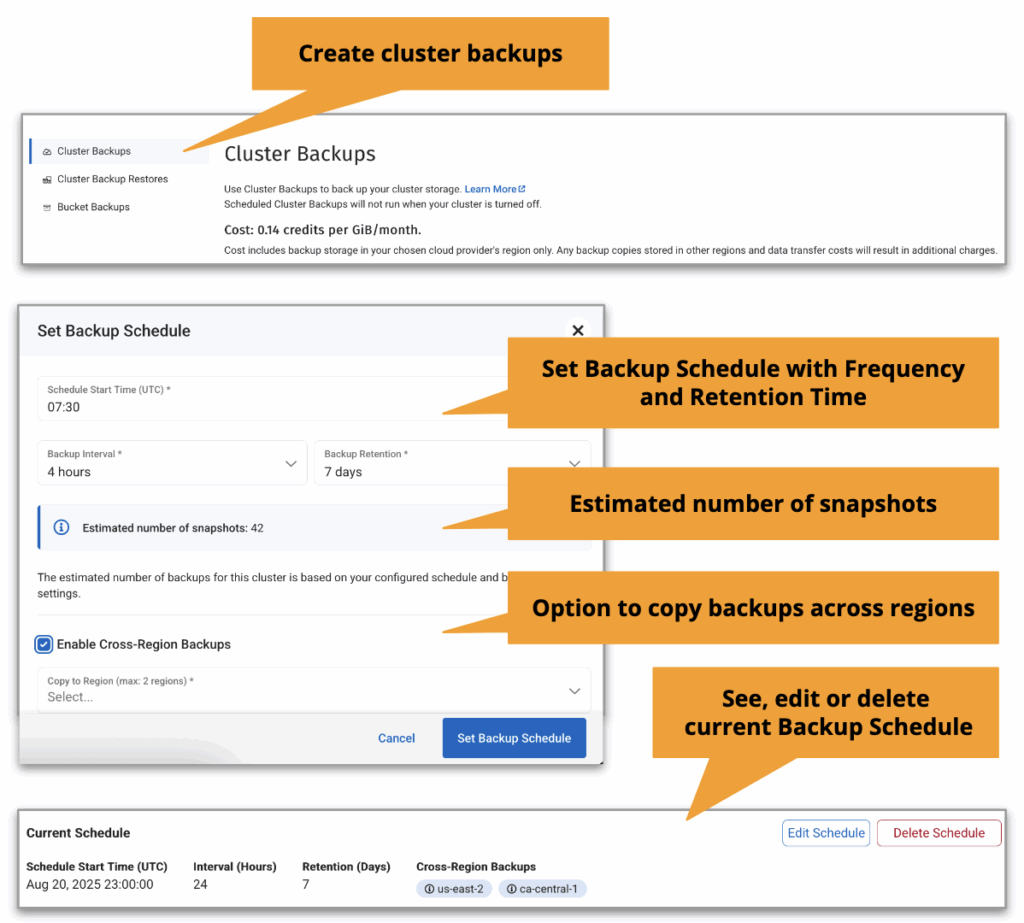
- They can also be used to create ad-hoc backups or to backup CMEK-associated Capella clusters. If a Capella cluster uses CMEK for encryption at rest, the database snapshot backup will show CMEK as enabled. A non-CMEK backup can be restored to a CMEK-associated cluster. Ensure that KMS retains CMEK for as long as Capella retains these encrypted backups for restoration

- Restore Options to source cluster
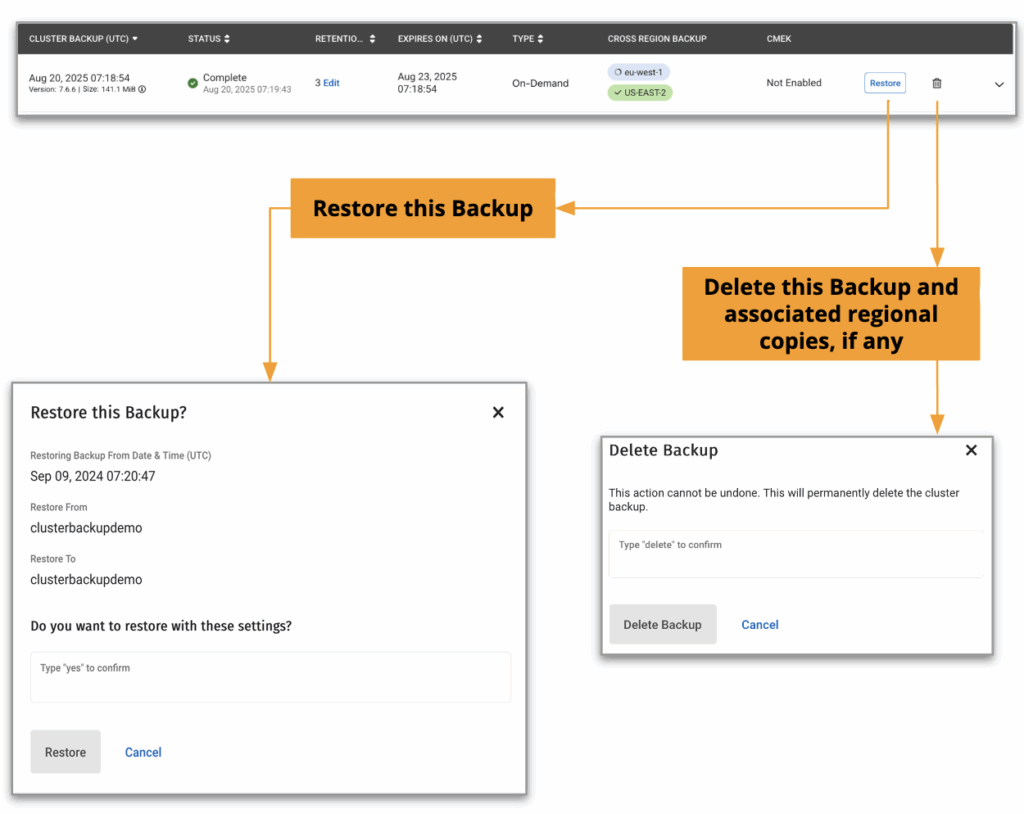
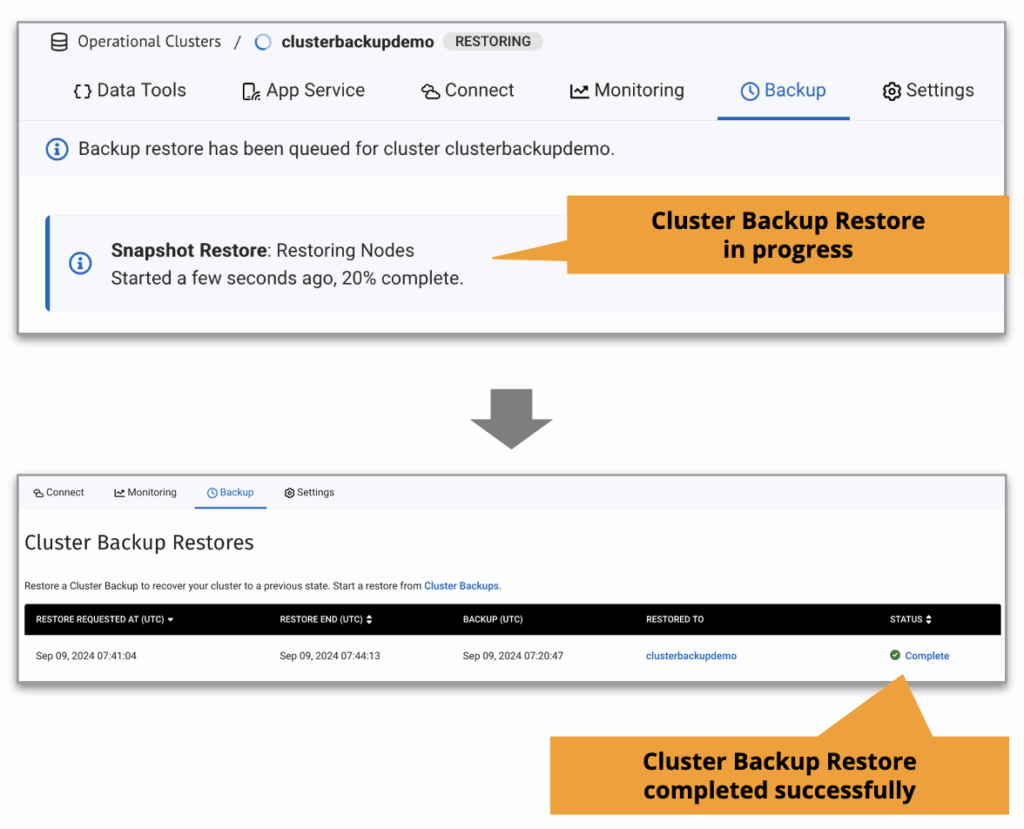
- To recover to the same source cluster, navigate within the cluster to the Backup tab, select the desired cluster backup and click the ‘Restore’ button to begin the process. It should be noted that any existing data will be overwritten and the applications will not be able to connect with the cluster until the restore operation is complete and the cluster is ready for use.
- To instead delete this backup and its replicated copies to other regions if any, click the Bin icon next to the ‘Restore’ button and confirm this operation in the following dialog box. Use this option carefully as there is no provision to bring back a backup once it has been deleted
- Ongoing or historical restore operations from a cluster backup can be tracked via ‘Cluster Backup Restore’ from the left hand side panel
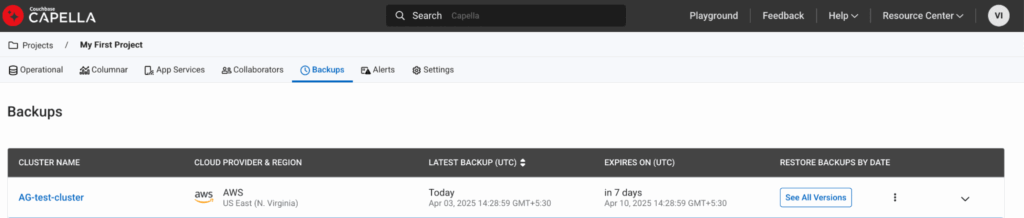
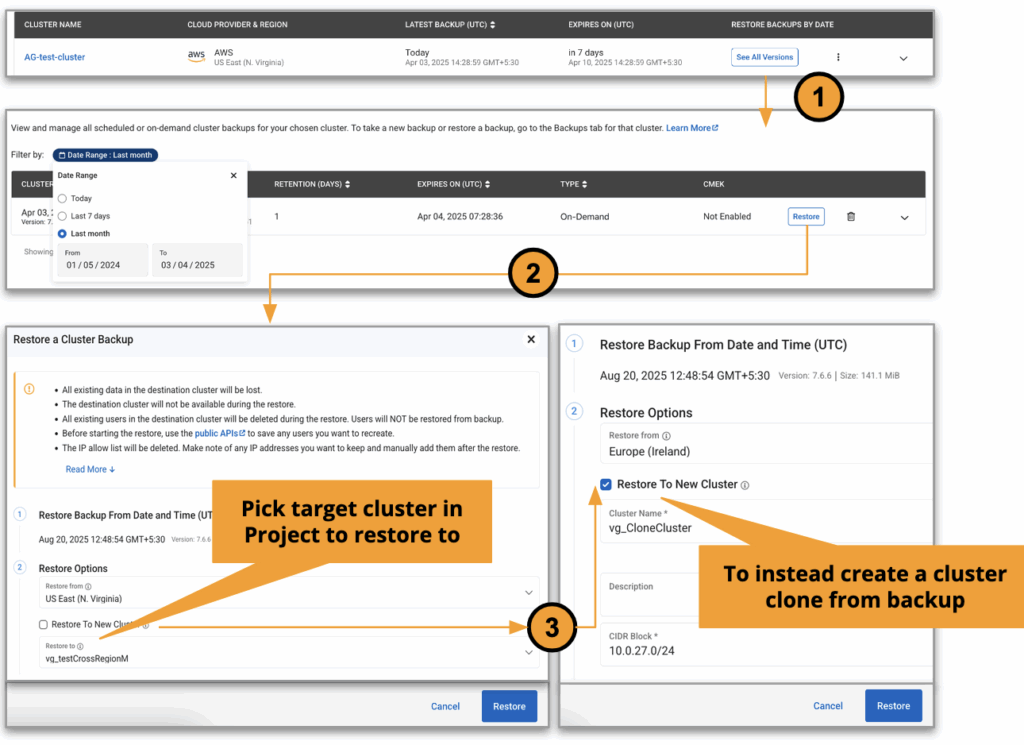
- Alternatively, to restore to a compatible cluster within the project or to create a cluster clone with the same contents and configuration, locate the Project holding the cluster with a valid backup. Navigate to the Backup tab, locate the desired cluster and select ‘See All Versions’ to view all available backups
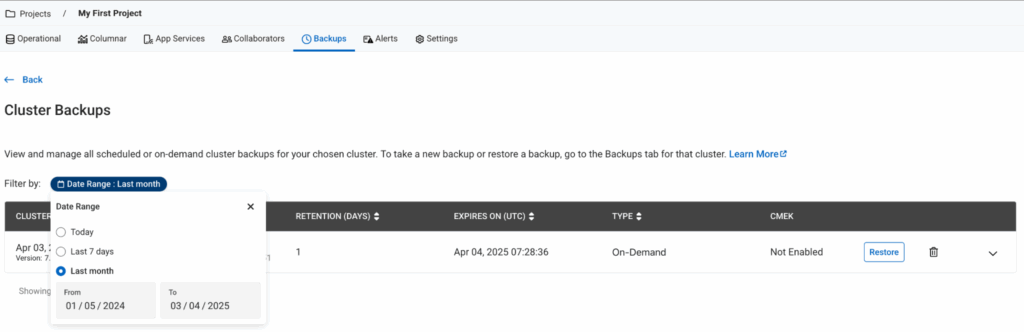
- Pick a backup either via eyeballing or via using the date filter and click ‘Restore’ button. Additionally during both the restore scenarios below, one can pick the desired region from the list where cluster backup has been replicated. It must be noted that CSPs will charge additionally for cross-region data transfer operations from a billing perspective
-
- To restore to an existing cluster, Select existing cluster from Restore to dropdown of compatible clusters
- Select Restore To New Cluster option to alternatively create a duplicate cluster from the backup
-

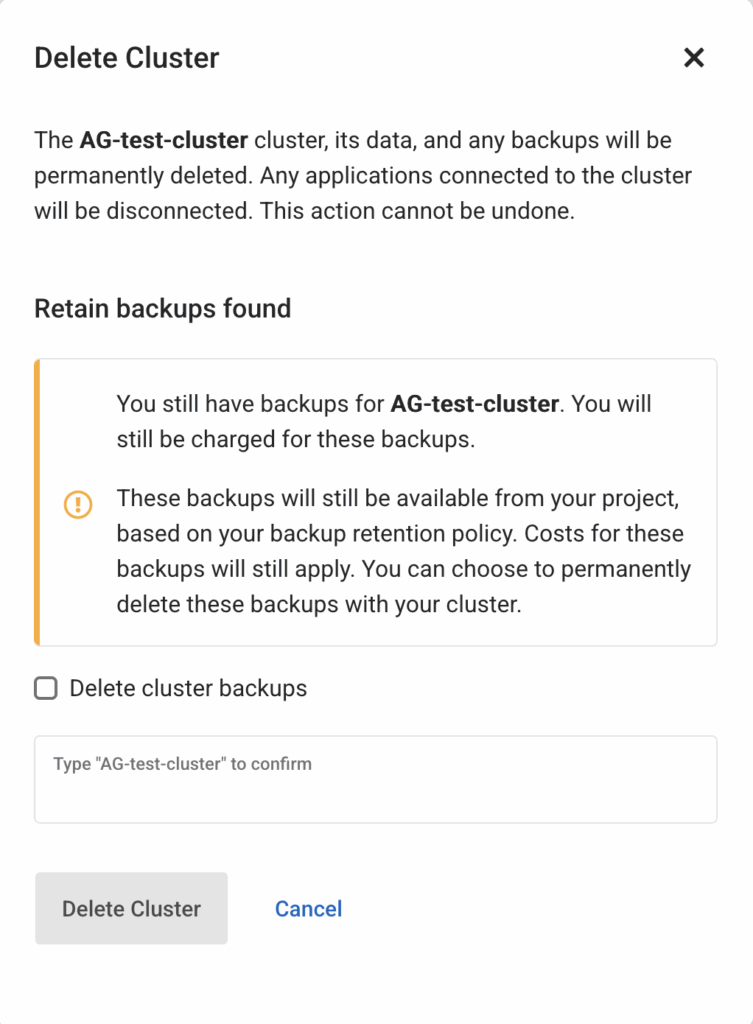
- Any cluster if deleted advertently or inadvertently, by default will retain its existing cluster backup and their cross-region replicated copies until explicitly marked for deletion here. This ensures that in case of inadvertent deletion, there is a fallback to recreate the cluster as that of the available cluster backups. These backups can be located within the Backup tab of the Project for taking further actions.
The new cloud provider snapshot-based backup will receive many more exciting improvements in the coming months, stay tuned for subsequent updates on Couchbase blogs. Learn more about these feature at:
- Cloud snapshots documentation
- Start your 30-day trial account for Capella to see Couchbase Capella in action now!
- Connect with us on the Couchbase Forum 그리고 join our public Discord

댓글 남기기
댓글을 달기 위해서는 로그인해야합니다.