
Couchbase 또는 Capella와 함께 작업하는 개발자라면, 아래 내용을 알고 싶으실 겁니다. 카펠라 데이터스튜디오. 관리하기 위한 매끄럽고 한 눈에 보이는 UI를 갖춘 무료 커뮤니티 지원 도구입니다. 카펠라 운영 중, 카펠라 주상절리, 그리고 Couchbase 서버 클러스터. Not only does it boost developer productivity, but it also makes your experience a whole lot smoother (and cooler). Let’s dive into the top 10 features you’ll love!
1. Single Pane of Glass
Say goodbye to UI overload! With one UI for Capella Operational, Couchbase Server, and Capella Columnar, you get a consistent user experience across all your clusters. No more switching screens/tabs/browsers —DataStudio remembers your connections, keeps passwords safe with native OS encryption, and even lets you tag your connections for easy management. The result? A seamless workflow, whether you’re working on-prem or in the cloud.

Developer pain point solved: “Wait, which login was that again?”—not with DataStudio. Your connections are remembered, and your secrets are encrypted!
2. Instant Datasets for Capella Operational & Couchbase Server
Want to spin up a dev environment in record time? With DataStudio, one click deploys an entire dataset—complete with indexes and collections definitions. Whether your data is stored locally or in an AWS S3 bucket, DataStudio has you covered. Create scopes, collections, and indexes, load your data, and watch the magic happen—all in one click.

Developer pain point solved: Setting up dev environments manually? Skip the tedious work and get started instantly.
3. Tools Plugin for Large Data Imports
Dealing with large datasets? Capella DataStudio makes it a breeze to import any size CSV/JSON data with its integrated cbimport tool. Plus, it offers an interactive UI for custom key generation and filtering fields, helping you prep your data efficiently.
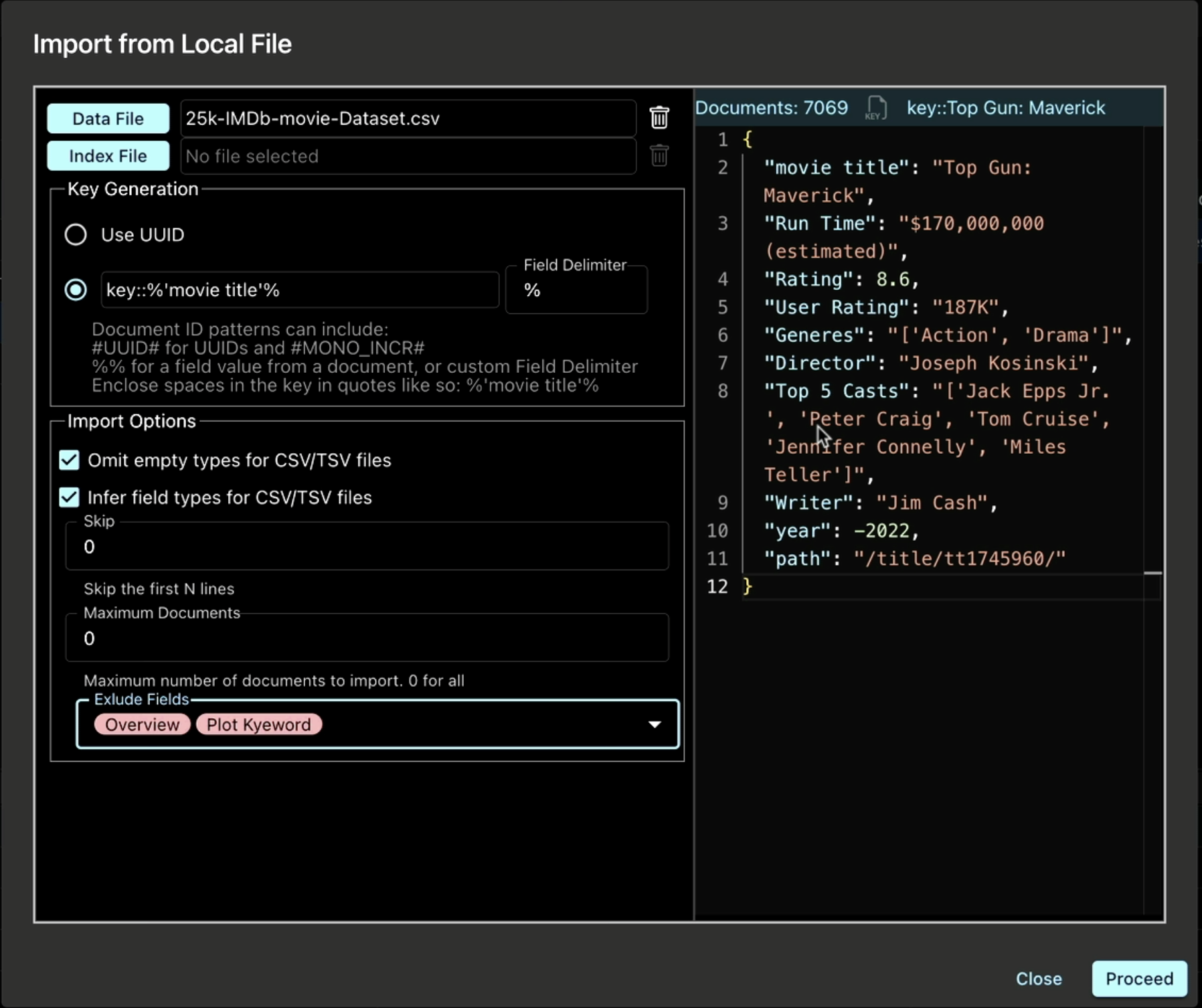
Developer pain point solved: Importing huge datasets feels like a Herculean task? Not anymore.
4. Effortless Backups and Restores
Need a local full backup? Or perhaps you’re migrating from Couchbase Server to Capella? The Tools Plugin lets you back up and restore data with ease—complete with automatic index rebuilding post-restore. You’ll always have a clear view of your backups, so you can breathe easy when it comes to data integrity.
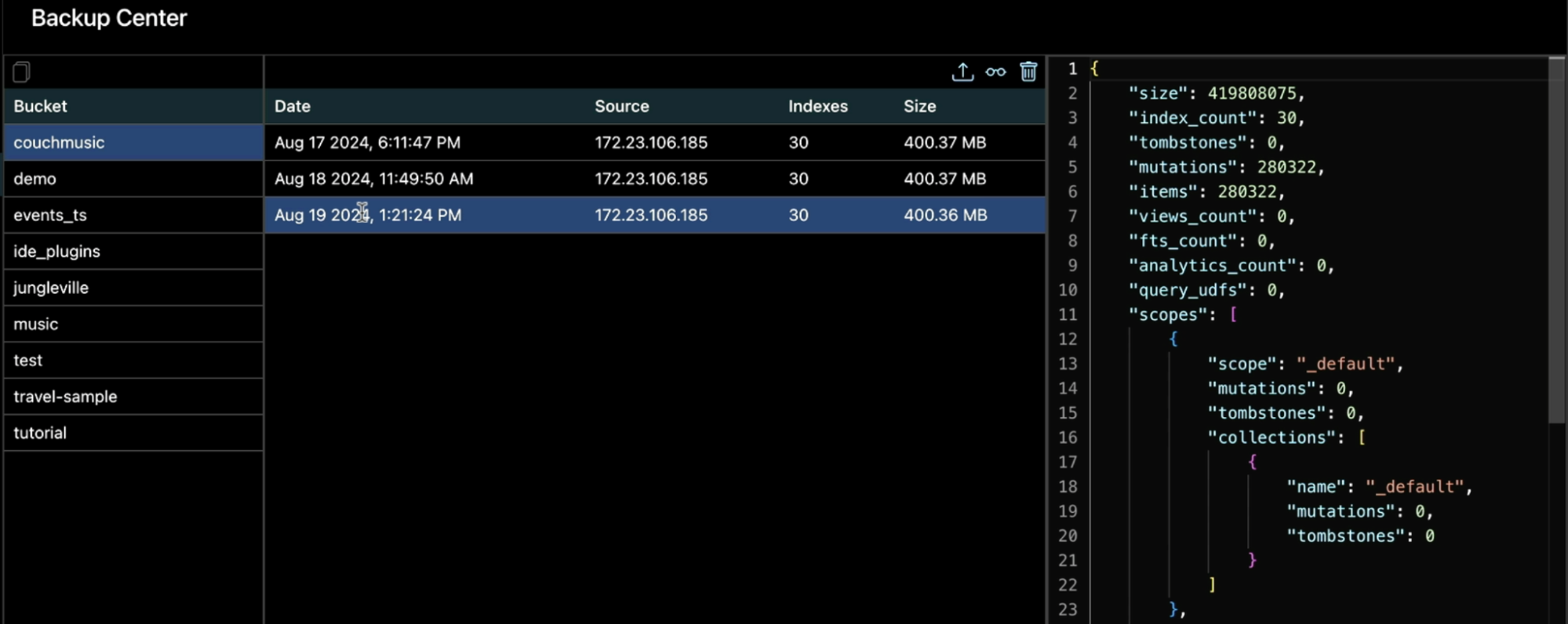
Developer pain point solved: Migrations giving you headaches? DataStudio has got your back (literally).
5. Innovative Schema Viewer
그 Schema Viewer displays your collections in handy cards, offering insights at a glance. For Capella Columnar, the source of the collection is also displayed, making it easier to track data sources. And if you’re using Capella iQ, you can annotate schemas to supercharge your AI-generated SQL++ queries.
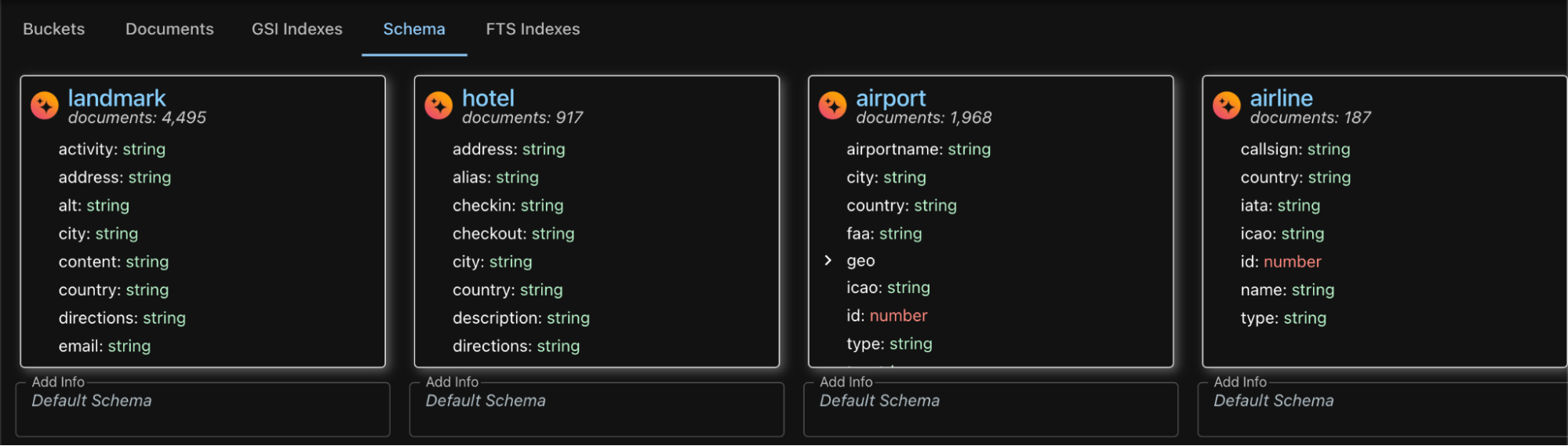
Developer pain point solved: Guesswork when working with large schemas? Get instant clarity and annotate your way to better insights.
6. GSI Index Viewer
Managing a mountain of GSI indexes can be a nightmare, but with DataStudio’s GSI Index Viewer, you can sort, filter, and consolidate your indexes to eliminate duplicates and identify defunct ones. Optimize your queries without clutter!

Developer pain point solved: “Why do I have 200 indexes?” Find when it was last used,, sort them, and clean house.
7. Productivity-Boosting Workbench
Capella DataStudio’s Query Workbench isn’t just for writing queries. The side panel gives you access to:
- Document Viewer
- GSI Indexes Viewer
- Query Favorites Viewer
- Schema Viewer
This means everything you need to analyze data is available on a single screen. Results? Fully sortable, filterable, and exportable—perfect for post-processing.
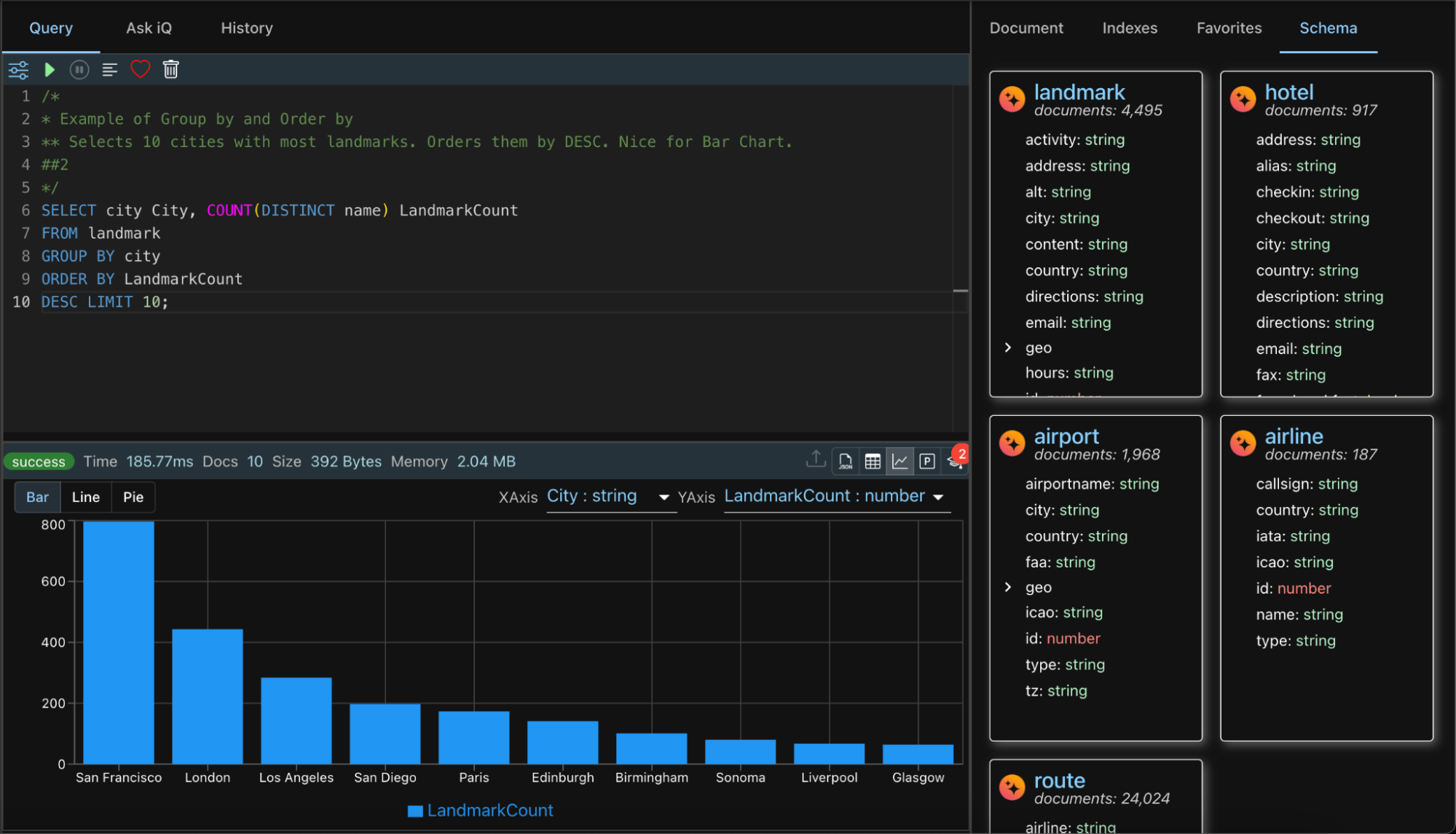
Developer pain point solved: “Where did I put that data?” It’s all laid out in one place. No more screen hopping!
8. Query Favorites
Have a list of go-to queries? With Query Favorites, you can now organize, share, and tag your queries. Want to keep them private or share with your team? DataStudio lets you store favorites locally or in shared S3. Tag them by type—joins, unnest, whatever you need—and filter them easily.

Developer pain point solved: Lost track of which query does what? Not anymore. Tag and organize like a pro.
9. Capella iQ for All
Want to use Capella iQ with Couchbase Server but don’t have a running Capella Cluster? No problem! With Capella iQ, you can get the benefits of Capella’s powerful AI without needing a cluster, just a Couchbase Capella account (and it’s free). Then, supply your login credentials, and you’re ready to go. Use it with any connection—on-prem, Docker, you name it!

Developer pain point solved: Want to use Capella iQ with Couchbase Server? Now you can—no Capella cluster required!
10. Usable Query History
Ever wanted to track query performance over time? DataStudio’s Query History makes it easy to sort, filter, and search through your queries. Drill down into details like execution time, memory consumption, and results to fine-tune your queries.

Developer pain point solved: Optimizing queries feels like trial and error? Now you can rely on history to guide your improvements.
Bonus! Capella Columnar Exclusives
11. S3 File Manager
With Capella Columnar, managing S3 files is a breeze thanks to the built-in S3 File Manager. Upload your CSV/JSON files to S3, import them into standalone collections, and even use the auto-schema generator to take the guesswork out of defining your data structure.

12. Beautiful UI for Columnar
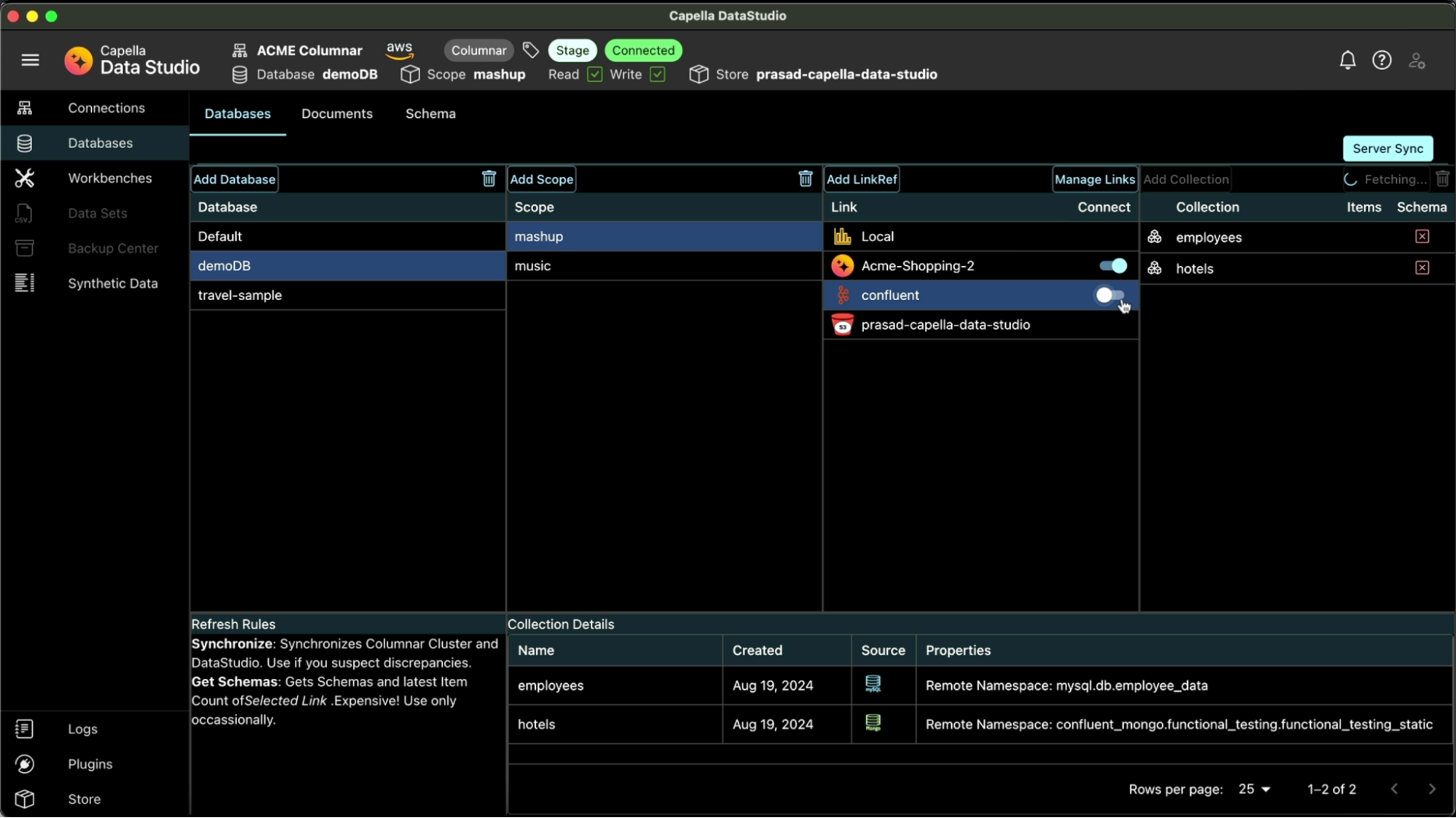
Enjoy the same smooth UI experience across 카펠라 운영 중, 카우치베이스 서버, 그리고 카펠라 주상절리. From document management to schema viewing, everything looks and feels consistent, no matter where your data lives.
Ready to Boost Your Productivity?
Capella DataStudio는 개발자들이 기다려 온 도구입니다. Couchbase Server, Capella Operational 또는 Capella Columnar 클러스터를 관리하든 이 앱은 여러분의 작업을 더 쉽고 빠르게, 그리고 더욱 멋지게 만들어줍니다.
Try Capella DataStudio for free 여기 그리고 저희의 제품을 확인해 보세요 튜토리얼 동영상:
Capella DataStudio를 사용하면 데이터 관리가 이렇게 재미있고 생산적이었던 적이 없었습니다!

댓글 남기기
댓글을 달기 위해서는 로그인해야합니다.