

Couchbase Server 6.5.1부터 당사는 rpm 패키지에 대한 non-root 설치 및 업그레이드를 표준화했습니다. 이를 통해 이제 non-root 사용자로 Couchbase Server를 손쉽게 설치, 업그레이드 및 관리할 수 있습니다.
이 블로그의 목적은 우리의 훌륭한 [단어 누락됨]을 대체하기 위한 것이 아닙니다 카우치베이스 문서, 오히려, 일부를 다시 강조하기 위해 모범 사례 성공적인 설치를 위해 이 블로그는 2개의 파트로 나뉘어 있습니다.
파트 1루트가 아닌 사용자로 Couchbase Server 6.5.1 설치.
제 2부비루트(non-root)로 설치된 Couchbase Server 6.0.4를 버전 6.5.1로 업그레이드합니다.
Couchbase Server 6.5.1의 새로운 기능
설치새로운 설치 프로그램 cb-비패키지-설치 프로그램, ,는 rpm2cpio와 reloc.sh를 사용하는 것과 대조적으로 Couchbase 서버를 설치하는 데 사용됩니다.
상태이제 새로운 명령어로 Couchbase 서버의 상태를 확인할 수 있습니다., couchbase-server –status
업그레이드: cb-비패키지-설치 프로그램 이전 버전에서 카우치베이스 서버를 업그레이드하는 데 사용됩니다. 모두 업그레이드 옵션, 유연한 장애 조치 및 델타 복구를 지원하는 롤링 온라인 업그레이드를 포함하여 지원됩니다.
파트 1: 신규 설치
계획
- 루트가 아닌 사용자 계정으로 3노드 Couchbase 6.5.1 클러스터 배포
- 사용자는 ec2-user입니다.
- 서버가 다음 위치에 배포됩니다: /home/ec2-user/cb-server
- 데이터는 다음 경로에 있습니다: /home/ec2-user/cb-data
사전 요구 사항
몇 가지가 있습니다 일반적인 오류 Couchbase 서버를 non-root 사용자로 실행할 때 마주칠 수 있으며, 링크된 문서에 이에 대한 설명이 나와 있습니다. 예를 들어: 유리미츠. 유리밋 프로세스당 열린 파일 디스크립터의 수입니다. 표준 root 설치 프로그램은 설치 중에 이를 변경하지만, non-root의 경우 이를 직접 처리해야 합니다. 따라서 매우 중요하므로 여기서 몇 가지를 강조하고자 합니다.
투명 거대 페이지(THP) 비활성화
투명 거대 페이지(THP)는 대부분의 Linux 운영 체제에서 기본적으로 활성화되어 있는 메모리 관리 시스템입니다. Couchbase Server가 Linux에서 정상적으로 작동하려면 THP를 비활성화해야 합니다. 다음을 따르십시오. 문서화 그리고 THP가 비활성화되어 있는지 확인하세요.
커널 스와피니스 구성
리눅스에서 커널의 swappiness 수준은 RAM 사용량을 기반으로 시스템이 물리적 메모리에서 페이지를 스왑 아웃할 가능성이 얼마나 되는지를 나타냅니다. 최적의 Couchbase Server 성능을 달성하려면 대부분의 리눅스 시스템에서 swappiness를 1 또는 0으로 설정해야 합니다. 다음을 따르십시오. 문서화 그리고 스와피니스(Swappiness)가 권장 사항에 따라 설정되었는지 확인하십시오.
ulimit 확인하기
ec2-user의 ulimit을 간단히 확인합니다. 다음은 권장하는 최소값입니다. 이를 영구적으로 설정하십시오.
|
1 2 3 4 5 |
[EC2–사용자@IP–172–31–22–131 ~]$ ulimit –n 70000 [EC2–사용자@IP–172–31–22–131 ~]$ ulimit –c 무제한 |
필수 프로그램 설치
파이썬 2, bzip2, 펄이 필요합니다. 따라서 이들이 모두 사용 가능한지 확인해 주세요.
|
1 2 3 4 5 6 7 8 9 |
[EC2–사용자@IP–172–31–22–131 ~]$ 파이썬 2 –V 파이썬 2.7.16 [EC2–사용자@IP–172–31–22–131 ~]$ bzip2 –V bzip2, a 차단하다–정렬 파일 압축기; 버전 1.0.6, 6–9월–2010. [EC2–사용자@IP–172–31–22–131 ~]$ 펄 –v 이것 이다 펄 5, 버전 26, 서버전 3 (v5.26.3) 지어진 ~를 위해 x86_64–리눅스–스레드–multi (~와 함께 51 등록됨 패치, 보다 펄 –V ~를 위해 더 상세 정보) |
패키지를 다운로드하세요
|
1 2 3 |
[EC2–사용자@IP–172–31–22–131 ~]$ Wget https://packages.couchbase.com/releases/6.5.1/couchbase-server-enterprise-6.5.1-centos8.x86_64.rpm [EC2–사용자@IP–172–31–22–131 ~]$ Wget https://packages.couchbase.com/cb-non-package-installer/cb-non-package-installer |
루트 권한 없이 카우치베이스 서버 설치
설치하려면 첫 번째 노드에 SSH로 접속하세요.
1단계: 서버와 데이터용 디렉터리 만들기
|
1 2 3 4 |
[EC2–사용자@IP–172–31–22–131 ~]$ ls –l 전체 346696 drwxrwx—–. 3 EC2–사용자 EC2–사용자 21 4월 24 18:03 씨비–데이터 drwxrwxr–x. 2 EC2–사용자 EC2–사용자 6 4월 24 18:03 씨비–서버 |
2단계: Couchbase 서버 설치
|
1 2 |
[EC2–사용자@IP–172–31–22–131 ~]$ ./씨비–아니오–패키지–설치 프로그램 —설치 —설치–위치 /집/EC2–사용자/씨비–서버 —패키지 카우치베이스–서버–기업–6.5.1–센토스 8.x86_64.rpm Successfully installed |
Step 3: Start the Couchbase Server
|
1 2 3 4 5 6 7 8 9 10 11 12 |
/집/EC2–사용자/씨비–서버/opt/카우치베이스/bin/카우치베이스–서버 — –noinput –detached 그 maximum number of processes ~를 위해 the 카우치베이스 사용자 이다 설정 too low (4096). It 반드시 해야 한다 be at least 10000. Normally this 할 수 있다 be increased by adding the following lines -로 /etc/security/limits.conf: 카우치베이스 <가치< 카우치베이스 <가치< Where <가치< 이다 greater than 10000. 그 procedure may be totally different 만약 you‘re running so called “non-root/non-sudo install” 또는 만약 you‘ve 지어진 카우치베이스 서버 에서 source. |
You can ignore that message since we have already set the ulimits for ec2-user.
Step 4: Check the status
|
1 2 |
[EC2–사용자@IP–172–31–22–131 ~]$ /집/EC2–사용자/씨비–서버/opt/카우치베이스/bin/카우치베이스–서버 —status 카우치베이스 서버 이다 running |
Repeat above steps for the other 2 nodes
Setup the Couchbase Cluster
Access: https://xxxx.compute.amazonaws.com:8091
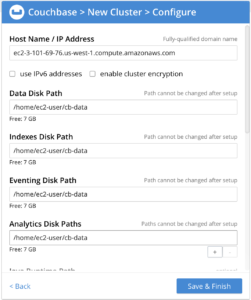
Note the changes to the various Data Paths.
Check the 1 node cluster

Add remaining nodes
Click on ADD SERVER from the above screen, add the other 2 nodes and Rebalance. When adding, do check the custom data paths in the Add Server screen.
 Cluster is now up and running
Part 2: Upgrade
Pre-upgrade
I start with a 3 node Couchbase Server 6.0.4 installed as ec2-user.
The installation home is: /home/ec2-user/cb-server
The data directory is: /home/ec2-user/cb-data
Lets check the Couchbase Server status by logging into Couchbase 6.0.4 Admin UI and make sure they are all Green.
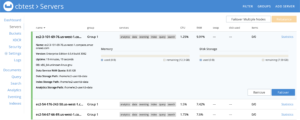 Next, a quick check of the buckets shows:

Now, let’s upgrade this cluster to Couchbase 6.5.1.
사전 요구 사항
This is the same as described in Part 1 of this blog. Please make sure of meeting these pre-requisites even if these have not been done when you installed Couchbase Server 6.0.4. The upgrade process is a good opportunity to do this.
Upgrade Process
Step 1: Gracefully Failover a node
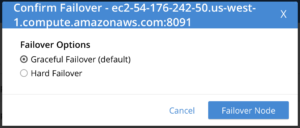
Notes
- Do not Rebalance yet
- The node is Failed over and not taking any traffic, but is still part of the cluster
A quick check of the node
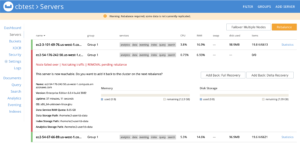
SSH into the failed over node and perform these steps.
Step 2: Stop the server
|
1 |
[EC2–사용자@IP–172–31–25–239 ~]$ /집/EC2–사용자/씨비–서버/opt/카우치베이스/bin/카우치베이스–서버 –k |
Step 3: Upgrade the server
|
1 2 3 4 |
[EC2–사용자@IP–172–31–25–239 ~]$ ./씨비–아니오–패키지–설치 프로그램 —upgrade —설치–위치 /집/EC2–사용자/씨비–서버 —패키지 카우치베이스–서버–기업–6.5.1–센토스 8.x86_64.rpm Running cbupgrade this could take some time 업그레이드 가지고 있다 completed successfully |
Step 4: Start the server
|
1 |
[EC2–사용자@IP–172–31–25–239 ~]$ /집/EC2–사용자/씨비–서버/opt/카우치베이스/bin/카우치베이스–서버 — –noinput –detached |
Tip: In any of the steps, you can check the server status by:
0
Check the server version in the UI, post upgrade
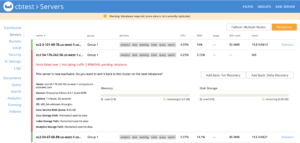
Note the change in the Server Version.
Add the node back and Rebalance
Note: We will be performing Rolling Online Upgrade ~와 함께 Graceful Failover and Delta Recovery.
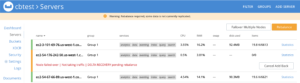
Click the Add Back: Delta Recovery button.
Optional: Check the Log
1
Complete full upgrade
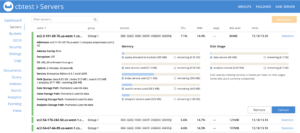
Repeat the same process for all 3 nodes.To Failover the first node, which you were logging into the Admin UI, you will need to access the Admin UI from a upgraded node. The look and feel has been made better, but the functionality is the same.
결론
After the completion of the upgrade process, check the Dashboard for the Server version:

The upgrade is complete.

댓글 남기기
댓글을 달기 위해서는 로그인해야합니다.