
We’re excited to announce the General Availability (GA) of the Couchbase Quarkus SDK 1.0, now officially ready for production use! This release brings native integration with the Quarkus framework, enhancing developer productivity and application performance. A standout feature of this release is support for GraalVM native image generation, enabling ultrafast startup times and optimized runtime performance.
What’s New in Couchbase Quarkus SDK 1.0?
The new quarkus-couchbase extension integrates our existing Java SDK into Quarkus’ ecosystem. It produces a 클러스터 object easily accessible with Quarkus’ ArC dependency injection framework, and adds GraalVM compatibility to run the Java SDK as a native executable on any platform.
Seamless GraalVM Native Image Support:
- Ultra-fast startup times and reduced memory footprint
- Ideal for cloud-native and serverless environments
Effortless Integration with Quarkus:
- Built-in dependency injection for Cluster injection
- Reactive and imperative APIs for flexible development
- Simplified configuration for connectivity
- Micrometer metrics, SmallRye health checks
Open Source Collaboration:
- Explore the GitHub repository to contribute and learn
Get Started with Couchbase Quarkus SDK
1. Create a new application
We recommend creating a Quarkus app with the Couchbase Extension via code.quarkus.io. The link will automatically add the 카우치베이스 그리고 REST Quarkus extensions and generate a new sample application.
If you already have an application on hand, add Couchbase as a dependency:
1.1. Add the Dependency
Maven
|
1 2 3 4 5 |
<dependency< <groupId<io.quarkiverse.카우치베이스</groupId< <artifactId<quarkus–카우치베이스</artifactId< <버전<1.0.0</버전< </dependency< |
Gradle
|
1 2 3 |
dependencies { implementation ‘io.quarkiverse.couchbase:quarkus-couchbase:1.0.0’ } |
2. Configure Your Application
Add your connection string and credentials in application.properties located at src/main/resources/application.properties:
|
1 2 3 |
quarkus.카우치베이스.connection–문자열=카우치베이스://localhost quarkus.카우치베이스.사용자 이름=관리자 quarkus.카우치베이스.비밀번호=비밀번호 |
The extension automatically starts a TestContainer, which can be disabled if desired with:
|
1 |
quarkus.devservices.활성화됨=거짓 |
Remember to head to the Couchbase Cluster UI at https://localhost:8091 and create a Bucket named 기본값 if you’re using DevServices.
3. Injecting the Cluster
The Quarkus Couchbase extension produces a 클러스터 bean that can be injected using the @Inject annotation.
|
1 2 3 4 5 |
가져오기 jakarta.inject.Inject; 가져오기 com.카우치베이스.클라이언트.java.클러스터; @Inject 클러스터 클러스터; |
From there, its usage is the same as it would be with the normal Java SDK.
4. Example: Creating an HTTP GET Endpoint
Modify the code in src/main/java/org/acme/GreetingResource.java:
|
1 2 3 4 5 6 7 8 9 10 11 12 13 14 15 16 17 18 19 20 21 22 23 24 25 26 |
패키지 org.acme; 가져오기 jakarta.기업.context.ApplicationScoped; 가져오기 jakarta.inject.Inject; 가져오기 jakarta.ws.rs.GET; 가져오기 jakarta.ws.rs.Path; 가져오기 jakarta.ws.rs.Produces; 가져오기 jakarta.ws.rs.core.MediaType; 가져오기 com.카우치베이스.클라이언트.java.클러스터; @ApplicationScoped @Path(“카우치베이스”) 공공의 클래스 GreetingResource { @Inject 클러스터 클러스터; @GET @Produces(MediaType.TEXT_PLAIN) @Path(“simpleQuery”) 공공의 문자열 simpleQuery() { 변수 질의 = 클러스터.질의(“SELECT RAW ‘hello world’ AS greeting”); 반환 질의.rowsAs(문자열.클래스).얻다(0); } } |
5. Example: Performing KV Operations
Use the same KV API as in the normal Java SDK:
|
1 2 3 4 5 6 7 8 9 10 11 12 13 14 15 16 17 18 19 20 21 22 23 24 25 26 27 28 29 30 31 32 33 34 35 36 |
패키지 org.acme; 가져오기 com.카우치베이스.클라이언트.java.클러스터; 가져오기 com.카우치베이스.클라이언트.java.JSON.JsonObject; 가져오기 com.카우치베이스.클라이언트.java.kv.뮤테이션 결과; 가져오기 jakarta.기업.context.ApplicationScoped; 가져오기 jakarta.inject.Inject; 가져오기 jakarta.ws.rs.GET; 가져오기 jakarta.ws.rs.Path; 가져오기 jakarta.ws.rs.Produces; 가져오기 jakarta.ws.rs.core.MediaType; @ApplicationScoped @Path(“카우치베이스”) 공공의 클래스 GreetingResource { @Inject 클러스터 클러스터; @GET @Produces(MediaType.TEXT_PLAIN) @Path(“simpleUpsert”) 공공의 문자열 simpleUpsert() { 변수 양동이 = 클러스터.양동이(“default”); 변수 컬렉션 = 양동이.defaultCollection(); JsonObject 콘텐츠 = JsonObject.만들다() .넣다(“author”, “mike”) .넣다(“title”, “My Blog Post 1”); 뮤테이션 결과 결과 = 컬렉션.업서트(“document-key”, 콘텐츠); 반환 결과.mutationToken().문자열로변환(); } } |
Running your application
Run in dev mode with:
|
1 |
mvn quarkus:개발자 |
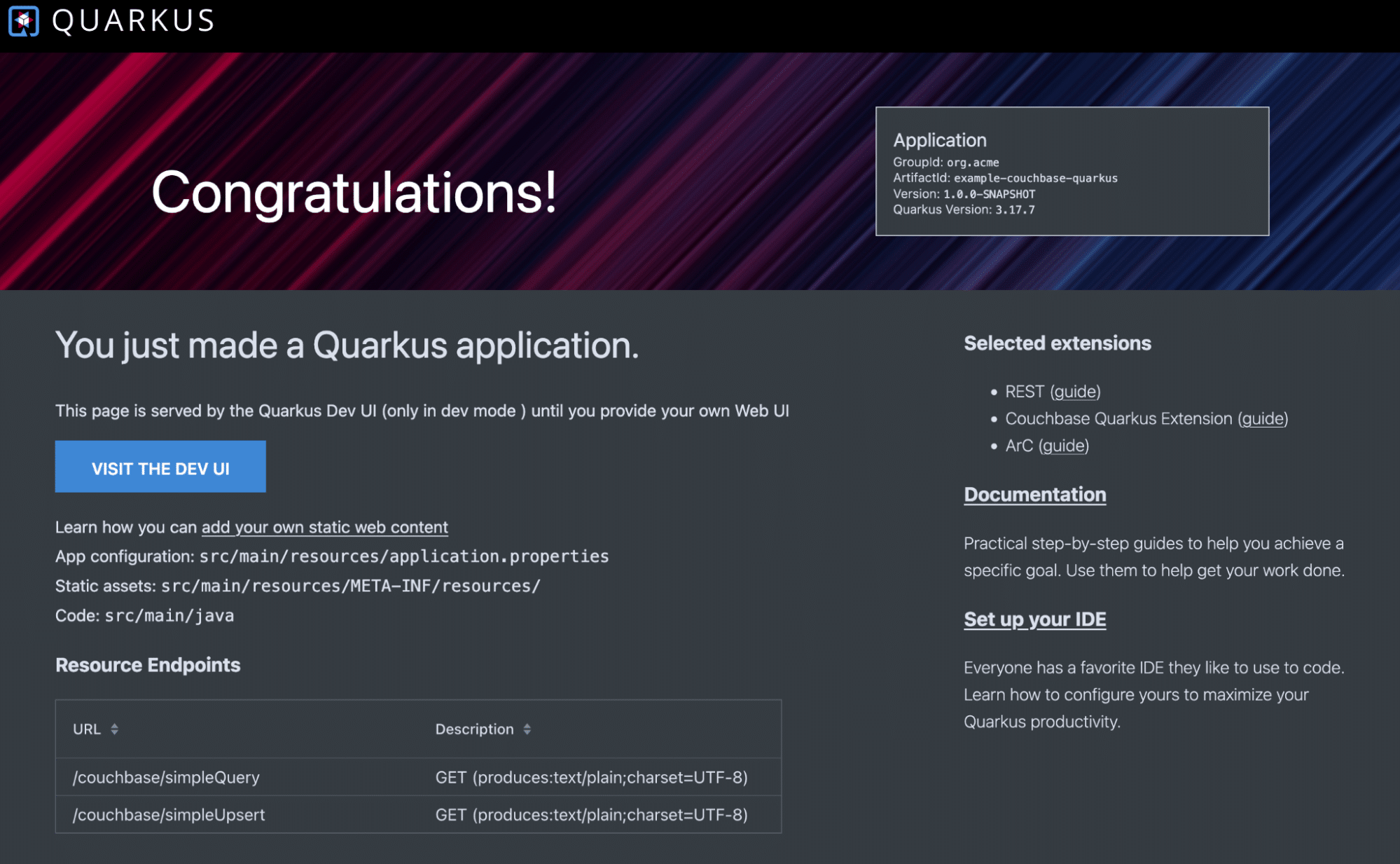
And head to the Developer UI at https://localhost:8080/q/dev-ui/welcome.
 Or compile to a native executable:
|
1 |
mvn clean 설치 –Dnative –Dmaven.test.skip |
The native-image will be located in the 목표 directory of your module.
Why Choose Couchbase Quarkus SDK 1.0?
- 성능: GraalVM native images provide unparalleled speed and efficiency.
- 유연성: Seamless integration with Quarkus simplifies development workflows.
- 확장성: Couchbase’s rich feature set supports applications at any scale.
Ready to Build?
Start building blazing-fast, cloud-native applications today! Explore the Couchbase Quarkus SDK GitHub Repository for more resources, contribute to the project, and share your feedback.
Let’s redefine application performance and developer productivity—together!
Community and Support
We believe in the power of community and open-source development. The Quarkus SDK for Couchbase is open-source, and we encourage you to contribute, provide feedback, and join the conversation. For support, if you are our enterprise licensed customer, you can reach out via support, otherwise, you can access our comprehensive 문서화, join the 카우치베이스 포럼 또는 Couchbase Discord, or reach out via our support portal.
Further Reading
To learn more, check out our documentation website. It goes into more detail on the API, especially around transactions and asynchronous operations and provides other reference material and sample bindings links for you to dig deeper:
- Couchbase Quarkus SDK usage
- Couchbase Quarkus SDK documentation
- Download and install Couchbase Quarkus SDK
Supported operating systems and compatibility requirements are listed on our documentation website.
Happy coding!
카우치베이스 팀

댓글 남기기
댓글을 달기 위해서는 로그인해야합니다.