
Couchbase’s new EF Core provider opens the door to some powerful .NET integrations: even ones traditionally tied to relational databases. This post walks through how Identity, GraphQL, and OData all work with Couchbase.
In this post, I’ll walk through three advanced EF Core integrations that I have successfully tested with Couchbase:
- ASP.NET Core Identity
- GraphQL (via Hot Chocolate)
- OData
Nota: These integrations are based on limited testing and are not officially supported (yet). Your mileage may vary, but so far, they show a lot of promise.
ASP.NET Core Identity
Microsoft.AspNetCore.Identity.EntityFrameworkCore provides a plug-and-play authentication and user management system for ASP.NET apps.
Couchbase’s EF Core provider works well with it. The only caveat is that you’ll need to make sure the proper collections exist first (like AspNetUsers, AspNetRoles, etc).
Nota: You must create the following collections in advance: AspNetUsers, AspNetRoles, AspNetUserRoles, AspNetUserClaims, AspNetUserLogins, AspNetUserTokens, AspNetRoleClaims.
Example EF setup
|
1 2 3 4 5 6 7 8 9 10 11 12 13 14 15 16 17 18 19 |
público clase AppDbContext : IdentityDbContext<ApplicationUserEl resultado de tu pregunta se muestra a continuación: { público AppDbContext(DbContextOptions<AppDbContextEl resultado de tu pregunta se muestra a continuación: Opciones) : base(Opciones) { } protegido anular vacío OnModelCreating(ModelBuilder constructor) { base.OnModelCreating(constructor); constructor.Entidad<ApplicationUserEl resultado de tu pregunta se muestra a continuación:().ToCouchbaseCollection(este, “AspNetUsers”); constructor.Entidad<IdentityRoleEl resultado de tu pregunta se muestra a continuación:().ToCouchbaseCollection(este, “AspNetRoles”); constructor.Entidad<IdentityUserRole<cadena>>().ToCouchbaseCollection(este, “AspNetUserRoles”); constructor.Entidad<IdentityUserClaim<cadena>>().ToCouchbaseCollection(este, “AspNetUserClaims”); constructor.Entidad<IdentityUserLogin<cadena>>().ToCouchbaseCollection(este, “AspNetUserLogins”); constructor.Entidad<IdentityUserToken<cadena>>().ToCouchbaseCollection(este, “AspNetUserTokens”); constructor.Entidad<IdentityRoleClaim<cadena>>().ToCouchbaseCollection(este, “AspNetRoleClaims”); } } público clase ApplicationUser : IdentityUser { } |
MVC auth example
Here’s an ASP.NET Core MVC controller with registration, login, and logout, as well as a custom role:
|
1 2 3 4 5 6 7 8 9 10 11 12 13 14 15 16 17 18 19 20 21 22 23 24 25 26 27 28 29 30 31 32 33 34 35 36 37 38 39 40 41 42 43 44 45 46 47 48 49 50 51 52 53 54 55 56 57 58 |
público clase AuthController : Controller { privado de solo lectura UserManager<ApplicationUserEl resultado de tu pregunta se muestra a continuación: _userManager; privado de solo lectura SignInManager<ApplicationUserEl resultado de tu pregunta se muestra a continuación: _signInManager; privado de solo lectura RoleManager<IdentityRoleEl resultado de tu pregunta se muestra a continuación: _roleManager; público AuthController(UserManager<ApplicationUserEl resultado de tu pregunta se muestra a continuación: userManager, SignInManager<ApplicationUserEl resultado de tu pregunta se muestra a continuación: signInManager, RoleManager<IdentityRoleEl resultado de tu pregunta se muestra a continuación: roleManager) { _userManager = userManager; _signInManager = signInManager; _roleManager = roleManager; } público IActionResult Register() =El resultado de tu pregunta se muestra a continuación: Ver(); [HttpPost] público asíncrono Task<IActionResultEl resultado de tu pregunta se muestra a continuación: Register(RegisterModel modelo) { si (!ModelState.IsValid) regresar Ver(modelo); var usuario = nuevo ApplicationUser { UserName = modelo.Email, Email = modelo.Email }; var resultado = esperar _userManager.CreateAsync(usuario, modelo.Password); si (resultado.Succeeded) { var roleName = “CustomRole”; si (!esperar _roleManager.RoleExistsAsync(roleName)) esperar _roleManager.CreateAsync(nuevo IdentityRole(roleName)); esperar _userManager.AddToRoleAsync(usuario, roleName); esperar _signInManager.SignInAsync(usuario, isPersistent: falso); regresar RedirectToAction(“Index”, “Home”); } para cada (var error en resultado.Errores) ModelState.AddModelError(“”, error.Description); regresar Ver(modelo); } público IActionResult Login() =El resultado de tu pregunta se muestra a continuación: Ver(); [HttpPost] público asíncrono Task<IActionResultEl resultado de tu pregunta se muestra a continuación: Login(LoginModel modelo) { si (!ModelState.IsValid) regresar Ver(modelo); var resultado = esperar _signInManager.PasswordSignInAsync(modelo.Email, modelo.Password, falso, falso); si (resultado.Succeeded) regresar RedirectToAction(“Index”, “Home”); ModelState.AddModelError(“”, “Invalid login attempt.”); regresar Ver(modelo); } público asíncrono Task<IActionResultEl resultado de tu pregunta se muestra a continuación: Logout() { esperar _signInManager.SignOutAsync(); regresar RedirectToAction(“Index”, “Home”); } } |
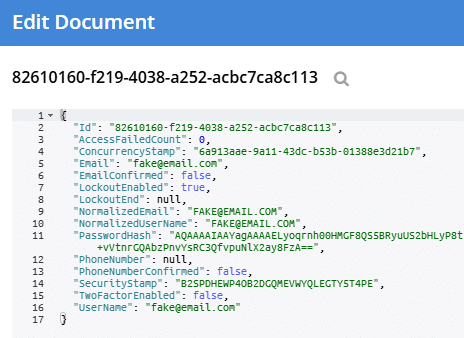
The data follows the standard Identity structure, stored in a Couchbase document. For example, a document in AspNetUser collection:
GraphQL with Hot Chocolate
Hot Chocolate is a popular GraphQL server for .NET. It can integrate with EF Core, leaning on the LINQ capabilities of the provider (which Couchbase has). This means that GraphQL queries are translated to LINQ, which is then translated to Couchbase SQL++.
Setup
|
1 2 3 4 5 6 7 8 9 10 11 12 13 14 15 16 17 18 |
público clase WidgetQuery { [UseFiltering] [UseSorting] público IQueryable<WidgetEl resultado de tu pregunta se muestra a continuación: GetWidgets([Service] WidgetDbContext dbContext) =El resultado de tu pregunta se muestra a continuación: dbContext.Widgets; } // Program.cs: constructor.Servicios .AddGraphQLServer() .AddQueryType<WidgetQueryEl resultado de tu pregunta se muestra a continuación:() .AddFiltering() .AddSorting() .AddProjections(); aplicación.MapGraphQL(); |
Example usage
- Ir a /graphql in browser (this brings up a web interface)
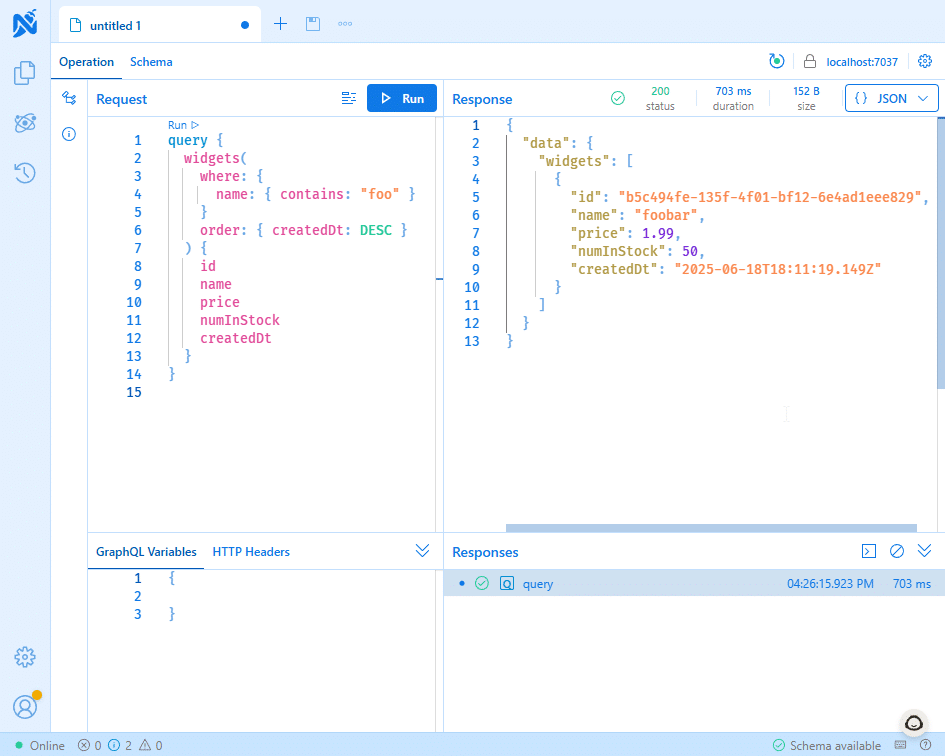
- Try a query like this:
|
1 2 3 4 5 6 7 8 9 |
consulta { widgets(where: { nombre: { contains: “foo” } }, orden: { createdDt: DESC }) { identificación nombre price numInStock createdDt } } |
This will return results like:
|
1 2 3 4 5 6 7 8 9 10 11 12 13 |
{ “data”: { “widgets”: [ { “id”: “b5c494fe-135f-4f01-bf12-6e4ad1eee829”, “nombre”: “foobar”, “price”: 1.99, “numInStock”: 50, “createdDt”: “2025-06-18T18:11:19.149Z” } ] } } |
Tips
- GraphQL queries need to match your GSI indexes (it’s just SQL++ queries under the hood).
- You can use cover indexes and other SQL++ indexes to improve performance.
OData
Microsoft.AspNetCore.OData exposes your EF Core data as OData endpoints, making it easy to connect tools like Excel, Power BI, and Tableau to Couchbase.
Sample program.cs
|
1 2 3 4 5 6 7 8 9 10 11 12 13 14 |
constructor.Servicios.AddControllersWithViews() .AddOData(opt =El resultado de tu pregunta se muestra a continuación: { var odataBuilder = nuevo ODataConventionModelBuilder(); odataBuilder.EntitySet<WidgetEl resultado de tu pregunta se muestra a continuación:(“Widgets”); opt.AddRouteComponents(“odata”, odataBuilder.GetEdmModel()) .Filter() .OrderBy() .Seleccionar() .Expand() .Count() .SetMaxTop(100); }); |
Controller
|
1 2 3 |
[HttpGet(“/odata/Widgets”)] [EnableQuery] público IQueryable<WidgetEl resultado de tu pregunta se muestra a continuación: GetOData() =El resultado de tu pregunta se muestra a continuación: _context.Widgets; |
Example OData queries
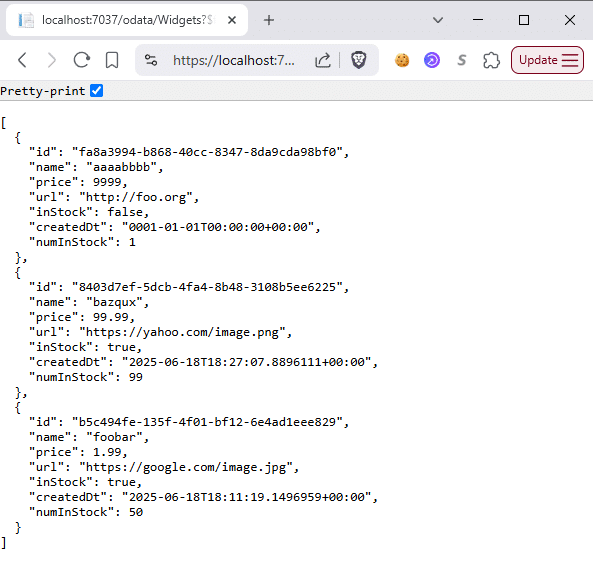
- https://localhost:7037/odata/Widgets?$filter=price gt 1&$orderby=name
- https://localhost:7037/odata/Widgets?$select=name,price&$top=10
Nota: Make sure your EF Core LINQ queries can be translated to SQL++ and that any filtered/sorted fields are indexed in Couchbase.
Wrapping up
All of these integrations are backed by EF Core—and now, with Couchbase support, you can take full advantage of them in your code. Whether you’re building secure web applications, GraphQL APIs or integrating with BI tools, The EF Core and Couchbase combo makes it possible.
Curious to see more? Let us know what integrations you’d like to explore next!

Deja un comentario
Lo siento, debes estar conectado para publicar un comentario.