
Couchbase Capella has launched a Private Preview for AI services! Check out 이 블로그 이러한 서비스들이 어떻게 클라우드 네이티브, 확장성이 뛰어난 AI 애플리케이션 및 AI 에이전트를 구축하는 프로세스를 간소화하는지 간략하게 살펴보세요.
In our previous blog, we demonstrated how to set up the model service, and this post continues our tutorial series by exploring the next critical step. In this blog, we’ll explore how to use the Structured Vectorization service to automatically embed JSON documents, making them instantly usable with Couchbase vector search. This makes it easier to build AI applications with seamless semantic search and smart data retrieval, while keeping performance high and data secure within your infrastructure.
The Vectorization Service in Capella securely converts data into vector embeddings at scale. It uses Couchbase Eventing for real-time processing and efficient data transformation. This ensures fast, secure execution close to your infrastructure.
What are vector embeddings and why are they important?
Vector embeddings are numerical representations of text, images, or other data types that capture their nuanced semantic meaning in a format suitable for machine learning. In building a retrieval-augmented generation (RAG) app, embeddings serve as the backbone for efficiently searching and ranking vast amounts of data based on similarity, which is essential for delivering relevant context in real-time. For instance, AI use cases such as semantic search engines, recommendation systems, conversational agents like chatbots, and image recognition apps would rely on embeddings to transform raw data into actionable insights, ultimately improving performance and user experience.
Who should use the Capella Vectorization Service?
If you’re storing JSON documents in Capella and want to accelerate AI development, Capella’s Vectorization Service is the perfect solution. It eliminates the need to build a custom embedding system by seamlessly converting your data into vector representations.
Whether you’re building a retrieval-augmented generation (RAG) app, setting up semantic search, or adding AI-driven features, this service makes the process quick and easy. It handles the complex work with built-in efficiency and scalability, so you can focus on innovation while your data transforms into AI-ready insights instantly.
Getting started: deploy a Vectorization Workflow
Let’s go through a simple tutorial to deploy a Vectorization Workflow in Capella.
What you’ll learn:
- Creating a Vectorization Workflow in Capella
- Utilizing the embeddings with a RAG Application
전제 조건
시작하기 전에 다음 사항이 있는지 확인하세요:
- 개인 미리 보기에 등록하고 조직의 AI 서비스를 활성화했습니다. 여기서 가입하세요!
- 조직 소유자 역할 permissions to manage the Vectorization Service
- A multi-AZ operational cluster with Search and Eventing services
- An existing keyspace where the JSON documents are ingested or stored
Step 1: deploying the Vectorization Workflow
이동하기 AI 서비스 Capella 홈페이지에서 클릭하세요. 벡터화 서비스 진행하기 위해.

Enter the workflow name

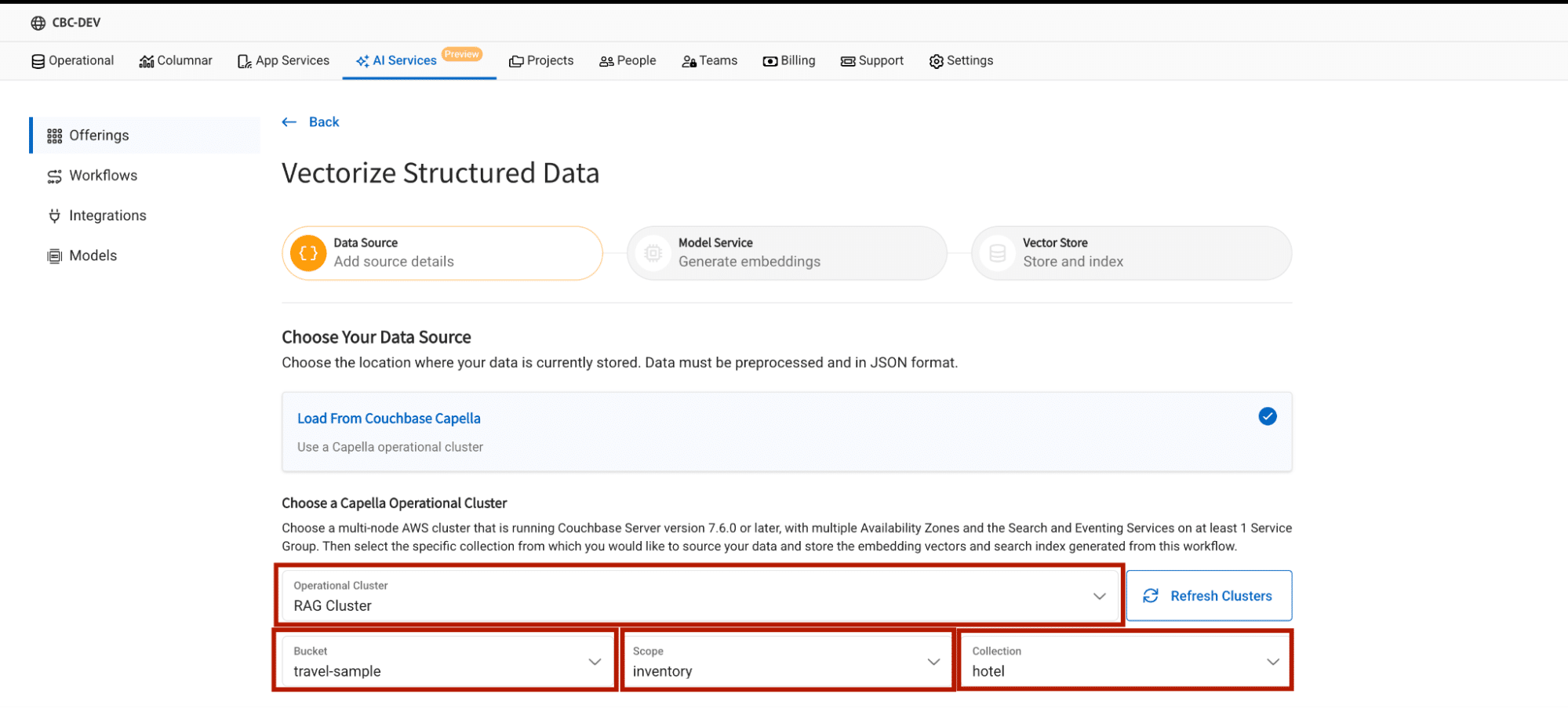
Select the operational cluster
Here, select the cluster, bucket, scope and collection where the raw JSON documents are located.
Select the source fields
Source fields determine which part of your JSON document will be used to generate embeddings.
Note: The vectorization service batches data in groups of 16 objects, with each object representing text to embed from a single document. However, if the combined text in a batch exceeds the model’s maximum allowed input length, the embedding process for that document will fail.
While batching reduces the number of API calls, it’s crucial to ensure that the text from each document remains within the model’s size limits. Otherwise, any batch that includes oversized text will not be processed successfully.
In Capella, you have two options:
- All Source Fields: Generates embeddings for the entire JSON document.
- Customized Source Fields: Allows you to specify a particular field for generating embeddings.

Select the embedding model
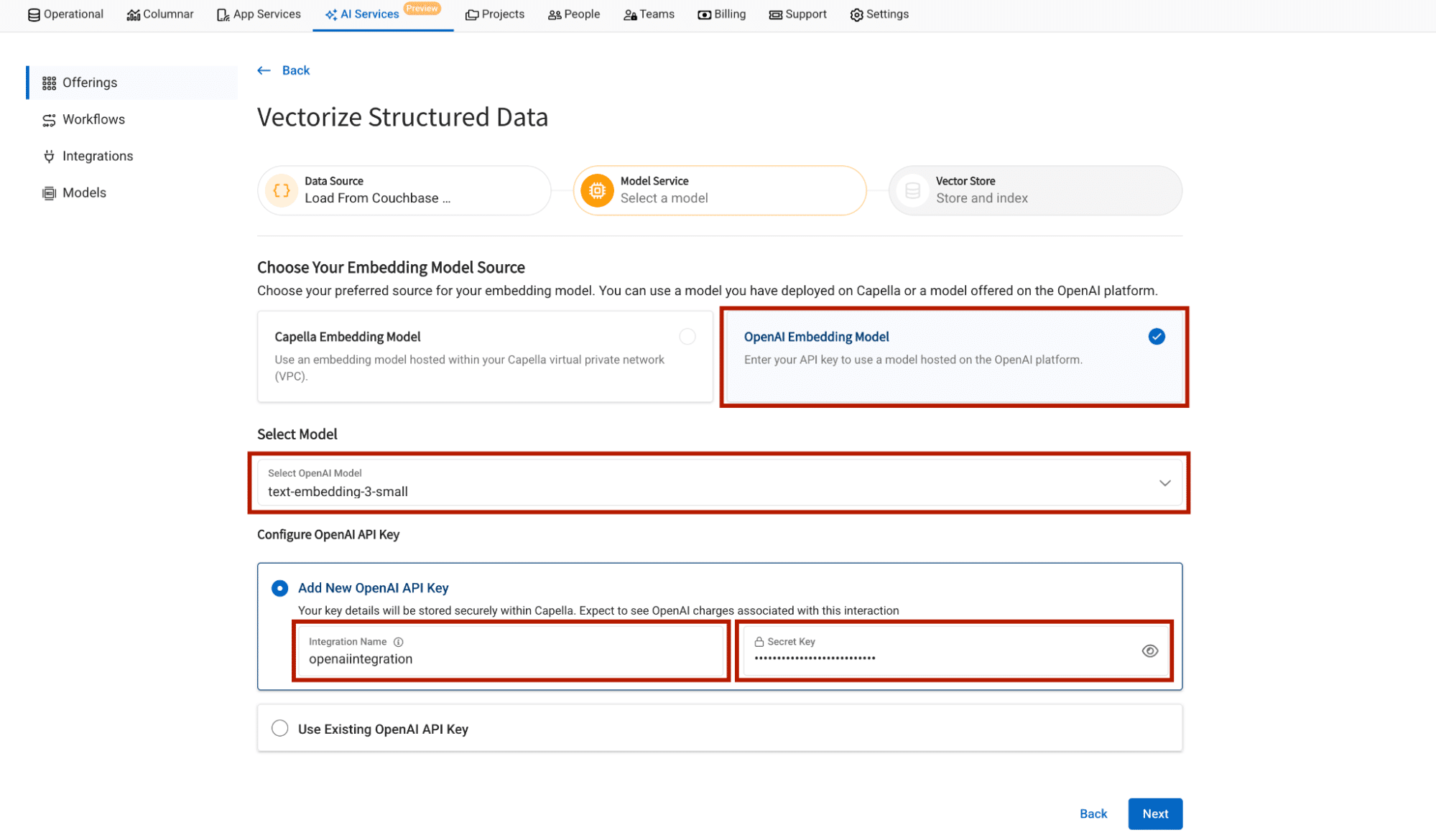
Couchbase Capella provides the option to choose both OpenAI as an embedding provider or you can choose a Capella-hosted embedding model.
Follow this blog for creating a Capella Hosted Embedding Model.
In this blog we’ll focus on OpenAI as our embedding provider.
When we add our API key as integration in Capella, Capella saves that API key safely in AWS Safely manager, which can later be reused for another workflow, without the hassle of adding API key again.
Configure embedding field name and vector index name

Now that you’ve set up the vectorization workflow, let’s create an interactive RAG application that leverages these embeddings to deliver valuable results.
Step 2: Utilizing the embeddings with a RAG Application
About the application
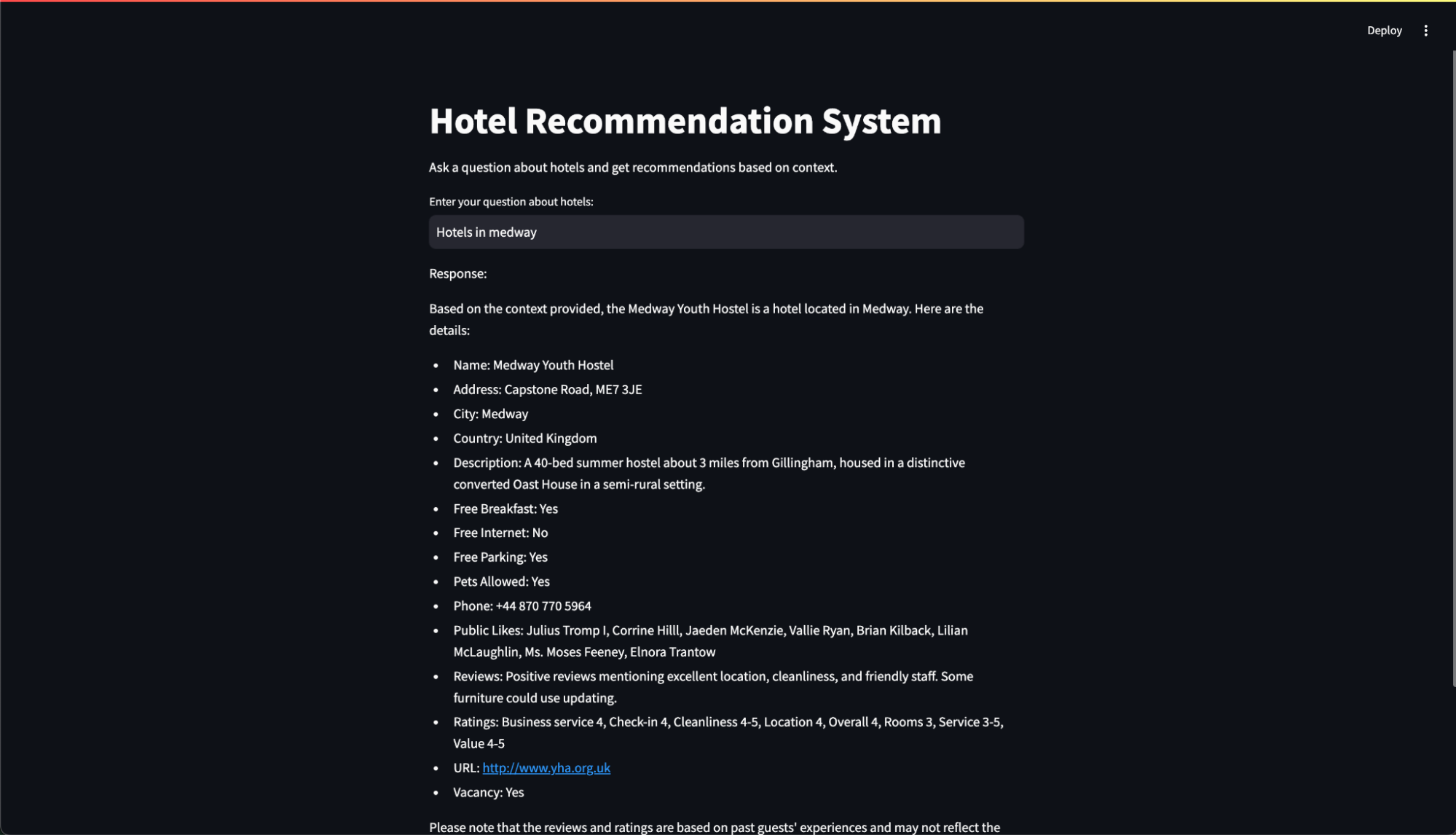
This application leverages embeddings produced by our workflow to power a sophisticated Hotel Recommendation System. This application upon receiving user input, generates precise embeddings, conducts a vector search on our Couchbase server, and refines the final response with an advanced large language model (LLM).
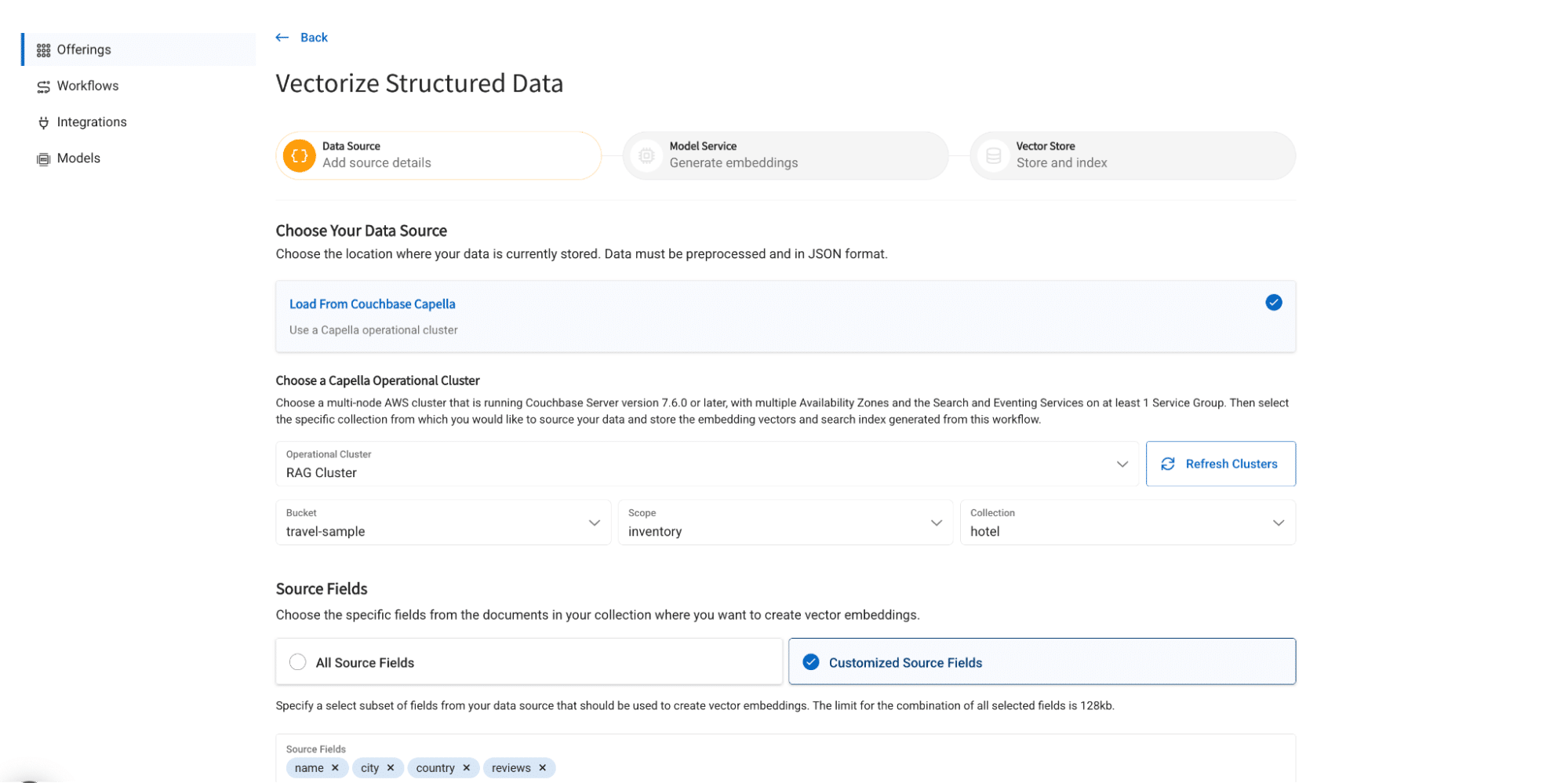
To use the application you can import the 여행 샘플 bucket and generate embedding for 이름,city,country 그리고 reviews field in the hotel collection.
Setting up the workflow
- Import travel-sample bucket
- Create Structured workflow with the following configuration
- Bucket: 여행 샘플
- Scope: inventory
- Collection: hotel
- Source Fields: 이름, city, country, reviews
Trying out the application
- Clone the GitHub repository
git clone https://github.com/ayansharma2/RAG-APP.git
- Change directory
cd RAG-APP
- (Optional but recommended) Create and activate a virtual environment:
- On macOS/Linux:
python3 -m venv venv

source venv/bin/activate
- On Windows:
python -m venv venv

venvScriptsactivate
- Install project dependencies
pip install -r requirements.txt
- Run the application
streamlit run main.py
Application in action
마지막 생각들
Capella’s Structured Vectorization service makes data embedding generation simple and seamless, helping you build AI-powered applications with ease. It automatically converts JSON documents into vector embeddings, saving time and eliminating the need for manual data transformation. This speeds up the development of retrieval-augmented generation (RAG) systems, semantic search, and other AI tools. With high performance and built-in compliance, your team can innovate faster and more securely.
Sign up for the Private Preview today and start building smarter, scalable applications with Couchbase Capella! 여기에서 프라이빗 프리뷰에 가입하세요!
참고문헌
- Read the Capella AI Services press release
- 확인해 보세요 카펠라 AI 서비스 or sign up for the 비공개 미리보기
- 카펠라 모델 서비스 문서 (for preview customers)
감사의 말씀
Thanks to the team (Abhishek J, Paulomee D, Kiran M, Nithish R, Santosh H, Denis S, Talina S, and many more). Thanks to everyone who helped directly or indirectly!

댓글 남기기
댓글을 달기 위해서는 로그인해야합니다.