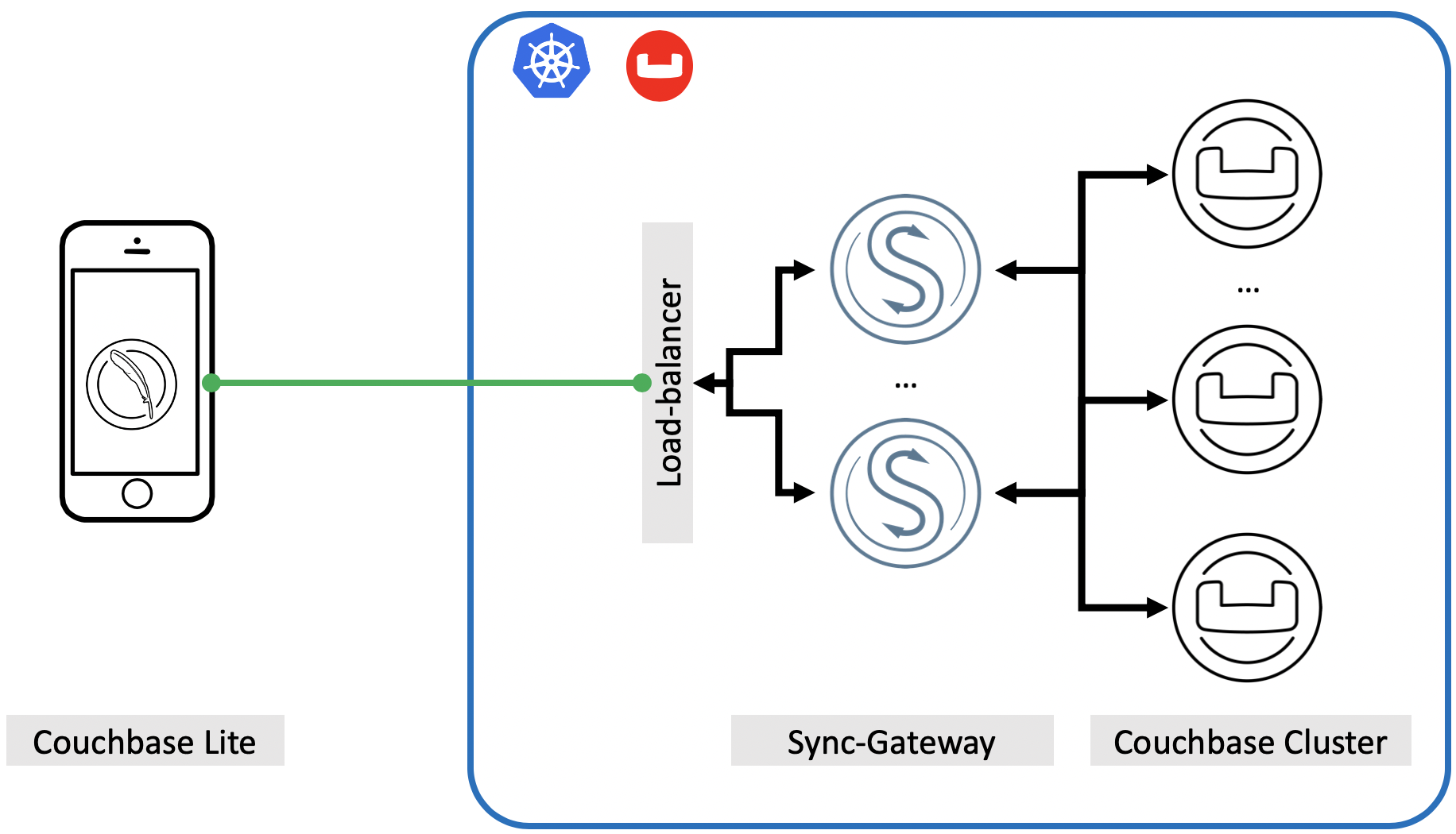
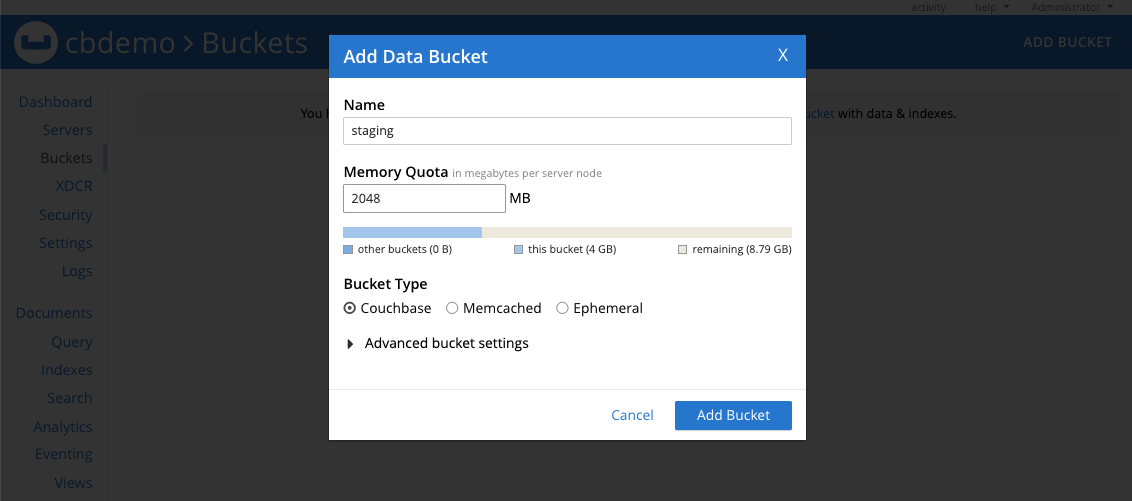
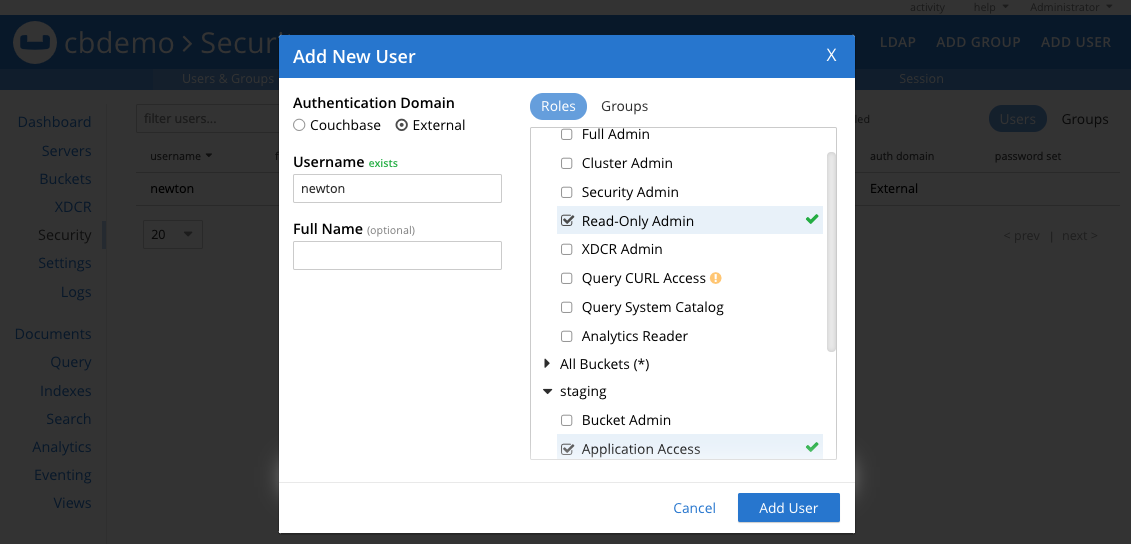
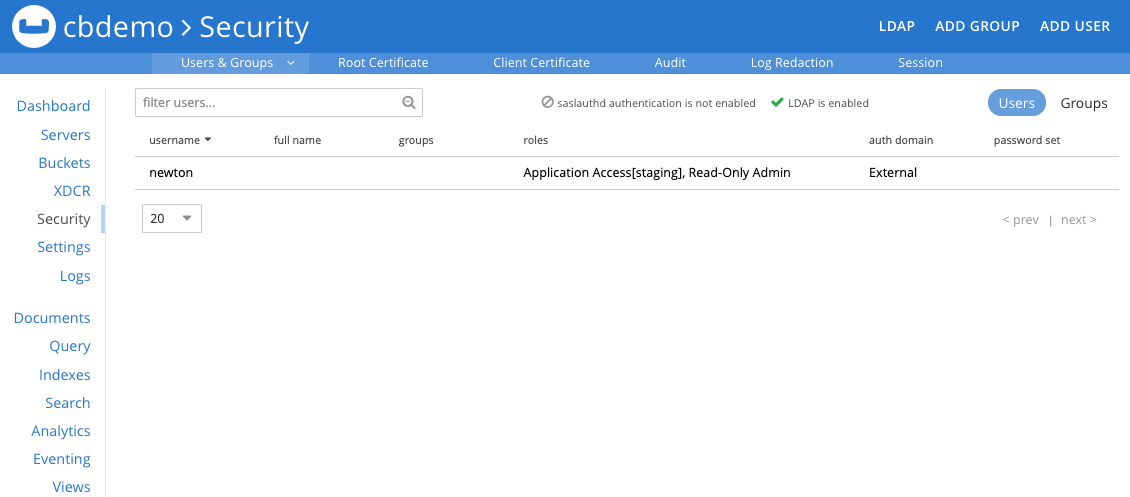
{"id":8969,"date":"2021-01-07T05:22:35","date_gmt":"2021-01-07T13:22:35","guid":{"rendered":"https:\/\/www.couchbase.com\/blog\/?p=8969"},"modified":"2025-06-13T19:58:04","modified_gmt":"2025-06-14T02:58:04","slug":"get-set-to-the-edge-with-sync-gateway","status":"publish","type":"post","link":"https:\/\/www.couchbase.com\/blog\/get-set-to-the-edge-with-sync-gateway\/","title":{"rendered":"Get set to the edge with Sync Gateway"},"content":{"rendered":"\r\n<h2 class=\"wp-block-heading\">Introduction<\/h2>\r\n\r\n\r\n\r\n<p>Imagine you are going to meet an important client in downtown San Francisco, CA and you have an email with details on who to call to when you get to the office lobby. You are in the lobby but the Mobile network reception is completely down. You try to open your email client but it needs network connection every time you start the application. I am sure the inability to read the email without connectivity will lead to frustrating user experience.<\/p>\r\n\r\n\r\n\r\n<p>To prevent these situations applications are now built with the <a href=\"https:\/\/www.couchbase.com\/blog\/offline-first-more-reliable-mobile-apps\/\">offline first<\/a> paradigm. This simply means application functionality is unaffected by intermittent lack of network connectivity. Also offline first usually implies the ability to sync data between edge-devices to the backend database.<\/p>\r\n\r\n\r\n\r\n<p>Many relational or even non-relation database solutions treat mobile and backend as two separate problems therefore building offline-first applications with these point-solutions is next to impossible.<\/p>\r\n\r\n\r\n\r\n<p>&nbsp;<\/p>\r\n\r\n\r\n\r\n<figure class=\"wp-block-gallery columns-1 is-cropped wp-block-gallery-1 is-layout-flex wp-block-gallery-is-layout-flex\">\r\n<ul class=\"blocks-gallery-grid\">\r\n<li class=\"blocks-gallery-item\">\r\n<figure><img loading=\"lazy\" decoding=\"async\" width=\"1832\" height=\"1050\" class=\"wp-image-8970\" src=\"https:\/\/i1.wp.com\/blog.couchbase.com\/wp-content\/uploads\/2020\/07\/sgw-arch.png?fit=900%2C516&amp;ssl=1\" alt=\"\" data-id=\"8970\" data-full-url=\"https:\/\/i1.wp.com\/blog.couchbase.com\/wp-content\/uploads\/2020\/07\/sgw-arch.png?fit=1832%2C1050&amp;ssl=1\" data-link=\"https:\/\/www.couchbase.com\/blog\/?attachment_id=8970\" srcset=\"https:\/\/www.couchbase.com\/blog\/wp-content\/uploads\/sites\/1\/2020\/07\/sgw-arch.png 1832w, https:\/\/www.couchbase.com\/blog\/wp-content\/uploads\/sites\/1\/2020\/07\/sgw-arch-300x172.png 300w, https:\/\/www.couchbase.com\/blog\/wp-content\/uploads\/sites\/1\/2020\/07\/sgw-arch-1024x587.png 1024w, https:\/\/www.couchbase.com\/blog\/wp-content\/uploads\/sites\/1\/2020\/07\/sgw-arch-768x440.png 768w, https:\/\/www.couchbase.com\/blog\/wp-content\/uploads\/sites\/1\/2020\/07\/sgw-arch-1536x880.png 1536w, https:\/\/www.couchbase.com\/blog\/wp-content\/uploads\/sites\/1\/2020\/07\/sgw-arch-20x11.png 20w, https:\/\/www.couchbase.com\/blog\/wp-content\/uploads\/sites\/1\/2020\/07\/sgw-arch-1320x757.png 1320w\" sizes=\"auto, (max-width: 1832px) 100vw, 1832px\" \/><\/figure>\r\n<\/li>\r\n<\/ul>\r\n<figcaption class=\"blocks-gallery-caption\">Figure 1: Architecture diagram of Couchbase Lite interacting with Couchbase Cluster via Sync Gateway<\/figcaption>\r\n<\/figure>\r\n\r\n\r\n\r\n<p>&nbsp;<\/p>\r\n\r\n\r\n\r\n<p>Couchbase on the other hand is the leading provider of a fully integrated edge to the cloud solution. <a href=\"https:\/\/docs.couchbase.com\/couchbase-lite\/2.7\/introduction.html\">Couchbase Lite<\/a> product is the embedded database for the edge devices (where you can run declarative queries locally on the device), <a href=\"https:\/\/docs.couchbase.com\/sync-gateway\/2.7\/introduction.html\">Sync Gateway<\/a> is the gel technology which enables data synchronization from the edge devices to the <a href=\"https:\/\/docs.couchbase.com\/home\/server.html\">Couchbase Cluster<\/a>.<\/p>\r\n\r\n\r\n\r\n<p>In this article, we will focus on deploying Couchabse Cluster and Sync Gateway on the Kubernetes platform. The goal is that you get first-hand experience working with these technologies and you understand mechanics behind each one.<\/p>\r\n\r\n\r\n\r\n<p>One more take away I would like you to have from this article is some of the best practices while deploying this solution in your own private or public cloud.<\/p>\r\n\r\n\r\n\r\n<h2 class=\"wp-block-heading\">Best practices<\/h2>\r\n\r\n\r\n\r\n<p>As I hear these questions from many of my enterprise customers, I decided to address these first by talking about some of the best practices when it comes to deploying Couchbase on the Kubernetes platform.<\/p>\r\n\r\n\r\n\r\n<ol class=\"wp-block-list\">\r\n<li>Always perform <a href=\"https:\/\/docs.couchbase.com\/server\/6.5\/install\/sizing-general.html#sizing-data-service-nodes\">sizing analysis<\/a> of the Couchbase cluster first, to plan what EC2 instance, storage device types, and space would be needed for the cluster. Sizing estimates remain the same for the Kubernetes cluster as one would do it for the on-premises cluster.<br \/>However, do remember that in K8s we are doing the sizing for Kubernetes Nodes, where Couchbase pods are going to run. That is where the second best-practice comes into the picture.<\/li>\r\n<li>Use <code>spec.antiAffinity=true<\/code> in <a href=\"https:\/\/github.com\/couchbaselabs\/cboperator-hol\/blob\/master\/eks\/cb-operator-guide\/files\/2.0.1\/yaml\/couchbase-cluster.yaml\" target=\"_blank\" rel=\"noopener noreferrer\">couchbase-cluster.yaml<\/a> file during cluster deployment in production. This field specifies whether or not two pods in this cluster can be deployed on the same Kubernetes node. From the high-availability perspective, we don&#8217;t want to place more than one pod on each of the K8s nodes, so that single node failure brings down a single pod only.<\/li>\r\n<li>In the Kubernetes environment, it is advisable to manage pod placement on predefined node types (large, xlarge, 4xlarge, etc.), so that desired resources can be guaranteed at the cluster deployment or auto-recovery time. You can use <code>spec.servers[].pod.spec.nodeSelector<\/code> field (as mentioned in <a href=\"https:\/\/github.com\/couchbaselabs\/cboperator-hol\/blob\/master\/eks\/cb-operator-guide\/files\/2.0.1\/yaml\/couchbase-cluster.yaml\" target=\"_blank\" rel=\"noopener noreferrer\">couchbase-cluster<\/a><a href=\"https:\/\/github.com\/couchbaselabs\/cboperator-hol\/blob\/master\/eks\/cb-operator-guide\/files\/2.0.1\/yaml\/couchbase-cluster.yaml\" target=\"_blank\" rel=\"noopener noreferrer\">.yaml<\/a>), which specifies a key-value map of the constraints on node placement for pods. For a pod to be eligible to run on a node, the node must have each of the indicated key-value pairs as labels.<\/li>\r\n<li>One last one before we begin the fun: if your K8s cluster have homogeneous nodes and you don&#8217;t want to use <code>node selector<\/code> method to determine the pod placement, then use <a href=\"https:\/\/docs.couchbase.com\/operator\/2.0\/reference-couchbasecluster.html#spec-servers-resources\">spec.servers[].resources<\/a> to define <code>requests<\/code> and <code>limits<\/code>. Again this will help to place pods with a predefined pool of resources.<\/li>\r\n<\/ol>\r\n\r\n\r\n\r\n<blockquote class=\"wp-block-quote is-layout-flow wp-block-quote-is-layout-flow\">\r\n<p><strong><em>NOTE:<\/em><\/strong> In the example below we will use <code>nodeSelector<\/code> technique to place respective pod types on the <code>nodegroups<\/code> to guarantee the desired resources.<\/p>\r\n<\/blockquote>\r\n\r\n\r\n\r\n<h2 class=\"wp-block-heading\">Prerequisites<\/h2>\r\n\r\n\r\n\r\n<p>Make sure you have an AWS account setup (instructions out of scope from this blog) and all the tools you would need to successfully try these instructions are ready. Here is the list of things you would need:<\/p>\r\n\r\n\r\n\r\n<ol class=\"wp-block-list\">\r\n<li>Download the latest <a href=\"https:\/\/www.couchbase.com\/downloads?family=kubernetes\">Couchbase Autonomous Operator<\/a> package and unzip to the local machine. The Operator package contains command-line tools that you will use to install the Operator.<\/li>\r\n<li>Install and setup <a href=\"https:\/\/kubernetes.io\/docs\/tasks\/tools\/install-kubectl\/\">kubectl<\/a> on your local machine \u2013 kubectl is a command-line interface for running commands against Kubernetes clusters.<\/li>\r\n<li>Install the latest <a href=\"https:\/\/docs.aws.amazon.com\/cli\/latest\/userguide\/cli-chap-install.html\">AWS CLI<\/a> \u2013 The AWS CLI is a unified tool that enables you to interact with AWS services using commands in your command-line shell. In this case, we will be using AWS CLI to communicate securely with the Kubernetes cluster running on AWS.<\/li>\r\n<\/ol>\r\n\r\n\r\n\r\n<p>Once you have <code>aws cli<\/code> setup with your account credentials you can move on to creating a Kubernetes cluster section.<\/p>\r\n\r\n\r\n\r\n<h2 class=\"wp-block-heading\">Step 1: Create Multi-Nodegroup K8s Cluster<\/h2>\r\n\r\n\r\n\r\n<p>Kubernetes (K8s) provides us the flexibility to provision different sizes (vCPU, RAM, Disk size) compute machines into one single Kubernetes cluster so resource requirements of various managed services can be satisfied from a single K8s cluster.<\/p>\r\n\r\n\r\n\r\n<p>We are going to leverage the same flexibility and provision three <code>NodeGroups<\/code>, which we will later use to host a specific set of Couchbase services.<\/p>\r\n\r\n\r\n\r\n<h3 class=\"wp-block-heading\">1.1. Create an EKS cluster in the region of your choice<\/h3>\r\n\r\n\r\n\r\n<p>First, let&#8217;s deploy a K8s cluster in <code>us-west-2<\/code> region and across two availability zones <code>us-west-2a\/b<\/code>. You can mention a different <code>vpc-cidr<\/code> block as per your needs but in this example we will be using <code>172.16.0.0\/20<\/code>, providing us a range of over 4K (2<sup>12<\/sup>) IP addresses, which should be more than enough for us.<\/p>\r\n\r\n\r\n\r\n<pre class=\"wp-block-code\"><code>$ eksctl create cluster --name k8sEKS \\\r\n --version 1.18 \\\r\n --region us-west-2 \\\r\n --zones us-west-2a,us-west-2b \\\r\n --vpc-cidr 172.16.0.0\/20 \\\r\n --without-nodegroup<\/code><\/pre>\r\n\r\n\r\n\r\n<h3 class=\"wp-block-heading\">1.2. Create separate Node Groups<\/h3>\r\n\r\n\r\n\r\n<p>Lets&#8217; create <code>nodegroup<\/code> within the EKS cluster so we can host Couchbase <code>Data<\/code> service instances. In this example, we will be using <code>m5.large (2 vCPU &amp; 8GB RAM)<\/code> EC2 machines as <code>node-type<\/code>, but the actual size of the EC2 node will depend on the capacity and performance planning based on your workload. So make sure you pick the right kind of nodes in your production deployment.<\/p>\r\n\r\n\r\n\r\n<pre class=\"wp-block-code\"><code>$ eksctl create nodegroup --cluster=k8sEKS \\\r\n --name=m5l-pool \\\r\n --node-type m5.large \\\r\n --region us-west-2 \\\r\n --nodes 2 \\\r\n --nodes-min 2 \\\r\n --nodes-max 4 \\\r\n --node-ami auto<\/code><\/pre>\r\n\r\n\r\n\r\n<p>To host <code>Index\/Query<\/code> services we will create a separate nodegroup with more compute and RAM. In this example we will be using <code>r5.large (2 vCPU &amp; 16GB RAM)<\/code> machines.<\/p>\r\n\r\n\r\n\r\n<pre class=\"wp-block-code\"><code>$ eksctl create nodegroup --cluster=k8sEKS \\\r\n --name=r5l-pool \\\r\n --node-type r5.large \\\r\n --region us-west-2 \\\r\n --nodes 2 \\\r\n --nodes-min 2 \\\r\n --nodes-max 4 \\\r\n --node-ami auto<\/code><\/pre>\r\n\r\n\r\n\r\n<p>Last but not least we will use <code>t2.xlarge (4 vCP &amp; 16GB RAM)<\/code> to host <code>Sync-Gateway<\/code> instance.<\/p>\r\n\r\n\r\n\r\n<pre class=\"wp-block-code\"><code>$ eksctl create nodegroup --cluster=k8sEKS \\\r\n --name=t2xl-pool \\\r\n --node-type t2.xlarge \\\r\n --region us-west-2 \\\r\n --nodes 1 \\\r\n --nodes-min 1 \\\r\n --nodes-max 2 \\\r\n --node-ami auto<\/code><\/pre>\r\n\r\n\r\n\r\n<p>Once all three <code>nodegroups<\/code> are ready we can start labeling each node in the nodegroup or use pre-existing label but first confirm all <code>nodegroups<\/code> are ready:<\/p>\r\n\r\n\r\n\r\n<pre class=\"wp-block-code\"><code>$ eksctl get nodegroups --cluster=k8sEKS --region=us-west-2\r\n\r\nLUSTER    NODEGROUP   CREATED         MIN SIZE    MAX SIZE    DESIRED CAPACITY    INSTANCE TYPE   IMAGE ID\r\nk8sEKS    m5l-pool    2020-07-24T18:58:02Z    2       4       2           m5.largeami-04387c277e83865b2\r\nk8sEKS    r5l-pool    2020-07-24T18:58:09Z    2       4       2           r5.largeami-04387c277e83865b2\r\nk8sEKS    t2xl-pool   2020-07-24T19:09:09Z    1       2       1           t2.xlargeami-04387c277e83865b2<\/code><\/pre>\r\n\r\n\r\n\r\n<h3 class=\"wp-block-heading\">1.3. Label EKS nodes<\/h3>\r\n\r\n\r\n\r\n<p>We have picked three different types of EC2 machines to host <code>data<\/code>, <code>Index\/Query<\/code>, and <code>sync-gateway<\/code> machines just to dedicate Couchbase services to a specific <code>nodegroup<\/code> type. We are going to use an existing label called <code>beta.kubernetes.io\/instance-type<\/code> for node selection. This label is going to be available by default so we don&#8217;t have to create a new label. You can simply see node labels by running this cmd:<\/p>\r\n\r\n\r\n\r\n<pre class=\"wp-block-code\"><code>$ kubectl get nodes --show-labels\r\n\r\nNAME                                         STATUS    ROLES     AGE       VERSION              LABELS\r\nip-172-16-0-12.us-west-2.compute.internal    Ready     &lt;none&gt;    21m       v1.14.9-eks-a0a484   ...,beta.kubernetes.io\/instance-type=t2.xlarge,...\r\nip-172-16-0-127.us-west-2.compute.internal   Ready     &lt;none&gt;    32m       v1.14.9-eks-a0a484   ...,beta.kubernetes.io\/instance-type=m5.large,...\r\nip-172-16-3-234.us-west-2.compute.internal   Ready     &lt;none&gt;    32m       v1.14.9-eks-a0a484   ...,beta.kubernetes.io\/instance-type=m5.large,...\r\nip-172-16-1-29.us-west-2.compute.internal    Ready     &lt;none&gt;    32m       v1.14.9-eks-a0a484   ...,beta.kubernetes.io\/instance-type=r5.large,...\r\nip-172-16-3-119.us-west-2.compute.internal   Ready     &lt;none&gt;    32m       v1.14.9-eks-a0a484   ...,beta.kubernetes.io\/instance-type=r5.large,...<\/code><\/pre>\r\n\r\n\r\n\r\n<p>In this example we will be hosting <code>data<\/code> service on <code>m5.large<\/code> machines, <code>index\/query<\/code> on <code>r5.large<\/code> machines and <code>sync-gateway<\/code> on <code>t2.xlarge<\/code> machine.<\/p>\r\n\r\n\r\n\r\n<p>In a real production environment, we understand you may have a different type of machine but not essentially one type dedicated to one specific type of Couchbase service. In that case, you can create mutually exclusive labels for each node type.<\/p>\r\n\r\n\r\n\r\n<p>You would use <code>kubectl label<\/code> cmd to label all the nodes that you want to use for data nodes only like this:<\/p>\r\n\r\n\r\n\r\n<pre class=\"wp-block-code\"><code>$ kubectl label nodes 'ec2-node-ip'  instanceType=data<\/code><\/pre>\r\n\r\n\r\n\r\n<p>Same way to label all the index (query or another) nodes:<\/p>\r\n\r\n\r\n\r\n<pre class=\"wp-block-code\"><code>$ kubectl label nodes 'ec2-node-ip'  instanceType=index<\/code><\/pre>\r\n\r\n\r\n\r\n<p>Once you label all the nodes, you are ready to move to the next section.<\/p>\r\n\r\n\r\n\r\n<p><strong><em>NOTE:<\/em><\/strong> We are using <code>beta.kubernetes.io\/instance-type<\/code> as the label, therefore we don&#8217;t have to create any new label for the nodes.<\/p>\r\n\r\n\r\n\r\n<h2 class=\"wp-block-heading\">Step 2: Install the Custom Resource Definition<\/h2>\r\n\r\n\r\n\r\n<p>The first step in installing the Operator is to install the custom resource definition (CRD) that describes the <code>Couchbase<\/code> resource types. This can be achieved by running the below command from the Operator package directory:<\/p>\r\n\r\n\r\n\r\n<pre class=\"wp-block-code\"><code>kubectl create -f crd.yaml<\/code><\/pre>\r\n\r\n\r\n\r\n<h2 class=\"wp-block-heading\">Step 3: Create a Namespace<\/h2>\r\n\r\n\r\n\r\n<p>Namespaces are a way to divide cluster resources between multiple users.<\/p>\r\n\r\n\r\n\r\n<p>Namespaces are a way to divide cluster resources between multiple users.<\/p>\r\n\r\n\r\n\r\n<ul class=\"wp-block-list\">\r\n<li>Run the following command to create a namespace.<\/li>\r\n<\/ul>\r\n\r\n\r\n\r\n<pre class=\"wp-block-code\"><code>  $ kubectl create namespace cbdb\r\n\r\n  namespace\/cbdb created<\/code><\/pre>\r\n\r\n\r\n\r\n<ul class=\"wp-block-list\">\r\n<li>Confirm the Namespace is created successfully.<\/li>\r\n<\/ul>\r\n\r\n\r\n\r\n<pre class=\"wp-block-code\"><code>  $ kubectl get namespaces\r\n\r\n  NAME              STATUS    AGE\r\n  cbdb              Active    34s\r\n  default           Active    5h20m<\/code><\/pre>\r\n\r\n\r\n\r\n<h2 class=\"wp-block-heading\">Step 4: Install the Operator<\/h2>\r\n\r\n\r\n\r\n<p>The operator is composed of two components: a <code>per-cluster dynamic admission controller<\/code> (DAC) and a <code>per-namespace Operator<\/code>. Refer to the <a href=\"https:\/\/docs.couchbase.com\/operator\/2.0\/concept-operator.html\">operator architecture<\/a> for additional information on what is required and security considerations.<\/p>\r\n\r\n\r\n\r\n<h3 class=\"wp-block-heading\">4.1. Install the Dynamic Admission Controller (DAC)<\/h3>\r\n\r\n\r\n\r\n<p>The DAC allows custom resources to be modified and interrogated before a resource is accepted and committed to etcd. Running the DAC allows us to add sensible defaults to Couchbase cluster configurations thus minimizing the size of specifications. It also allows us to maintain backward compatibility when new attributes are added and must be populated. This makes the experience of using Couchbase resources similar to that of native resource types.<\/p>\r\n\r\n\r\n\r\n<p>Lets now install the Dynamic Admission Controller.<\/p>\r\n\r\n\r\n\r\n<ul class=\"wp-block-list\">\r\n<li>Open a Terminal window and go to the directory where you unpacked the Operator package. Run the following command to install the DAC into the <code>default<\/code> namespace.<\/li>\r\n<\/ul>\r\n\r\n\r\n\r\n<pre class=\"wp-block-code\"><code>$ bin\/cbopcfg generate admission --namespace default | kubectl create -f -\r\n\r\n\r\nserviceaccount\/couchbase-operator-admission created\r\nclusterrole.rbac.authorization.k8s.io\/couchbase-operator-admission created\r\nclusterrolebinding.rbac.authorization.k8s.io\/couchbase-operator-admission created\r\nsecret\/couchbase-operator-admission created\r\ndeployment.apps\/couchbase-operator-admission created\r\nservice\/couchbase-operator-admission created\r\nmutatingwebhookconfiguration.admissionregistration.k8s.io\/couchbase-operator-admission created\r\nvalidatingwebhookconfiguration.admissionregistration.k8s.io\/couchbase-operator-admission created<\/code><\/pre>\r\n\r\n\r\n\r\n<ul class=\"wp-block-list\">\r\n<li>Confirm the admission controller has deployed successfully.<\/li>\r\n<\/ul>\r\n\r\n\r\n\r\n<pre class=\"wp-block-code\"><code>$ kubectl get deployments\r\n\r\nNAME                           READY     UP-TO-DATE   AVAILABLE   AGE\r\ncouchbase-operator-admission   1\/1       1            1           48s<\/code><\/pre>\r\n\r\n\r\n\r\n<h3 class=\"wp-block-heading\">4.2. Install the Couchbase Operator<\/h3>\r\n\r\n\r\n\r\n<p>Now lets deploy the Operator in the <code>workshop<\/code> namespace by running the following command.<\/p>\r\n\r\n\r\n\r\n<pre class=\"wp-block-code\"><code>$ bin\/cbopcfg generate operator --namespace cbdb | kubectl create -f -\r\n\r\nserviceaccount\/couchbase-operator created\r\nrole.rbac.authorization.k8s.io\/couchbase-operator created\r\nrolebinding.rbac.authorization.k8s.io\/couchbase-operator created\r\ndeployment.apps\/couchbase-operator created\r\nservice\/couchbase-operator created<\/code><\/pre>\r\n\r\n\r\n\r\n<p>Running the above command downloads the Operator Docker image and creates a <a href=\"https:\/\/kubernetes.io\/docs\/concepts\/workloads\/controllers\/deployment\/\">deployment<\/a>, which manages a single instance of the Operator. The Operator uses a deployment so that it can restart the pod if it dies.<\/p>\r\n\r\n\r\n\r\n<p>After you run the <code>kubectl create<\/code> command, it generally takes less than a minute for Kubernetes to deploy the Operator and for the Operator to be ready to run.<\/p>\r\n\r\n\r\n\r\n<h3 class=\"wp-block-heading\">4.3. Check the status of the Deployment<\/h3>\r\n\r\n\r\n\r\n<p>You can use the following command to check on the status of the deployment:<\/p>\r\n\r\n\r\n\r\n<pre class=\"wp-block-code\"><code>$ kubectl get deployments -n cbdb\r\n\r\nNAME                 READY     UP-TO-DATE   AVAILABLE   AGE\r\ncouchbase-operator   1\/1       1            1           73s<\/code><\/pre>\r\n\r\n\r\n\r\n<h3 class=\"wp-block-heading\">4.4. Check the status of the Operator<\/h3>\r\n\r\n\r\n\r\n<p>Run the following command to verify that the Operator has started successfully:<\/p>\r\n\r\n\r\n\r\n<pre class=\"wp-block-code\"><code>$ kubectl get pods -l app=couchbase-operator -n cbdb\r\n\r\nNAME                                  READY     STATUS    RESTARTS   AGE\r\ncouchbase-operator-558fd8486c-788jr   1\/1       Running   0          2m9s<\/code><\/pre>\r\n\r\n\r\n\r\n<p>If the Operator is up and running, the command returns an output where the <strong>READY<\/strong> field shows <strong>1\/1<\/strong>, such as:<\/p>\r\n\r\n\r\n\r\n<h2 class=\"wp-block-heading\">Step 5. Deploy Couchbase Cluster<\/h2>\r\n\r\n\r\n\r\n<p>In a production environment where performance and SLA of the system matter most, we should always plan on deploying Couchbase cluster using persistent volumes because it helps in:<\/p>\r\n\r\n\r\n\r\n<ul class=\"wp-block-list\">\r\n<li><strong>Data Recoverability<\/strong>: Persistent Volumes allow the data associated with Pods to be recovered in the case that a Pod is terminated. This helps prevent data loss and avoid time-consuming index building when using data or index services.<\/li>\r\n<li><strong>Pod Relocation<\/strong>: Kubernetes may decide to evict pods that reach resource thresholds such as CPU and Memory Limits. Pods that are backed with Persistent Volumes can be terminated and restarted on different nodes without incurring any downtime or data loss.<\/li>\r\n<li><strong>Dynamic Provisioning<\/strong>: The Operator will create Persistent Volumes on-demand as your cluster scales, alleviating the need to pre-provision your cluster storage before deployment.<\/li>\r\n<li><strong>Cloud Integration<\/strong>: Kubernetes integrates with native storage provisioners available on major cloud vendors such as AWS and GCE.<\/li>\r\n<\/ul>\r\n\r\n\r\n\r\n<h3 class=\"wp-block-heading\">5.1. Create Secret for Couchbase Admin Console<\/h3>\r\n\r\n\r\n\r\n<p>The first thing we need to do is create a secret credential that will be used by the administrative web console during login. For convenience, a sample secret is provided in the Operator package. When you push it to your Kubernetes cluster, the secret sets the username to the Administrator and the password to password.<\/p>\r\n\r\n\r\n\r\n<p>To push the <a href=\"https:\/\/github.com\/couchbaselabs\/cboperator-hol\/blob\/master\/eks\/cb-operator-guide\/files\/2.0.1\/yaml\/secret.yaml\">secret.yaml<\/a> into your Kubernetes cluster, run the following command:<\/p>\r\n\r\n\r\n\r\n<pre class=\"wp-block-code\"><code>$ kubectl create -f secret.yaml -n cbdb\r\n\r\nSecret\/cb-admin-auth created<\/code><\/pre>\r\n\r\n\r\n\r\n<h3 class=\"wp-block-heading\">5.2 Create storage class for the k8s cluster<\/h3>\r\n\r\n\r\n\r\n<p>In order to use PersistentVolume for Couchbase services (data, index, search, etc.), we need to create Storage Classes (<a href=\"https:\/\/github.com\/couchbaselabs\/cboperator-hol\/blob\/master\/eks\/cb-operator-guide\/files\/2.0.1\/yaml\/sc-nas.yaml\">sc-nas.yaml<\/a>). Run kubectl to create a new SSD based storage class:<\/p>\r\n\r\n\r\n\r\n<pre class=\"wp-block-code\"><code>$ kubectl create -f sc-nas.yaml -n cbdb\r\n\r\n\r\nstorageclass.storage.k8s.io\/nas created<\/code><\/pre>\r\n\r\n\r\n\r\n<h3 class=\"wp-block-heading\">5.3. Deploy Couchbase Cluster<\/h3>\r\n\r\n\r\n\r\n<p>The full spec for deploying the Couchbase cluster across 3 different zones using persistent volumes can be seen in the <a href=\"https:\/\/github.com\/couchbaselabs\/cboperator-hol\/blob\/master\/eks\/cb-operator-guide\/files\/2.0.1\/yaml\/couchbase-cluster.yaml\">couchbase-cluster.yaml<\/a> file. This file along with other sample YAML files used in this article can be downloaded from this git repo.<\/p>\r\n\r\n\r\n\r\n<p>Open the YAML file you just downloaded and notice how we are using <code>nodeSelector<\/code> for placing the pods on the nodes that have the specific value of <code>beta.kubernetes.io\/instance-type<\/code> label.<\/p>\r\n\r\n\r\n\r\n<pre class=\"wp-block-code\"><code>servers:\r\n  - name: data-service-2a\r\n    size: 1\r\n    services:\r\n      - data\r\n    volumeMounts:\r\n      default: pvc-default        # \/opt\/couchbase\/var\/lib\/couchbase\r\n      data: pvc-data               # \/mnt\/data\r\n    pod:\r\n      spec:\r\n        nodeSelector:\r\n          beta.kubernetes.io\/instance-type: m5.large\r\n  - name: index-quer-service-2a\r\n    size: 1\r\n    services:\r\n      - index\r\n      - query\r\n    volumeMounts:\r\n      default: pvc-default\r\n      index: pvc-index\r\n    pod:\r\n      spec:\r\n        nodeSelector:\r\n          beta.kubernetes.io\/instance-type: r5.large<\/code><\/pre>\r\n\r\n\r\n\r\n<p>Now use <code>kubectl<\/code> to deploy the cluster but make sure you are using <a href=\"https:\/\/github.com\/couchbaselabs\/cboperator-hol\/blob\/master\/eks\/cb-operator-guide\/files\/2.0.1\/yaml\/couchbase-cluster.yaml\">couchbase-cluster.yaml<\/a> file from the git, not the same name file present in the current working directory.<\/p>\r\n\r\n\r\n\r\n<pre class=\"wp-block-code\"><code>$ kubectl create -f couchbase-cluster.yaml -n cbdb --save-config\r\n\r\ncouchbasecluster.couchbase.com\/cbdemo created<\/code><\/pre>\r\n\r\n\r\n\r\n<p>This will start deploying the Couchbase cluster and if all goes fine then we will have four Couchbase cluster pods hosting the services as per the configuration file above. To check the progress run this command, which will watch (-w argument) the progress of pods creating:<\/p>\r\n\r\n\r\n\r\n<pre class=\"wp-block-code\"><code>$ kubectl get pods  -n cbdb -w\r\n\r\nNAME                                  READY     STATUS    RESTARTS   AGE\r\ncbdemo-0000                           0\/1       Running   0          1m\r\ncbdemo-0001                           0\/1       Running   0          53s\r\ncbdemo-0002                           0\/1       Running   0          20s\r\ncouchbase-operator-558fd8486c-788jr   1\/1       Running   0          21m\r\ncbdemo-0003   0\/1       Pending   0         3s\r\ncbdemo-0003   0\/1       Pending   0         3s\r\ncbdemo-0003   0\/1       ContainerCreating   0         3s\r\ncbdemo-0003   0\/1       Running   0         18s\r\ncbdemo-0001   1\/1       Running   0         2m\r\ncbdemo-0000   1\/1       Running   0         2m\r\ncbdemo-0002   1\/1       Running   0         1m\r\ncbdemo-0003   1\/1       Running   0         1m<\/code><\/pre>\r\n\r\n\r\n\r\n<p>To view which pod is running on which node you can run:<\/p>\r\n\r\n\r\n\r\n<pre class=\"wp-block-code\"><code>$ kubectl get pods -owide -n cbdb\r\n\r\nNAME                                  READY     STATUS    RESTARTS   AGE       IP             NODE                                         NOMINATED NODE   READINESS GATES\r\ncbdemo-0000                           1\/1       Running   0          10m       172.16.2.134   ip-172-16-3-234.us-west-2.compute.internal   &lt;none&gt;           &lt;none&gt;\r\ncbdemo-0001                           1\/1       Running   0          10m       172.16.1.116   ip-172-16-0-127.us-west-2.compute.internal   &lt;none&gt;           &lt;none&gt;\r\ncbdemo-0002                           1\/1       Running   0          9m51s     172.16.1.5     ip-172-16-1-29.us-west-2.compute.internal    &lt;none&gt;           &lt;none&gt;\r\ncbdemo-0003                           1\/1       Running   0          9m3s      172.16.2.98    ip-172-16-3-119.us-west-2.compute.internal   &lt;none&gt;           &lt;none&gt;\r\ncouchbase-operator-558fd8486c-r2tcc   1\/1       Running   0          31m       172.16.1.230   ip-172-16-0-12.us-west-2.compute.internal    &lt;none&gt;           &lt;none&gt;<\/code><\/pre>\r\n\r\n\r\n\r\n<p>You would notice that <code>Index\/Query<\/code> service is running on pod <code>cbdemo-0002<\/code> and <code>cbdemo-0003<\/code> which is hosted on the EKS nodes with label <code>beta.kubernetes.io\/instance-type: r5.large<\/code> and <code>data<\/code> service pods (<code>cbdemo-0000<\/code>, <code>cbdemo-0001<\/code>) are placed on EKS nodes with label <code>beta.kubernetes.io\/instance-type: m5.large<\/code>. This means <code>nodeSelector<\/code> defined in <a href=\"https:\/\/github.com\/couchbaselabs\/cboperator-hol\/blob\/master\/eks\/cb-operator-guide\/files\/2.0.1\/yaml\/couchbase-cluster.yaml\">couchbase-cluster.yaml<\/a> has successfully enforced the placement of pods on the nodes with desired resources.<\/p>\r\n\r\n\r\n\r\n<p>At this point you can do the port forwarding like this:<\/p>\r\n\r\n\r\n\r\n<pre class=\"wp-block-code\"><code>$ kubectl port-forward cbdemo-0000 18091:18091 -n cbdb\r\n\r\nForwarding from 127.0.0.1:18091 -&gt; 18091\r\nForwarding from [::1]:18091 -&gt; 18091<\/code><\/pre>\r\n\r\n\r\n\r\n<p>And access web-console by typing https:\/\/localhost:18091 on the browser.<\/p>\r\n\r\n\r\n\r\n<h2 class=\"wp-block-heading\">Step 6. Deploying a Sync Gateway Cluster<\/h2>\r\n\r\n\r\n\r\n<p>Great progress so far deploying multi-zone, highly-available Couchbase cluster using persistent storage volumes. Now before we begin deploying Sync Gateway, we need to make sure of two more things:<\/p>\r\n\r\n\r\n\r\n<h3 class=\"wp-block-heading\">6.1 Sync Gateway Prerequisites<\/h3>\r\n\r\n\r\n\r\n<ul class=\"wp-block-list\">\r\n<li>We have a bucket available where client application as well as Sync Gateway is going to write the data. We don&#8217;t have any bucket available to write just yet, so we are going to create a <code>staging<\/code> bucket from the <code>Web Console<\/code>.<\/li>\r\n<\/ul>\r\n\r\n\r\n\r\n<figure class=\"wp-block-gallery columns-1 is-cropped wp-block-gallery-2 is-layout-flex wp-block-gallery-is-layout-flex\">\r\n<ul class=\"blocks-gallery-grid\">\r\n<li class=\"blocks-gallery-item\">\r\n<figure><img loading=\"lazy\" decoding=\"async\" width=\"1132\" height=\"501\" class=\"wp-image-8971\" src=\"https:\/\/i2.wp.com\/blog.couchbase.com\/wp-content\/uploads\/2020\/07\/bucket.png?fit=900%2C398&amp;ssl=1\" alt=\"\" data-id=\"8971\" data-full-url=\"https:\/\/i2.wp.com\/blog.couchbase.com\/wp-content\/uploads\/2020\/07\/bucket.png?fit=1132%2C501&amp;ssl=1\" data-link=\"https:\/\/www.couchbase.com\/blog\/?attachment_id=8971\" srcset=\"https:\/\/www.couchbase.com\/blog\/wp-content\/uploads\/sites\/1\/2020\/07\/bucket.png 1132w, https:\/\/www.couchbase.com\/blog\/wp-content\/uploads\/sites\/1\/2020\/07\/bucket-300x133.png 300w, https:\/\/www.couchbase.com\/blog\/wp-content\/uploads\/sites\/1\/2020\/07\/bucket-1024x453.png 1024w, https:\/\/www.couchbase.com\/blog\/wp-content\/uploads\/sites\/1\/2020\/07\/bucket-768x340.png 768w\" sizes=\"auto, (max-width: 1132px) 100vw, 1132px\" \/><\/figure>\r\n<\/li>\r\n<\/ul>\r\n<\/figure>\r\n\r\n\r\n\r\n<p><br \/>Figure 2: <code>Staging<\/code> bucket created with 2GB space.<\/p>\r\n\r\n\r\n\r\n<blockquote class=\"wp-block-quote is-layout-flow wp-block-quote-is-layout-flow\">\r\n<p><strong><em>NOTE:<\/em><\/strong> We used 2GB of RAM for this bucket but in the production environment you would be assigning RAM based on the sizing estimates that you or Couchbase Solutions Architect have done for your business use case.<\/p>\r\n<\/blockquote>\r\n\r\n\r\n\r\n<ul class=\"wp-block-list\">\r\n<li>We have an RBAC user in place with the <code>Application Access<\/code> role at the bucket level.<\/li>\r\n<\/ul>\r\n\r\n\r\n\r\n<p>We can simply create a <code>Couchbase<\/code> User as we generally do, but to make this little more interesting we are going to use an <code>external<\/code> (aka LDAP) user. In the <a href=\"https:\/\/github.com\/couchbaselabs\/cboperator-hol\/blob\/master\/eks\/cb-operator-guide\/files\/2.0.1\/yaml\/couchbase-cluster.yaml\">couchbase-cluster.yaml<\/a> you can find details of a third party <a href=\"https:\/\/www.forumsys.com\/tutorials\/integration-how-to\/ldap\/online-ldap-test-server\/\">LDAP test server<\/a> that we have used in this example.<\/p>\r\n\r\n\r\n\r\n<pre class=\"wp-block-code\"><code>security:\r\n  adminSecret: cb-admin-auth\r\n  rbac:\r\n    managed: false\r\n  ldap:\r\n    hosts:\r\n    - ldap.forumsys.com\r\n    port: 389\r\n    bindDN: \"cn=read-only-admin,dc=example,dc=com\"\r\n    bindSecret: cb-admin-auth\r\n    authenticationEnabled: true\r\n    userDNMapping:\r\n      template: \"uid=%u,dc=example,dc=com\"\r\n    authorizationEnabled: false<\/code><\/pre>\r\n\r\n\r\n\r\n<p>If you like to connect to a different LDAP server you can simply update <a href=\"https:\/\/docs.couchbase.com\/server\/current\/manage\/manage-security\/configure-ldap.html#configure-ldap-with-the-ui\">ldap<\/a> server details in the <a href=\"https:\/\/github.com\/couchbaselabs\/cboperator-hol\/blob\/master\/eks\/cb-operator-guide\/files\/2.0.1\/yaml\/couchbase-cluster.yaml\">couchbase-cluster.yaml<\/a> and apply the changes. Alright back to creating a user and assigning the bucket level <code>Application Access<\/code> role.<\/p>\r\n\r\n\r\n\r\n<figure class=\"wp-block-gallery columns-1 is-cropped wp-block-gallery-3 is-layout-flex wp-block-gallery-is-layout-flex\">\r\n<ul class=\"blocks-gallery-grid\">\r\n<li class=\"blocks-gallery-item\">\r\n<figure><img loading=\"lazy\" decoding=\"async\" width=\"1131\" height=\"544\" class=\"wp-image-8972\" src=\"https:\/\/i0.wp.com\/blog.couchbase.com\/wp-content\/uploads\/2020\/07\/newton-user.png?fit=900%2C433&amp;ssl=1\" alt=\"\" data-id=\"8972\" data-full-url=\"https:\/\/i0.wp.com\/blog.couchbase.com\/wp-content\/uploads\/2020\/07\/newton-user.png?fit=1131%2C544&amp;ssl=1\" data-link=\"https:\/\/www.couchbase.com\/blog\/?attachment_id=8972\" srcset=\"https:\/\/www.couchbase.com\/blog\/wp-content\/uploads\/sites\/1\/2020\/07\/newton-user.png 1131w, https:\/\/www.couchbase.com\/blog\/wp-content\/uploads\/sites\/1\/2020\/07\/newton-user-300x144.png 300w, https:\/\/www.couchbase.com\/blog\/wp-content\/uploads\/sites\/1\/2020\/07\/newton-user-1024x493.png 1024w, https:\/\/www.couchbase.com\/blog\/wp-content\/uploads\/sites\/1\/2020\/07\/newton-user-768x369.png 768w\" sizes=\"auto, (max-width: 1131px) 100vw, 1131px\" \/><\/figure>\r\n<\/li>\r\n<\/ul>\r\n<\/figure>\r\n\r\n\r\n\r\n<p><br \/>Figure 3: Using <code>newton<\/code> as the external user which will automatically be confirmed as <code>exists<\/code>.<\/p>\r\n\r\n\r\n\r\n<figure class=\"wp-block-gallery columns-1 is-cropped wp-block-gallery-4 is-layout-flex wp-block-gallery-is-layout-flex\">\r\n<ul class=\"blocks-gallery-grid\">\r\n<li class=\"blocks-gallery-item\">\r\n<figure><img loading=\"lazy\" decoding=\"async\" width=\"1130\" height=\"497\" class=\"wp-image-8973\" src=\"https:\/\/i2.wp.com\/blog.couchbase.com\/wp-content\/uploads\/2020\/07\/newton-ready.png?fit=900%2C396&amp;ssl=1\" alt=\"\" data-id=\"8973\" data-full-url=\"https:\/\/i2.wp.com\/blog.couchbase.com\/wp-content\/uploads\/2020\/07\/newton-ready.png?fit=1130%2C497&amp;ssl=1\" data-link=\"https:\/\/www.couchbase.com\/blog\/?attachment_id=8973\" srcset=\"https:\/\/www.couchbase.com\/blog\/wp-content\/uploads\/sites\/1\/2020\/07\/newton-ready.png 1130w, https:\/\/www.couchbase.com\/blog\/wp-content\/uploads\/sites\/1\/2020\/07\/newton-ready-300x132.png 300w, https:\/\/www.couchbase.com\/blog\/wp-content\/uploads\/sites\/1\/2020\/07\/newton-ready-1024x450.png 1024w, https:\/\/www.couchbase.com\/blog\/wp-content\/uploads\/sites\/1\/2020\/07\/newton-ready-768x338.png 768w\" sizes=\"auto, (max-width: 1130px) 100vw, 1130px\" \/><\/figure>\r\n<\/li>\r\n<\/ul>\r\n<\/figure>\r\n\r\n\r\n\r\n<p><br \/>Figure 4: User details after hitting the <code>Add User<\/code> button.<\/p>\r\n\r\n\r\n\r\n<p>So far so good. Bucket and RBAC user is ready so we can go ahead with configuring the <code>Sync Gateway<\/code>.<\/p>\r\n\r\n\r\n\r\n<h3 class=\"wp-block-heading\">6.2 Sync Gateway Configuration<\/h3>\r\n\r\n\r\n\r\n<p>In order for <code>Sync Gateway<\/code> to communicate with Couchbase Cluster, we need to provide database, bucket, and credential details. We will use <code>database<\/code> connection string as <code>couchbase:\/\/cbdemo-srv.cbdb.svc.cluster.local<\/code> as can be seen in the snippet below:<\/p>\r\n\r\n\r\n\r\n<pre class=\"wp-block-code\"><code>...\r\n      },\r\n      \"databases\": {\r\n        \"cbdemo\": {\r\n          \"server\": \"couchbase:\/\/cbdemo-srv.cbdb.svc.cluster.local\",\r\n          \"bucket\": \"staging\",\r\n          \"username\": \"newton\",\r\n          \"password\": \"password\",\r\n          \"allow_conflicts\": false,\r\n          \"revs_limit\": 20,\r\n          \"enable_shared_bucket_access\": true,\r\n          \"import_docs\": true,\r\n          \"sync\": `function(doc, oldDoc) {\r\n                      channel(doc.channels);\r\n                  }`,\r\n        }\r\n    ...<\/code><\/pre>\r\n\r\n\r\n\r\n<p>One thing I would highlight that with <code>Sync Gateway 2.7<\/code> (or above) enterprise customers can now designate multiple Sync Gateway nodes as Import nodes (to handle Couchbase Server writes), which provides added resiliency. Therefore we are using <code>import_docs: true<\/code> in the configuration file.<\/p>\r\n\r\n\r\n\r\n<p>You can find all other configuration attributes from <a href=\"https:\/\/github.com\/couchbaselabs\/cboperator-hol\/blob\/master\/eks\/cb-operator-guide\/files\/2.0.1\/yaml\/sgw-config.yaml\">sgw-config.yaml<\/a> file. We will use this file to create the secret and save the configurations there as well.<\/p>\r\n\r\n\r\n\r\n<pre class=\"wp-block-code\"><code>$ kubectl create -f sgw-config.yaml -n cbdb --save-config\r\n\r\nsecret\/sync-gateway created<\/code><\/pre>\r\n\r\n\r\n\r\n<p>To view <code>sgw-config<\/code> secret run below cmd:<\/p>\r\n\r\n\r\n\r\n<pre class=\"wp-block-code\"><code>$ kubectl get secret -n cbdb\r\n\r\nNAME                             TYPE                                  DATA      AGE\r\ncb-admin-auth                    Opaque                                2         4h\r\ncouchbase-operator-token-p4qzb   kubernetes.io\/service-account-token   3         4h\r\ndefault-token-x7cvw              kubernetes.io\/service-account-token   3         4h\r\nsgw-config                       Opaque                                1         30s<\/code><\/pre>\r\n\r\n\r\n\r\n<h3 class=\"wp-block-heading\">6.3 Deployment controller<\/h3>\r\n\r\n\r\n\r\n<p>After setting up the secret and configuration, we are almost ready to deploy <code>Sync Gateway<\/code> processes on our Kubernetes cluster. Adjust the <code>replicas<\/code> and <code>GOMAXPROCS<\/code> based on your production requirement but in this example, we are going to deploy two replicas with a maximum of single vCPU per replica.<\/p>\r\n\r\n\r\n\r\n<pre class=\"wp-block-code\"><code>apiVersion: apps\/v1\r\nkind: Deployment\r\nmetadata:\r\n  name: sync-gateway\r\nspec:\r\n  replicas: 2\r\n  selector:\r\n    matchLabels:\r\n      app: sync-gateway\r\n  template:\r\n    metadata:\r\n      labels:\r\n        app: sync-gateway\r\n    spec:\r\n      containers:\r\n      - name: sync-gateway\r\n        image: couchbase\/sync-gateway:2.7.3-enterprise\r\n        volumeMounts:\r\n        - name: config\r\n          mountPath: \/etc\/sync_gateway\r\n          readOnly: true\r\n        env:\r\n        - name: GOMAXPROCS\r\n          value: \"1\"\r\n      volumes:\r\n      - name: config\r\n        secret:\r\n          secretName: sync-gateway<\/code><\/pre>\r\n\r\n\r\n\r\n<p>Deploy <a href=\"https:\/\/github.com\/couchbaselabs\/cboperator-hol\/blob\/master\/eks\/cb-operator-guide\/files\/2.0.1\/yaml\/sgw-deployment.yaml\">sgw-deployment.yaml<\/a> file via <code>kubectl<\/code> cmd:<\/p>\r\n\r\n\r\n\r\n<pre class=\"wp-block-code\"><code>$ kubectl create -f sgw-deployment.yaml -n cbdb --save-config\r\n\r\ndeployment.extensions\/sync-gateway created<\/code><\/pre>\r\n\r\n\r\n\r\n<p>You can view the progress of the deployment by running:<\/p>\r\n\r\n\r\n\r\n<pre class=\"wp-block-code\"><code>$ kubectl get deployments sync-gateway -n cbdb\r\n\r\n$ kubectl get deployments sync-gateway -n cbdb\r\nNAME           READY     UP-TO-DATE   AVAILABLE   AGE\r\nsync-gateway   2\/2       2            2           98s<\/code><\/pre>\r\n\r\n\r\n\r\n<p>As can be seen above, both the replica instances are up and running and we now have to just put a loadbalancer in the front.<\/p>\r\n\r\n\r\n\r\n<h3 class=\"wp-block-heading\">6.4 Deploy a Load Balancer<\/h3>\r\n\r\n\r\n\r\n<p>In a production deployment, you will likely have one or more Sync Gateway nodes fronted by a <a href=\"https:\/\/docs.couchbase.com\/sync-gateway\/current\/load-balancer.html\">load balancer<\/a>.<\/p>\r\n\r\n\r\n\r\n<p>You will deploy the load balancer using the <a href=\"https:\/\/kubernetes.io\/docs\/tasks\/access-application-cluster\/create-external-load-balancer\/\">Kubernetes Load Balancer<\/a> service. The load balancer service provides an externally accessible IP address and routes traffic to the right ports in the cluster.<\/p>\r\n\r\n\r\n\r\n<ul class=\"wp-block-list\">\r\n<li>Create a new file called <a href=\"https:\/\/github.com\/couchbaselabs\/cboperator-hol\/blob\/master\/eks\/cb-operator-guide\/files\/2.0.1\/yaml\/sgw-lb.yaml\">sgw-lb.yaml<\/a> with the following attributes. Note that we are forwarding both 4984 (public access port) and 4985 (admin port)<\/li>\r\n<\/ul>\r\n\r\n\r\n\r\n<pre class=\"wp-block-code\"><code>kind: Service\r\napiVersion: v1\r\nmetadata:\r\n  name: sgw-lb\r\nspec:\r\n  type: LoadBalancer\r\n  selector:\r\n    app: sync-gateway\r\n  ports:\r\n  - name: http\r\n    protocol: TCP\r\n    port: 4984\r\n    targetPort: 4984\r\n  - name: http2\r\n    protocol: TCP\r\n    port: 4985\r\n    targetPort: 4985<\/code><\/pre>\r\n\r\n\r\n\r\n<blockquote class=\"wp-block-quote is-layout-flow wp-block-quote-is-layout-flow\">\r\n<p><strong>Note<\/strong> we are forwarding both 4984 (public access port) and 4985 (admin port) via load balancer.<\/p>\r\n<\/blockquote>\r\n\r\n\r\n\r\n<ul class=\"wp-block-list\">\r\n<li>Deploy the load balancer using <a href=\"https:\/\/github.com\/couchbaselabs\/cboperator-hol\/blob\/master\/eks\/cb-operator-guide\/files\/2.0.1\/yaml\/sgw-lb.yaml\">sgw-lb.yaml<\/a> file.<\/li>\r\n<\/ul>\r\n\r\n\r\n\r\n<pre class=\"wp-block-code\"><code>$ kubectl create -f sgw-lb.yaml -n cbdb\r\n\r\nservice\/sgw-load-balancer created<\/code><\/pre>\r\n\r\n\r\n\r\n<ul class=\"wp-block-list\">\r\n<li>Verify the pods that the load balancer is targeting.<\/li>\r\n<\/ul>\r\n\r\n\r\n\r\n<p>If all is deployed properly then you should see something similar to the following:<\/p>\r\n\r\n\r\n\r\n<pre class=\"wp-block-code\"><code>$ kubectl describe service sgw-load-balancer -n cbdb\r\n\r\nName:                     sgw-load-balancer\r\nNamespace:                cbdb\r\nLabels:                   &lt;none&gt;\r\nAnnotations:              &lt;none&gt;\r\nSelector:                 app=sync-gateway\r\nType:                     LoadBalancer\r\nIP:                       10.100.106.138\r\nLoadBalancer Ingress:     a8ce.us-west-2.elb.amazonaws.com\r\nPort:                     &lt;unset&gt;  4984\/TCP\r\nTargetPort:               4984\/TCP\r\nNodePort:                 &lt;unset&gt;  31066\/TCP\r\nEndpoints:                172.16.11.2:4984, 172.16.11.3:4984\r\nSession Affinity:         None\r\nExternal Traffic Policy:  Cluster\r\nEvents:\r\n  Type    Reason                Age   From                Message\r\n  ----    ------                ----  ----                -------\r\n  Normal  EnsuringLoadBalancer  3m    service-controller  Ensuring load balancer\r\n  Normal  EnsuredLoadBalancer   3m    service-controller  Ensured load balancer<\/code><\/pre>\r\n\r\n\r\n\r\n<p>Note down the <code>LoadBalancer Ingress<\/code> value.<\/p>\r\n\r\n\r\n\r\n<h3 class=\"wp-block-heading\">6.5 Test the installation<\/h3>\r\n\r\n\r\n\r\n<p>Once Load Balancer is online we can confirm Sync Gateway cluster accessibility via <code>LoadBalancer Ingress<\/code> endpoint (as mentioned in the above output). Just use <code>curl<\/code> cmd:<\/p>\r\n\r\n\r\n\r\n<pre class=\"wp-block-code\"><code>curl  https:\/\/a8ce.us-west-2.elb.amazonaws.com:4984<\/code><\/pre>\r\n\r\n\r\n\r\n<p>It should return the following.<\/p>\r\n\r\n\r\n\r\n<pre class=\"wp-block-code\"><code>{\"couchdb\":\"Welcome\",\"vendor\":{\"name\":\"Couchbase Sync \\\r\n Gateway\",\"version\":\"2.7\"},\"version\":\"Couchbase Sync Gateway\/2.7.3(3;33d352f) EE\"}<\/code><\/pre>\r\n\r\n\r\n\r\n<p>Voila!\u00a0 Sync Gateway is fully functional and ready to take the workload from the client (via Couchbase Lite) application.<\/p>\r\n\r\n\r\n\r\n<h4 class=\"wp-block-heading\">6.5.1 Test Reading\/Writing documents<\/h4>\r\n\r\n\r\n\r\n<p>In a separate blog I will discuss how one can develop applications for the edge devices using <a href=\"https:\/\/docs.couchbase.com\/couchbase-lite\/2.7\/compatibility.html#couchbase-litesync-gateway-matrix\">Couchbase Lite<\/a> but to test the sanity of our end-to-end setup we can quickly perform simple POST and GET operations using <code>Sync Gateway<\/code> <a href=\"https:\/\/docs.couchbase.com\/sync-gateway\/current\/rest-api.html#api-explorer\">public REST API<\/a>.<\/p>\r\n\r\n\r\n\r\n<p>Let&#8217;s use curl command to insert couple of documents:<\/p>\r\n\r\n\r\n\r\n<pre class=\"wp-block-code\"><code>$ curl -u admin:password -X POST \"https:\/\/a8ce.us-west-2.elb.amazonaws.com:4984\/cbdemo\/\" -H \"accept: application\/json\" -H \"Content-Type: application\/json\" -d \"{\\\"id\\\":\\\"doc3\\\",\\\"channels\\\":\\\"newton\\\"}\"\r\n\r\noutput\r\n\r\n{\"id\":\"c4988cff19c632a724e13d4390b23b82\",\"ok\":true,\"rev\":\"1-f99195111681fe7361b74eb5ebca23d4\"}<\/code><\/pre>\r\n\r\n\r\n\r\n<p>First document was inserted and document key was automatically generated as <code>c4988cff19c632a724e13d4390b23b82<\/code>.<\/p>\r\n\r\n\r\n\r\n<pre class=\"wp-block-code\"><code>$ curl -u admin:password -X POST \"https:\/\/a8ce.us-west-2.elb.amazonaws.com:4984\/cbdemo\/\" -H \"accept: application\/json\" -H \"Content-Type: application\/json\" -d \"{\\\"id\\\":\\\"doc4\\\",\\\"channels\\\":\\\"newton\\\"}\"\r\n\r\noutput\r\n\r\n{\"id\":\"8f02cab34faa17d61ca89aa05ade372e\",\"ok\":true,\"rev\":\"1-68b03bf8df34c5854d852e3b549d0572\"}<\/code><\/pre>\r\n\r\n\r\n\r\n<p>Second document was inserted successfully too, using admin credentials and the auto generated document key is <code>8f02cab34faa17d61ca89aa05ade372e<\/code>.<\/p>\r\n\r\n\r\n\r\n<p>We can now get the document by performing GET operation using Sync Gateway <a href=\"https:\/\/docs.couchbase.com\/sync-gateway\/current\/rest-api.html#api-explorer\">public REST API<\/a>:<\/p>\r\n\r\n\r\n\r\n<pre class=\"wp-block-code\"><code>$ curl -u admin:password -X GET \"https:\/\/a8ce.us-west-2.elb.amazonaws.com:4984\/cbdemo\/c4988cff19c632a724e13d4390b23b82\" -H \"accept: application\/json\" -H \"Content-Type: application\/json\"\r\n\r\noutput\r\n\r\n{\"_id\":\"c4988cff19c632a724e13d4390b23b82\",\"_rev\":\"1-f99195111681fe7361b74eb5ebca23d4\",\"channels\":\"foo\",\"id\":\"doc3\"}<\/code><\/pre>\r\n\r\n\r\n\r\n<h2 class=\"wp-block-heading\">Conclusion<\/h2>\r\n\r\n\r\n\r\n<p>Couchbase Sync Gateway is the critical data synchronization technology that enables application developers to build edge to the cloud solutions. In this article, we have used the latest version of Couchbase Autonomous Operator to install Couchbase cluster and Sync Gateway on the public cloud Kubernetes platform. In future articles, I will be building upon this article and show you how you can do many more enterprise-class things (like encryption, LDAP, Couchbase Lite development, and many more). Till then happy learning.<\/p>\r\n","protected":false},"excerpt":{"rendered":"<p>Introduction Imagine you are going to meet an important client in downtown San Francisco, CA and you have an email with details on who to call to when you get to the office lobby. You are in the lobby but [&hellip;]<\/p>\n","protected":false},"author":33279,"featured_media":8970,"comment_status":"open","ping_status":"open","sticky":false,"template":"","format":"standard","meta":{"_acf_changed":false,"inline_featured_image":false,"footnotes":""},"categories":[1815,2225,2322,2366],"tags":[1545,1547],"ppma_author":[9090],"class_list":["post-8969","post","type-post","status-publish","format-standard","has-post-thumbnail","hentry","category-best-practices-and-tutorials","category-cloud","category-kubernetes","category-sync-gateway","tag-kubernetes","tag-offline-first"],"acf":[],"yoast_head":"<!-- This site is optimized with the Yoast SEO Premium plugin v25.8 (Yoast SEO v25.8) - https:\/\/yoast.com\/wordpress\/plugins\/seo\/ -->\n<title>Get set to the edge with Sync Gateway - The Couchbase Blog<\/title>\n<meta name=\"robots\" content=\"index, follow, max-snippet:-1, max-image-preview:large, max-video-preview:-1\" \/>\n<link rel=\"canonical\" href=\"https:\/\/www.couchbase.com\/blog\/get-set-to-the-edge-with-sync-gateway\/\" \/>\n<meta property=\"og:locale\" content=\"en_US\" \/>\n<meta property=\"og:type\" content=\"article\" \/>\n<meta property=\"og:title\" content=\"Get set to the edge with Sync Gateway\" \/>\n<meta property=\"og:description\" content=\"Introduction Imagine you are going to meet an important client in downtown San Francisco, CA and you have an email with details on who to call to when you get to the office lobby. You are in the lobby but [&hellip;]\" \/>\n<meta property=\"og:url\" content=\"https:\/\/www.couchbase.com\/blog\/get-set-to-the-edge-with-sync-gateway\/\" \/>\n<meta property=\"og:site_name\" content=\"The Couchbase Blog\" \/>\n<meta property=\"article:published_time\" content=\"2021-01-07T13:22:35+00:00\" \/>\n<meta property=\"article:modified_time\" content=\"2025-06-14T02:58:04+00:00\" \/>\n<meta property=\"og:image\" content=\"https:\/\/www.couchbase.com\/blog\/wp-content\/uploads\/sites\/1\/2020\/07\/sgw-arch.png\" \/>\n\t<meta property=\"og:image:width\" content=\"1832\" \/>\n\t<meta property=\"og:image:height\" content=\"1050\" \/>\n\t<meta property=\"og:image:type\" content=\"image\/png\" \/>\n<meta name=\"author\" content=\"Anuj Sahni, Solutions &amp; Cloud Architecture Leader, Couchbase\" \/>\n<meta name=\"twitter:card\" content=\"summary_large_image\" \/>\n<meta name=\"twitter:label1\" content=\"Written by\" \/>\n\t<meta name=\"twitter:data1\" content=\"Anuj Sahni, Solutions &amp; Cloud Architecture Leader, Couchbase\" \/>\n\t<meta name=\"twitter:label2\" content=\"Est. reading time\" \/>\n\t<meta name=\"twitter:data2\" content=\"14 minutes\" \/>\n<script type=\"application\/ld+json\" class=\"yoast-schema-graph\">{\"@context\":\"https:\/\/schema.org\",\"@graph\":[{\"@type\":\"Article\",\"@id\":\"https:\/\/www.couchbase.com\/blog\/get-set-to-the-edge-with-sync-gateway\/#article\",\"isPartOf\":{\"@id\":\"https:\/\/www.couchbase.com\/blog\/get-set-to-the-edge-with-sync-gateway\/\"},\"author\":{\"name\":\"Anuj Sahni, Solutions &amp; Cloud Architecture Leader, Couchbase\",\"@id\":\"https:\/\/www.couchbase.com\/blog\/#\/schema\/person\/21c735da109667147c580bb2cb351c1c\"},\"headline\":\"Get set to the edge with Sync Gateway\",\"datePublished\":\"2021-01-07T13:22:35+00:00\",\"dateModified\":\"2025-06-14T02:58:04+00:00\",\"mainEntityOfPage\":{\"@id\":\"https:\/\/www.couchbase.com\/blog\/get-set-to-the-edge-with-sync-gateway\/\"},\"wordCount\":2857,\"commentCount\":0,\"publisher\":{\"@id\":\"https:\/\/www.couchbase.com\/blog\/#organization\"},\"image\":{\"@id\":\"https:\/\/www.couchbase.com\/blog\/get-set-to-the-edge-with-sync-gateway\/#primaryimage\"},\"thumbnailUrl\":\"https:\/\/www.couchbase.com\/blog\/wp-content\/uploads\/sites\/1\/2020\/07\/sgw-arch.png\",\"keywords\":[\"kubernetes\",\"offline first\"],\"articleSection\":[\"Best Practices and Tutorials\",\"Couchbase Capella\",\"Kubernetes\",\"Sync Gateway\"],\"inLanguage\":\"en-US\",\"potentialAction\":[{\"@type\":\"CommentAction\",\"name\":\"Comment\",\"target\":[\"https:\/\/www.couchbase.com\/blog\/get-set-to-the-edge-with-sync-gateway\/#respond\"]}]},{\"@type\":\"WebPage\",\"@id\":\"https:\/\/www.couchbase.com\/blog\/get-set-to-the-edge-with-sync-gateway\/\",\"url\":\"https:\/\/www.couchbase.com\/blog\/get-set-to-the-edge-with-sync-gateway\/\",\"name\":\"Get set to the edge with Sync Gateway - The Couchbase Blog\",\"isPartOf\":{\"@id\":\"https:\/\/www.couchbase.com\/blog\/#website\"},\"primaryImageOfPage\":{\"@id\":\"https:\/\/www.couchbase.com\/blog\/get-set-to-the-edge-with-sync-gateway\/#primaryimage\"},\"image\":{\"@id\":\"https:\/\/www.couchbase.com\/blog\/get-set-to-the-edge-with-sync-gateway\/#primaryimage\"},\"thumbnailUrl\":\"https:\/\/www.couchbase.com\/blog\/wp-content\/uploads\/sites\/1\/2020\/07\/sgw-arch.png\",\"datePublished\":\"2021-01-07T13:22:35+00:00\",\"dateModified\":\"2025-06-14T02:58:04+00:00\",\"breadcrumb\":{\"@id\":\"https:\/\/www.couchbase.com\/blog\/get-set-to-the-edge-with-sync-gateway\/#breadcrumb\"},\"inLanguage\":\"en-US\",\"potentialAction\":[{\"@type\":\"ReadAction\",\"target\":[\"https:\/\/www.couchbase.com\/blog\/get-set-to-the-edge-with-sync-gateway\/\"]}]},{\"@type\":\"ImageObject\",\"inLanguage\":\"en-US\",\"@id\":\"https:\/\/www.couchbase.com\/blog\/get-set-to-the-edge-with-sync-gateway\/#primaryimage\",\"url\":\"https:\/\/www.couchbase.com\/blog\/wp-content\/uploads\/sites\/1\/2020\/07\/sgw-arch.png\",\"contentUrl\":\"https:\/\/www.couchbase.com\/blog\/wp-content\/uploads\/sites\/1\/2020\/07\/sgw-arch.png\",\"width\":1832,\"height\":1050},{\"@type\":\"BreadcrumbList\",\"@id\":\"https:\/\/www.couchbase.com\/blog\/get-set-to-the-edge-with-sync-gateway\/#breadcrumb\",\"itemListElement\":[{\"@type\":\"ListItem\",\"position\":1,\"name\":\"Home\",\"item\":\"https:\/\/www.couchbase.com\/blog\/\"},{\"@type\":\"ListItem\",\"position\":2,\"name\":\"Get set to the edge with Sync Gateway\"}]},{\"@type\":\"WebSite\",\"@id\":\"https:\/\/www.couchbase.com\/blog\/#website\",\"url\":\"https:\/\/www.couchbase.com\/blog\/\",\"name\":\"The Couchbase Blog\",\"description\":\"Couchbase, the NoSQL Database\",\"publisher\":{\"@id\":\"https:\/\/www.couchbase.com\/blog\/#organization\"},\"potentialAction\":[{\"@type\":\"SearchAction\",\"target\":{\"@type\":\"EntryPoint\",\"urlTemplate\":\"https:\/\/www.couchbase.com\/blog\/?s={search_term_string}\"},\"query-input\":{\"@type\":\"PropertyValueSpecification\",\"valueRequired\":true,\"valueName\":\"search_term_string\"}}],\"inLanguage\":\"en-US\"},{\"@type\":\"Organization\",\"@id\":\"https:\/\/www.couchbase.com\/blog\/#organization\",\"name\":\"The Couchbase Blog\",\"url\":\"https:\/\/www.couchbase.com\/blog\/\",\"logo\":{\"@type\":\"ImageObject\",\"inLanguage\":\"en-US\",\"@id\":\"https:\/\/www.couchbase.com\/blog\/#\/schema\/logo\/image\/\",\"url\":\"https:\/\/www.couchbase.com\/blog\/wp-content\/uploads\/2023\/04\/admin-logo.png\",\"contentUrl\":\"https:\/\/www.couchbase.com\/blog\/wp-content\/uploads\/2023\/04\/admin-logo.png\",\"width\":218,\"height\":34,\"caption\":\"The Couchbase Blog\"},\"image\":{\"@id\":\"https:\/\/www.couchbase.com\/blog\/#\/schema\/logo\/image\/\"}},{\"@type\":\"Person\",\"@id\":\"https:\/\/www.couchbase.com\/blog\/#\/schema\/person\/21c735da109667147c580bb2cb351c1c\",\"name\":\"Anuj Sahni, Solutions &amp; Cloud Architecture Leader, Couchbase\",\"image\":{\"@type\":\"ImageObject\",\"inLanguage\":\"en-US\",\"@id\":\"https:\/\/www.couchbase.com\/blog\/#\/schema\/person\/image\/5e9708314822fac560c43a5fbdc9b74f\",\"url\":\"https:\/\/secure.gravatar.com\/avatar\/cb8391905c8ac6ff579c79c90aeaa4e9cf773b87a25e710ee107104c5659deb6?s=96&d=mm&r=g\",\"contentUrl\":\"https:\/\/secure.gravatar.com\/avatar\/cb8391905c8ac6ff579c79c90aeaa4e9cf773b87a25e710ee107104c5659deb6?s=96&d=mm&r=g\",\"caption\":\"Anuj Sahni, Solutions &amp; Cloud Architecture Leader, Couchbase\"},\"description\":\"Anuj Sahni is a Solutions &amp; Cloud Architecture leader on the Capella team, helping customers design scalable, high-performance enterprise applications and shape their cloud migration journeys using cloud-native technologies and the Couchbase stack. He combines deep expertise in cloud architectures with solutions architecture leadership to help enterprises modernize their applications effectively. Prior to joining Couchbase, Anuj served as Principal Product Manager at Oracle, leading initiatives for Oracle Service Cloud. He brings extensive experience in building distributed, always-available relational and non-relational database systems. Anuj holds an M.S. in Electrical and Computer Engineering from the University of Florida.\",\"sameAs\":[\"https:\/\/www.linkedin.com\/in\/anuj-sahni-6a80b617\"],\"url\":\"https:\/\/www.couchbase.com\/blog\/author\/anujsahni\/\"}]}<\/script>\n<!-- \/ Yoast SEO Premium plugin. -->","yoast_head_json":{"title":"Get set to the edge with Sync Gateway - The Couchbase Blog","robots":{"index":"index","follow":"follow","max-snippet":"max-snippet:-1","max-image-preview":"max-image-preview:large","max-video-preview":"max-video-preview:-1"},"canonical":"https:\/\/www.couchbase.com\/blog\/get-set-to-the-edge-with-sync-gateway\/","og_locale":"en_US","og_type":"article","og_title":"Get set to the edge with Sync Gateway","og_description":"Introduction Imagine you are going to meet an important client in downtown San Francisco, CA and you have an email with details on who to call to when you get to the office lobby. You are in the lobby but [&hellip;]","og_url":"https:\/\/www.couchbase.com\/blog\/get-set-to-the-edge-with-sync-gateway\/","og_site_name":"The Couchbase Blog","article_published_time":"2021-01-07T13:22:35+00:00","article_modified_time":"2025-06-14T02:58:04+00:00","og_image":[{"width":1832,"height":1050,"url":"https:\/\/www.couchbase.com\/blog\/wp-content\/uploads\/sites\/1\/2020\/07\/sgw-arch.png","type":"image\/png"}],"author":"Anuj Sahni, Solutions &amp; Cloud Architecture Leader, Couchbase","twitter_card":"summary_large_image","twitter_misc":{"Written by":"Anuj Sahni, Solutions &amp; Cloud Architecture Leader, Couchbase","Est. reading time":"14 minutes"},"schema":{"@context":"https:\/\/schema.org","@graph":[{"@type":"Article","@id":"https:\/\/www.couchbase.com\/blog\/get-set-to-the-edge-with-sync-gateway\/#article","isPartOf":{"@id":"https:\/\/www.couchbase.com\/blog\/get-set-to-the-edge-with-sync-gateway\/"},"author":{"name":"Anuj Sahni, Solutions &amp; Cloud Architecture Leader, Couchbase","@id":"https:\/\/www.couchbase.com\/blog\/#\/schema\/person\/21c735da109667147c580bb2cb351c1c"},"headline":"Get set to the edge with Sync Gateway","datePublished":"2021-01-07T13:22:35+00:00","dateModified":"2025-06-14T02:58:04+00:00","mainEntityOfPage":{"@id":"https:\/\/www.couchbase.com\/blog\/get-set-to-the-edge-with-sync-gateway\/"},"wordCount":2857,"commentCount":0,"publisher":{"@id":"https:\/\/www.couchbase.com\/blog\/#organization"},"image":{"@id":"https:\/\/www.couchbase.com\/blog\/get-set-to-the-edge-with-sync-gateway\/#primaryimage"},"thumbnailUrl":"https:\/\/www.couchbase.com\/blog\/wp-content\/uploads\/sites\/1\/2020\/07\/sgw-arch.png","keywords":["kubernetes","offline first"],"articleSection":["Best Practices and Tutorials","Couchbase Capella","Kubernetes","Sync Gateway"],"inLanguage":"en-US","potentialAction":[{"@type":"CommentAction","name":"Comment","target":["https:\/\/www.couchbase.com\/blog\/get-set-to-the-edge-with-sync-gateway\/#respond"]}]},{"@type":"WebPage","@id":"https:\/\/www.couchbase.com\/blog\/get-set-to-the-edge-with-sync-gateway\/","url":"https:\/\/www.couchbase.com\/blog\/get-set-to-the-edge-with-sync-gateway\/","name":"Get set to the edge with Sync Gateway - The Couchbase Blog","isPartOf":{"@id":"https:\/\/www.couchbase.com\/blog\/#website"},"primaryImageOfPage":{"@id":"https:\/\/www.couchbase.com\/blog\/get-set-to-the-edge-with-sync-gateway\/#primaryimage"},"image":{"@id":"https:\/\/www.couchbase.com\/blog\/get-set-to-the-edge-with-sync-gateway\/#primaryimage"},"thumbnailUrl":"https:\/\/www.couchbase.com\/blog\/wp-content\/uploads\/sites\/1\/2020\/07\/sgw-arch.png","datePublished":"2021-01-07T13:22:35+00:00","dateModified":"2025-06-14T02:58:04+00:00","breadcrumb":{"@id":"https:\/\/www.couchbase.com\/blog\/get-set-to-the-edge-with-sync-gateway\/#breadcrumb"},"inLanguage":"en-US","potentialAction":[{"@type":"ReadAction","target":["https:\/\/www.couchbase.com\/blog\/get-set-to-the-edge-with-sync-gateway\/"]}]},{"@type":"ImageObject","inLanguage":"en-US","@id":"https:\/\/www.couchbase.com\/blog\/get-set-to-the-edge-with-sync-gateway\/#primaryimage","url":"https:\/\/www.couchbase.com\/blog\/wp-content\/uploads\/sites\/1\/2020\/07\/sgw-arch.png","contentUrl":"https:\/\/www.couchbase.com\/blog\/wp-content\/uploads\/sites\/1\/2020\/07\/sgw-arch.png","width":1832,"height":1050},{"@type":"BreadcrumbList","@id":"https:\/\/www.couchbase.com\/blog\/get-set-to-the-edge-with-sync-gateway\/#breadcrumb","itemListElement":[{"@type":"ListItem","position":1,"name":"Home","item":"https:\/\/www.couchbase.com\/blog\/"},{"@type":"ListItem","position":2,"name":"Get set to the edge with Sync Gateway"}]},{"@type":"WebSite","@id":"https:\/\/www.couchbase.com\/blog\/#website","url":"https:\/\/www.couchbase.com\/blog\/","name":"The Couchbase Blog","description":"Couchbase, the NoSQL Database","publisher":{"@id":"https:\/\/www.couchbase.com\/blog\/#organization"},"potentialAction":[{"@type":"SearchAction","target":{"@type":"EntryPoint","urlTemplate":"https:\/\/www.couchbase.com\/blog\/?s={search_term_string}"},"query-input":{"@type":"PropertyValueSpecification","valueRequired":true,"valueName":"search_term_string"}}],"inLanguage":"en-US"},{"@type":"Organization","@id":"https:\/\/www.couchbase.com\/blog\/#organization","name":"The Couchbase Blog","url":"https:\/\/www.couchbase.com\/blog\/","logo":{"@type":"ImageObject","inLanguage":"en-US","@id":"https:\/\/www.couchbase.com\/blog\/#\/schema\/logo\/image\/","url":"https:\/\/www.couchbase.com\/blog\/wp-content\/uploads\/2023\/04\/admin-logo.png","contentUrl":"https:\/\/www.couchbase.com\/blog\/wp-content\/uploads\/2023\/04\/admin-logo.png","width":218,"height":34,"caption":"The Couchbase Blog"},"image":{"@id":"https:\/\/www.couchbase.com\/blog\/#\/schema\/logo\/image\/"}},{"@type":"Person","@id":"https:\/\/www.couchbase.com\/blog\/#\/schema\/person\/21c735da109667147c580bb2cb351c1c","name":"Anuj Sahni, Solutions &amp; Cloud Architecture Leader, Couchbase","image":{"@type":"ImageObject","inLanguage":"en-US","@id":"https:\/\/www.couchbase.com\/blog\/#\/schema\/person\/image\/5e9708314822fac560c43a5fbdc9b74f","url":"https:\/\/secure.gravatar.com\/avatar\/cb8391905c8ac6ff579c79c90aeaa4e9cf773b87a25e710ee107104c5659deb6?s=96&d=mm&r=g","contentUrl":"https:\/\/secure.gravatar.com\/avatar\/cb8391905c8ac6ff579c79c90aeaa4e9cf773b87a25e710ee107104c5659deb6?s=96&d=mm&r=g","caption":"Anuj Sahni, Solutions &amp; Cloud Architecture Leader, Couchbase"},"description":"Anuj Sahni is a Solutions &amp; Cloud Architecture leader on the Capella team, helping customers design scalable, high-performance enterprise applications and shape their cloud migration journeys using cloud-native technologies and the Couchbase stack. He combines deep expertise in cloud architectures with solutions architecture leadership to help enterprises modernize their applications effectively. Prior to joining Couchbase, Anuj served as Principal Product Manager at Oracle, leading initiatives for Oracle Service Cloud. He brings extensive experience in building distributed, always-available relational and non-relational database systems. Anuj holds an M.S. in Electrical and Computer Engineering from the University of Florida.","sameAs":["https:\/\/www.linkedin.com\/in\/anuj-sahni-6a80b617"],"url":"https:\/\/www.couchbase.com\/blog\/author\/anujsahni\/"}]}},"authors":[{"term_id":9090,"user_id":33279,"is_guest":0,"slug":"anujsahni","display_name":"Anuj Sahni, Solutions &amp; Cloud Architecture Leader, Couchbase","avatar_url":"https:\/\/secure.gravatar.com\/avatar\/cb8391905c8ac6ff579c79c90aeaa4e9cf773b87a25e710ee107104c5659deb6?s=96&d=mm&r=g","author_category":"1","last_name":"Sahni, Solutions & Cloud Architecture Leader, Couchbase","first_name":"Anuj","job_title":"","user_url":"https:\/\/www.linkedin.com\/in\/anuj-sahni-6a80b617","description":"<p data-start=\"231\" data-end=\"963\"><strong data-start=\"231\" data-end=\"963\">Anuj Sahni is a Solutions &amp; Cloud Architecture leader on the Capella team, helping customers design scalable, high-performance enterprise applications and shape their cloud migration journeys using cloud-native technologies and the Couchbase stack. He combines deep expertise in cloud architectures with solutions architecture leadership to help enterprises modernize their applications effectively. Prior to joining Couchbase, Anuj served as Principal Product Manager at Oracle, leading initiatives for Oracle Service Cloud. He brings extensive experience in building distributed, always-available relational and non-relational database systems. Anuj holds an M.S. in Electrical and Computer Engineering from the University of Florida.<\/strong><\/p>"}],"_links":{"self":[{"href":"https:\/\/www.couchbase.com\/blog\/wp-json\/wp\/v2\/posts\/8969","targetHints":{"allow":["GET"]}}],"collection":[{"href":"https:\/\/www.couchbase.com\/blog\/wp-json\/wp\/v2\/posts"}],"about":[{"href":"https:\/\/www.couchbase.com\/blog\/wp-json\/wp\/v2\/types\/post"}],"author":[{"embeddable":true,"href":"https:\/\/www.couchbase.com\/blog\/wp-json\/wp\/v2\/users\/33279"}],"replies":[{"embeddable":true,"href":"https:\/\/www.couchbase.com\/blog\/wp-json\/wp\/v2\/comments?post=8969"}],"version-history":[{"count":0,"href":"https:\/\/www.couchbase.com\/blog\/wp-json\/wp\/v2\/posts\/8969\/revisions"}],"wp:featuredmedia":[{"embeddable":true,"href":"https:\/\/www.couchbase.com\/blog\/wp-json\/wp\/v2\/media\/8970"}],"wp:attachment":[{"href":"https:\/\/www.couchbase.com\/blog\/wp-json\/wp\/v2\/media?parent=8969"}],"wp:term":[{"taxonomy":"category","embeddable":true,"href":"https:\/\/www.couchbase.com\/blog\/wp-json\/wp\/v2\/categories?post=8969"},{"taxonomy":"post_tag","embeddable":true,"href":"https:\/\/www.couchbase.com\/blog\/wp-json\/wp\/v2\/tags?post=8969"},{"taxonomy":"author","embeddable":true,"href":"https:\/\/www.couchbase.com\/blog\/wp-json\/wp\/v2\/ppma_author?post=8969"}],"curies":[{"name":"wp","href":"https:\/\/api.w.org\/{rel}","templated":true}]}}