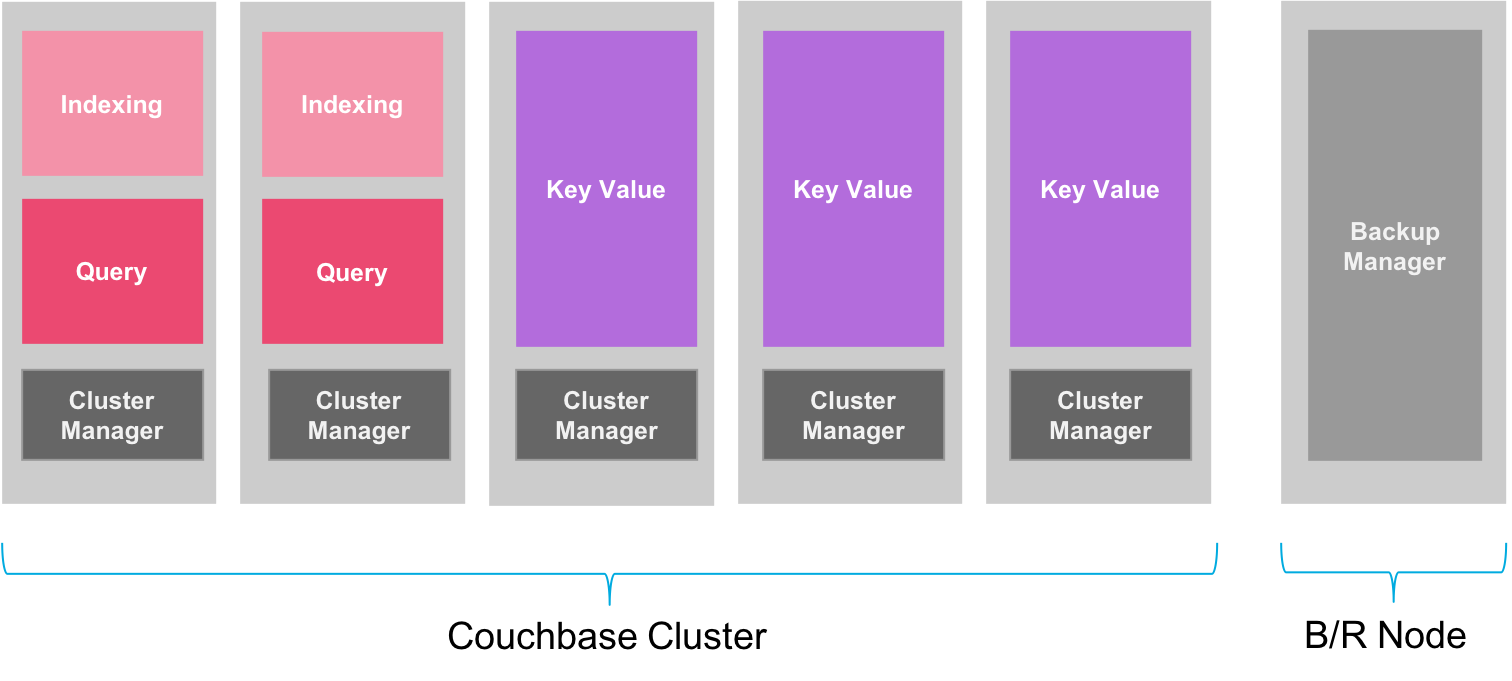
{"id":8123,"date":"2020-01-31T00:54:44","date_gmt":"2020-01-31T08:54:44","guid":{"rendered":"https:\/\/www.couchbase.com\/blog\/?p=8123"},"modified":"2025-06-13T17:14:27","modified_gmt":"2025-06-14T00:14:27","slug":"backup-restore-of-couchbase-cluster-in-a-kubernetes-environment","status":"publish","type":"post","link":"https:\/\/www.couchbase.com\/blog\/backup-restore-of-couchbase-cluster-in-a-kubernetes-environment\/","title":{"rendered":"Couchbase Backup \/ Restore in K8s Environment"},"content":{"rendered":"\r\n<h2 class=\"wp-block-heading\">1. Introduction<\/h2>\r\n\r\n\r\n\r\n<p>Periodic backup of data is an important part of any production database deployment, which helps ensure data recovery in the event of a disaster and it also minimizes data inconsistency when a restore is required.<\/p>\r\n\r\n\r\n\r\n<p>Couchbase provides <a href=\"https:\/\/docs.couchbase.com\/server\/current\/backup-restore\/cbbackupmgr.html\">cbbackupmgr<\/a> utility that has been improved over the years to become an enterprise-grade Backup and Restore tool to backup large data sets with much higher performance therefore we recommend this tool to be used in the production. It is worth mentioning that in <a href=\"https:\/\/www.couchbase.com\/blog\/enhanced-data-protection-with-couchbase-6-5\/\">Couchbase Server 6.5<\/a> we have overhauled the backup-storage engine completely, and introduced higher compression ratio, which has resulted in much improved backup-restore performance and reduced storage requirements for each backup snapshot, resulting in cost saving.<\/p>\r\n\r\n\r\n<hr class=\"wp-block-separator\" \/>\r\n\r\n\r\n<h2 class=\"wp-block-heading\">2. Best Practice<\/h2>\r\n\r\n\r\n\r\n<p>Although <a href=\"https:\/\/docs.couchbase.com\/server\/current\/backup-restore\/cbbackupmgr.html\">cbbackupmgr<\/a> exists under Couchbase_HOME, it is <strong>not<\/strong> recommended to run this utility from any of the active nodes in the cluster. As it would be competing for resources of active requests and could potentially hamper the performance of your database system.<\/p>\r\n\r\n\r\n\r\n<p>It is, therefore, a best practice to provide a separate instance (for backup and restore needs) with only the Couchbase binaries installed but no Couchbase services running, so resources can be better managed for both the database cluster and the backup node.<\/p>\r\n\r\n\r\n\r\n<figure class=\"wp-block-image size-large\"><img loading=\"lazy\" decoding=\"async\" width=\"1512\" height=\"681\" class=\"wp-image-8124\" src=\"https:\/\/i0.wp.com\/blog.couchbase.com\/wp-content\/uploads\/2020\/01\/backup-setup.png?fit=900%2C405&amp;ssl=1\" alt=\"Backup Manager\" srcset=\"https:\/\/www.couchbase.com\/blog\/wp-content\/uploads\/sites\/1\/2020\/01\/backup-setup.png 1512w, https:\/\/www.couchbase.com\/blog\/wp-content\/uploads\/sites\/1\/2020\/01\/backup-setup-300x135.png 300w, https:\/\/www.couchbase.com\/blog\/wp-content\/uploads\/sites\/1\/2020\/01\/backup-setup-1024x461.png 1024w, https:\/\/www.couchbase.com\/blog\/wp-content\/uploads\/sites\/1\/2020\/01\/backup-setup-768x346.png 768w, https:\/\/www.couchbase.com\/blog\/wp-content\/uploads\/sites\/1\/2020\/01\/backup-setup-20x9.png 20w, https:\/\/www.couchbase.com\/blog\/wp-content\/uploads\/sites\/1\/2020\/01\/backup-setup-1320x595.png 1320w\" sizes=\"auto, (max-width: 1512px) 100vw, 1512px\" \/><\/figure>\r\n\r\n\r\n\r\n<p>As can be seen from the above figure, a separate backup\/restore node is provisioned in addition to a five node Couchbase cluster. Another best practice is to allocate sufficient storage to hold at least 5x the Couchbase data set size so there is enough space to store required snapshots of the database to meet the <a href=\"https:\/\/en.wikipedia.org\/wiki\/Recovery_point_objective\">Recovery Point Objective<\/a> (RPO) of the business.<\/p>\r\n\r\n\r\n\r\n<h2 class=\"wp-block-heading\">3. Backup Strategy<\/h2>\r\n\r\n\r\n\r\n<p><a href=\"https:\/\/docs.couchbase.com\/server\/current\/backup-restore\/cbbackupmgr.html\">cbbackupmgr<\/a> provides a suite of commands which enables DBAs to implement a backup strategy that best suite their business needs. Here are some of the commands:<\/p>\r\n\r\n\r\n\r\n<ul class=\"wp-block-list\">\r\n<li><strong>cbbackupmgr backup<\/strong> &#8211; <a href=\"https:\/\/docs.couchbase.com\/server\/current\/backup-restore\/cbbackupmgr-backup.html\">Backs up data from a Couchbase cluster<\/a>.<\/li>\r\n<li><strong>cbbackupmgr compact<\/strong> &#8211; <a href=\"https:\/\/docs.couchbase.com\/server\/current\/backup-restore\/cbbackupmgr-compact.html\">Compacts a backup<\/a><\/li>\r\n<li><strong>cbbackupmgr merge<\/strong> &#8211; <a href=\"https:\/\/docs.couchbase.com\/server\/current\/backup-restore\/cbbackupmgr-merge.html\">Merges backups together<\/a><\/li>\r\n<li><strong>cbbackupmgr config<\/strong> &#8211; <a href=\"https:\/\/docs.couchbase.com\/server\/current\/backup-restore\/cbbackupmgr-config.html\">Creates a new backup repository<\/a><\/li>\r\n<li><strong>cbbackupmgr list<\/strong> &#8211; <a href=\"https:\/\/docs.couchbase.com\/server\/current\/backup-restore\/cbbackupmgr-info.html\">Lists backups in the archive<\/a><\/li>\r\n<\/ul>\r\n\r\n\r\n\r\n<p>Using these commands one can implement any of the three backup strategies as mentioned in the <a href=\"https:\/\/docs.couchbase.com\/server\/current\/backup-restore\/cbbackupmgr-strategies.html\">documentation<\/a>. In the example below, we will describe <a href=\"https:\/\/docs.couchbase.com\/server\/current\/backup-restore\/cbbackupmgr-strategies.html#periodic-merge\">Periodic Merge<\/a> strategy, in context of Couchbase Cluster running within Kubernetes environment.<\/p>\r\n\r\n\r\n\r\n<h3 class=\"wp-block-heading\">4. Periodic Merge<\/h3>\r\n\r\n\r\n\r\n<p>This backup strategy is intended to have the lowest database overhead as it requires the least amount of time to backup the changes and practically no resources consumption from the database cluster to consolidate the data during the compaction and merge process (as it happens on the backup node).<\/p>\r\n\r\n\r\n\r\n<p>On a high level here is how <em>Periodic Merge<\/em> strategy works:<\/p>\r\n\r\n\r\n\r\n<ol class=\"wp-block-list\">\r\n<li>Setup backup repository using <a href=\"https:\/\/docs.couchbase.com\/server\/current\/backup-restore\/cbbackupmgr-config.html\">cbbackupmgr config<\/a><\/li>\r\n<li>Take an incremental backup of the database (in the repository) using <a href=\"https:\/\/docs.couchbase.com\/server\/current\/backup-restore\/cbbackupmgr-backup.html\">cbbackupmgr backup<\/a><\/li>\r\n<li>Perform backup compaction using <a href=\"https:\/\/docs.couchbase.com\/server\/current\/backup-restore\/cbbackupmgr-compact.html\">cbbackupmgr compact<\/a> so that disk space can be efficiently used.<\/li>\r\n<li>Merge &#8216;n&#8217; oldest backups using <a href=\"https:\/\/docs.couchbase.com\/server\/current\/backup-restore\/cbbackupmgr-merge.html\">cbbackupmgr merge<\/a> so that the number of backups in the repository doesn&#8217;t grow infinitely and space requirements remain under check.<\/li>\r\n<\/ol>\r\n\r\n\r\n\r\n<p>Note: The above steps are captured in the <a href=\"https:\/\/github.com\/couchbaselabs\/cboperator-hol\/blob\/master\/eks\/cb-operator-guide\/files\/sh\/backup-with-periodic-merge.sh\">backup-with-periodic-merge.sh<\/a> script, which we will later use in our Kubernetes setup to take periodic backups.<\/p>\r\n\r\n\r\n\r\n<h2 class=\"wp-block-heading\">5. Backup Couchbase Data<\/h2>\r\n\r\n\r\n\r\n<p>In my last blog on Couchbase Autonomous Operator, I have described step-by-step on <a href=\"https:\/\/www.couchbase.com\/blog\/deploy-self-healing-highly-available-couchbase-cluster-on-kubernetes-using-persistent-volumes\/\">how to deploy self-healing, highly-available Couchbase cluster using Persistent Volumes<\/a>. Assuming you have followed those steps and deployed the cluster already, steps below will describe how you can setup automatic backup capability using <code>cronjob<\/code>. It is considered best practice to regularly backup your data, and also test restoring backups to confirm the restore process before disaster recovery is actually required.<\/p>\r\n\r\n\r\n\r\n<p>This functionality is not provided by the Operator and left to the cluster administrator to define backup policies and test data restoration. This section describes some common patterns that may be employed to perform the required functions.<\/p>\r\n\r\n\r\n\r\n<h3 class=\"wp-block-heading\">5.1. Create Storage Class<\/h3>\r\n\r\n\r\n\r\n<p>The Kubernetes resource definitions below illustrate a typical arrangement for backup that saves the state of the entire cluster. We would need to first define the <code>StorageClass<\/code> which we will format using <code>xfs<\/code> for the most optimal performance.<\/p>\r\n\r\n\r\n\r\n<pre class=\"wp-block-code\"><code># Create storage class for backup\/restore operations\r\napiVersion: storage.k8s.io\/v1\r\nkind: StorageClass\r\nmetadata:\r\n  labels:\r\n    k8s-addon: storage-aws.addons.k8s.io\r\n  name: gp2-backup-storage\r\nparameters:\r\n  type: gp2\r\n  fsType: xfs\r\nprovisioner: kubernetes.io\/aws-ebs\r\nreclaimPolicy: Retain\r\nvolumeBindingMode: WaitForFirstConsumer<\/code><\/pre>\r\n\r\n\r\n\r\n<p>Using above definition in <a href=\"https:\/\/github.com\/couchbaselabs\/cboperator-hol\/blob\/master\/eks\/cb-operator-guide\/files\/br\/backup-sc.yaml\">backup-sc.yaml<\/a> file, we can create storage class like this:<\/p>\r\n\r\n\r\n\r\n<pre class=\"wp-block-code\"><code>$ kubectl create -f backup-sc.yaml -n emart<\/code><\/pre>\r\n\r\n\r\n\r\n<h3 class=\"wp-block-heading\">5.2. Create Persistent Volume<\/h3>\r\n\r\n\r\n\r\n<p>A persistent volume is claimed to keep data safe in the event of an outage. You will need to plan the claim size based on your expected data set size, the number of days data retention and whether incremental backups are used at all.<\/p>\r\n\r\n\r\n\r\n<pre class=\"wp-block-code\"><code># Define backup storage volume\r\nkind: PersistentVolumeClaim\r\napiVersion: v1\r\nmetadata:\r\n  name: backup-pvc\r\nspec:\r\n  storageClassName: gp2-backup-storage\r\n  resources:\r\n    requests:\r\n      storage: 50Gi\r\n  accessModes:\r\n    - ReadWriteOnce<\/code><\/pre>\r\n\r\n\r\n\r\n<p>Save above definition in <a href=\"https:\/\/github.com\/couchbaselabs\/cboperator-hol\/blob\/master\/eks\/cb-operator-guide\/files\/br\/backup-pvc.yaml\">backup-pvc.yaml<\/a> and create the claim:<\/p>\r\n\r\n\r\n\r\n<pre class=\"wp-block-code\"><code>$ kubectl create -f backup-pvc.yaml -n emart<\/code><\/pre>\r\n\r\n\r\n\r\n<h3 class=\"wp-block-heading\">5.3. Configure Backup repository<\/h3>\r\n\r\n\r\n\r\n<p>Before we can begin taking snapshots of our data periodically, we need to configure the backup archive location. A job is created to mount the persistent volume and initialize a backup repository. The repository is named <code>couchbase<\/code> which will map to the cluster name in later specifications.<\/p>\r\n\r\n\r\n\r\n<pre class=\"wp-block-code\"><code># Create a backup repository\r\nkind: Job\r\napiVersion: batch\/v1\r\nmetadata:\r\n  name: couchbase-cluster-backup-config\r\nspec:\r\n  template:\r\n    spec:\r\n      containers:\r\n        - name: backup-config\r\n          image: couchbase\/server:enterprise-6.5.0\r\n          command: [\"cbbackupmgr\", \"config\", \"--archive\", \"\/backups\", \"--repo\", \"couchbase\"]\r\n          volumeMounts:\r\n            - name: \"couchbase-cluster-backup-volume\"\r\n              mountPath: \"\/backups\"\r\n      volumes:\r\n        - name: couchbase-cluster-backup-volume\r\n          persistentVolumeClaim:\r\n            claimName: backup-pvc\r\n      restartPolicy: Never<\/code><\/pre>\r\n\r\n\r\n\r\n<p>Save above definition in <a href=\"https:\/\/github.com\/couchbaselabs\/cboperator-hol\/blob\/master\/eks\/cb-operator-guide\/files\/br\/config.yaml\">config.yaml<\/a> and create backup repository:<\/p>\r\n\r\n\r\n\r\n<pre class=\"wp-block-code\"><code>$ kubectl create -f config.yaml -n emart<\/code><\/pre>\r\n\r\n\r\n\r\n<h3 class=\"wp-block-heading\">5.3. Run Backup as CronJob<\/h3>\r\n\r\n\r\n\r\n<p>Create a cronjob as described in the <a href=\"https:\/\/github.com\/couchbaselabs\/cboperator-hol\/blob\/master\/eks\/cb-operator-guide\/files\/br\/periodic-backup.yaml\">periodic-backup.yaml<\/a> file, which takes a backup of the Couchbase cluster by a) downloading the backup script in the pod b) running the script and taking backup of the cluster data using the persistent storage volume.<\/p>\r\n\r\n\r\n\r\n<pre class=\"wp-block-code\"><code>kind: CronJob\r\napiVersion: batch\/v1beta1\r\nmetadata:\r\n  name: couchbase-cluster-backup-create\r\nspec:\r\n  schedule: \"*\/5 * * * *\"\r\n  jobTemplate:\r\n    spec:\r\n      template:\r\n        spec:\r\n          containers:\r\n            #Delete backup-with-periodic-merge script so that new one can be pulled with each run\r\n            - name: delete-script\r\n              image: couchbase\/server:enterprise-6.5.0\r\n              command: [\"rm\", \"\/backups\/backup-with-periodic-merge.sh\"]\r\n              volumeMounts:\r\n                - name: \"couchbase-cluster-backup-volume\"\r\n                  mountPath: \"\/backups\"\r\n          initContainers:\r\n            #Download the backup script from the git repo\r\n            - name: wget-backup-script\r\n              image: couchbase\/server:enterprise-6.5.0\r\n              command: [\"wget\", \"https:\/\/raw.githubusercontent.com\/couchbaselabs\/cboperator-hol\/master\/eks\/cb-operator-guide\/files\/sh\/backup-with-periodic-merge.sh\", \"-P\", \"\/backups\/.\"]\r\n              volumeMounts:\r\n                - name: \"couchbase-cluster-backup-volume\"\r\n                  mountPath: \"\/backups\"\r\n            #Change the mod of the backup script to execution\r\n            - name: chmod-script\r\n              image: couchbase\/server:enterprise-6.5.0\r\n              command: [\"chmod\", \"700\", \"\/backups\/backup-with-periodic-merge.sh\"]\r\n              volumeMounts:\r\n                - name: \"couchbase-cluster-backup-volume\"\r\n                  mountPath: \"\/backups\"\r\n            #Run the script so it can do a) Backup b) Compaction c) Merge with each snapshot\r\n            - name: periodic-merge\r\n              image: couchbase\/server:enterprise-6.5.0\r\n              command: [\"sh\", \"-c\" ,\"\/backups\/backup-with-periodic-merge.sh --cluster cbdemo-srv.emart.svc\"]\r\n              volumeMounts:\r\n                - name: \"couchbase-cluster-backup-volume\"\r\n                  mountPath: \"\/backups\"\r\n          volumes:\r\n            - name: couchbase-cluster-backup-volume\r\n              persistentVolumeClaim:\r\n                claimName: backup-pvc\r\n          restartPolicy: Never<\/code><\/pre>\r\n\r\n\r\n\r\n<p>In the above YAML we are running backup every 5 mins but you can change the frequency so it can meet your business RPO. As our Couchbase cluster is deployed within namespace <code>emart<\/code> so we will deploy the backup cronjob under the same namespace:<\/p>\r\n\r\n\r\n\r\n<pre class=\"wp-block-code\"><code>$ kubectl apply -f periodic-backup.yaml -n emart\r\n\r\ncronjob.batch\/couchbase-cluster-backup-create created<\/code><\/pre>\r\n\r\n\r\n\r\n<h3 class=\"wp-block-heading\">5.4 Validate Periodic Backup Job<\/h3>\r\n\r\n\r\n\r\n<p>At this point, you can begin to watch the cronjob kicking in at every 5 minutes. And once it becomes active it will execute three <code>initContainers<\/code> (wget-backup-script, chmod-script, periodic-merge) in sequential order followed by the <code>cointainers<\/code> (delete-script):<\/p>\r\n\r\n\r\n\r\n<pre class=\"wp-block-code\"><code>$ kubectl get pods -n emart -w\r\n\r\nNAME                                            READY     STATUS    RESTARTS   AGE\r\nbackup-node                                     1\/1       Running   0          1d\r\ncbdemo-0000                                     1\/1       Running   0          5d\r\ncbdemo-0001                                     1\/1       Running   0          5d\r\ncbdemo-0002                                     1\/1       Running   0          5d\r\ncbdemo-0003                                     1\/1       Running   0          5d\r\ncbdemo-0004                                     1\/1       Running   0          5d\r\ncouchbase-operator-7654d844cb-gn4bw             1\/1       Running   0          5d\r\ncouchbase-operator-admission-7ff868f54c-5pklx   1\/1       Running   0          5d\r\n\r\ncouchbase-cluster-backup-create-1580357820-tz2hg   0\/1       Pending   0         2s\r\ncouchbase-cluster-backup-create-1580357820-tz2hg   0\/1       Pending   0         2s\r\ncouchbase-cluster-backup-create-1580357820-tz2hg   0\/1       Init:0\/3   0         2s\r\ncouchbase-cluster-backup-create-1580357820-tz2hg   0\/1       Init:1\/3   0         3s\r\ncouchbase-cluster-backup-create-1580357820-tz2hg   0\/1       Init:2\/3   0         4s\r\ncouchbase-cluster-backup-create-1580357820-tz2hg   0\/1       Init:2\/3   0         6s\r\ncouchbase-cluster-backup-create-1580357820-tz2hg   0\/1       PodInitializing   0         27s\r\ncouchbase-cluster-backup-create-1580357820-tz2hg   0\/1       Completed   0         30s<\/code><\/pre>\r\n\r\n\r\n\r\n<p>You can view the logs of each <code>initContainers<\/code> after the pod displays status <strong>Completed<\/strong>. The <code>initContainers<\/code> we are interested in is called <code>periodic-merge<\/code>:<\/p>\r\n\r\n\r\n\r\n<pre class=\"wp-block-code\"><code>$ kubectl logs couchbase-cluster-backup-create-1580357820-tz2hg -n emart -c periodic-merge\r\n\r\n\r\n---------------------------------------------------------\r\nBEGIN STEP 1: BACKUP : Thu Jan 30 04:17:12 UTC 2020\r\nRunning backup...\r\n Command:  cbbackupmgr backup  --archive \/backups --repo couchbase --cluster couchbase:\/\/cbdemo-srv.emart.svc --username Administrator --password password --threads 2\r\nWarning: Progress bar disabled because terminal width is less than 80 characters\r\nBackup successfully completed\r\nBacked up bucket \"gamesim-sample\" succeeded\r\nMutations backedup; 586, Mutations failed to backup: 0\r\nDeletions backedup: 0, Deletions failed to backup: 0\r\nBacked up bucket \"travel-sample\" succeeded\r\nMutations backedup; 0, Mutations failed to backup: 0\r\nDeletions backedup: 0, Deletions failed to backup: 0\r\n---------------------------------------------------------\r\nBEGIN STEP 2: COMPACTION : Thu Jan 30 04:17:20 UTC 2020\r\nList of backup snapshots ...\r\n\r\n2020-01-28T23_01_37.592188562Z\r\n2020-01-28T23_03_34.160387835Z\r\n2020-01-28T23_05_08.103740281Z\r\n2020-01-30T04_17_12.702824188Z\r\nLast backup name is: 2020-01-30T04_17_12.702824188Z\r\nCompacting the backup...\r\n Command: cbbackupmgr compact --archive \/backups --repo couchbase --backup 2020-01-30T04_17_12.702824188Z\r\nCompaction succeeded, 0 bytes freed\r\n---------------------------------------------------------\r\nBEGIN STEP 3: Merging old backup : Thu Jan 30 04:17:24 UTC 2020\r\n\r\n Size      Items          Name\r\n 604.93MB  -              + couchbase\r\n 192.00MB  -                  + 2020-01-28T23_01_37.592188562Z\r\n 192.00MB  -                      + beer-sample\r\n 37B       0                          analytics.json\r\n 414B      0                          bucket-config.json\r\n 192.00MB  7303                       + data\r\n 192.00MB  7303                           1024 Shards\r\n 2B        0                          full-text.json\r\n 1.94KB    1                          gsi.json\r\n 784B      1                          views.json\r\n 192.02MB  -                  + 2020-01-28T23_03_34.160387835Z\r\n 192.02MB  -                      + travel-sample\r\n 0B        0                          analytics.json\r\n 416B      0                          bucket-config.json\r\n 192.00MB  31591                      + data\r\n 192.00MB  31591                          1024 Shards\r\n 2B        0                          full-text.json\r\n 15.57KB   10                         gsi.json\r\n 2B        0                          views.json\r\n 64.02MB   -                  + 2020-01-28T23_05_08.103740281Z\r\n 64.02MB   -                      + travel-sample\r\n 0B        0                          analytics.json\r\n 416B      0                          bucket-config.json\r\n 64.00MB   0                          + data\r\n 64.00MB   0                              1024 Shards\r\n 2B        0                          full-text.json\r\n 15.57KB   10                         gsi.json\r\n 2B        0                          views.json\r\n 156.89MB  -                  + 2020-01-30T04_17_12.702824188Z\r\n 92.88MB   -                      + gamesim-sample\r\n 0B        0                          analytics.json\r\n 417B      0                          bucket-config.json\r\n 92.88MB   586                        + data\r\n 92.88MB   586                            1024 Shards\r\n 2B        0                          full-text.json\r\n 1.95KB    1                          gsi.json\r\n 501B      1                          views.json\r\n 64.02MB   -                      + travel-sample\r\n 0B        0                          analytics.json\r\n 416B      0                          bucket-config.json\r\n 64.00MB   0                          + data\r\n 64.00MB   0                              1024 Shards\r\n 2B        0                          full-text.json\r\n 15.57KB   10                         gsi.json\r\n 2B        0                          views.json\r\nStart 2020-01-28T23_01_37.592188562Z, END 2020-01-28T23_03_34.160387835Z\r\nMerging old backups...\r\n Command: cbbackupmgr merge --archive \/backups --repo couchbase --start 2020-01-28T23_01_37.592188562Z --end 2020-01-28T23_03_34.160387835Z\r\n\r\nMerge completed successfully\r\n\r\nSize      Items          Name\r\n 412.92MB  -              + couchbase\r\n 192.02MB  -                  + 2020-01-28T23_03_34.160387835Z\r\n 192.02MB  -                      + travel-sample\r\n 37B       0                          analytics.json\r\n 416B      0                          bucket-config.json\r\n 192.00MB  31591                      + data\r\n 192.00MB  31591                          1024 Shards\r\n 2B        0                          full-text.json\r\n 15.57KB   10                         gsi.json\r\n 2B        0                          views.json\r\n 64.02MB   -                  + 2020-01-28T23_05_08.103740281Z\r\n 64.02MB   -                      + travel-sample\r\n 0B        0                          analytics.json\r\n 416B      0                          bucket-config.json\r\n 64.00MB   0                          + data\r\n 64.00MB   0                              1024 Shards\r\n 2B        0                          full-text.json\r\n 15.57KB   10                         gsi.json\r\n 2B        0                          views.json\r\n 156.89MB  -                  + 2020-01-30T04_17_12.702824188Z\r\n 92.88MB   -                      + gamesim-sample\r\n 0B        0                          analytics.json\r\n 417B      0                          bucket-config.json\r\n 92.88MB   586                        + data\r\n 92.88MB   586                            1024 Shards\r\n 2B        0                          full-text.json\r\n 1.95KB    1                          gsi.json\r\n 501B      1                          views.json\r\n 64.02MB   -                      + travel-sample\r\n 0B        0                          analytics.json\r\n 416B      0                          bucket-config.json\r\n 64.00MB   0                          + data\r\n 64.00MB   0                              1024 Shards\r\n 2B        0                          full-text.json\r\n 15.57KB   10                         gsi.json\r\n 2B        0                          views.json<\/code><\/pre>\r\n\r\n\r\n\r\n<p>Note: As can be seen from the logs above, before the merge step there were four backups available and after merge there are three backup snapshots that are referred to as <code>RESTOREPOINTS<\/code> in <a href=\"https:\/\/github.com\/couchbaselabs\/cboperator-hol\/blob\/master\/eks\/cb-operator-guide\/files\/sh\/backup-with-periodic-merge.sh\">backup-with-periodic-merge.sh<\/a> script.<\/p>\r\n\r\n\r\n\r\n<p>This concludes the backup section.<\/p>\r\n\r\n\r\n\r\n<h2 class=\"wp-block-heading\">6. Restoring<\/h2>\r\n\r\n\r\n\r\n<p>Much like a backup, we can restore data to a new Couchbase cluster with a Kubernetes Job.<\/p>\r\n\r\n\r\n\r\n<pre class=\"wp-block-code\"><code>kind: Job\r\napiVersion: batch\/v1\r\nmetadata:\r\n  name: couchbase-cluster-restore\r\nspec:\r\n  template:\r\n    spec:\r\n      containers:\r\n        - name: couchbase-cluster-restore\r\n          image: couchbase\/server:enterprise-6.0.2\r\n          command: [\"cbbackupmgr\", \"restore\", \"--archive\", \"\/backups\", \"--repo\", \"couchbase\", \"--cluster\", \"couchbase:\/\/cbdemo-srv.emart.svc\", \"--username\", \"Administrator\", \"--password\", \"password\"]\r\n          volumeMounts:\r\n            - name: \"couchbase-cluster-backup-volume\"\r\n              mountPath: \"\/backups\"\r\n      volumes:\r\n        - name: couchbase-cluster-backup-volume\r\n          persistentVolumeClaim:\r\n            claimName: backup-pvc\r\n      restartPolicy: Never<\/code><\/pre>\r\n\r\n\r\n\r\n<p>If you would rather like to create a temporary backup-restore pod to see what backups are available or to troubleshoot an issue, you can mount the same <code>persistentVolumeClaim<\/code> to a new pod. Here is the definition of the pod which can be stored in <a href=\"https:\/\/github.com\/couchbaselabs\/cboperator-hol\/blob\/master\/eks\/cb-operator-guide\/files\/br\/backup-pod.yaml\">backup-pod.yaml<\/a>:<\/p>\r\n\r\n\r\n\r\n<pre class=\"wp-block-code\"><code>apiVersion: v1\r\nkind: Pod\r\nmetadata:\r\n  name: backup-node\r\nspec:  # specification of the pod's contents\r\n  containers:\r\n    - name: backup-pod\r\n      image: couchbase\/server:enterprise-6.5.0\r\n      # Just spin &amp; wait forever\r\n      command: [ \"\/bin\/bash\", \"-c\", \"--\" ]\r\n      args: [ \"while true; do sleep 30; done;\" ]\r\n      volumeMounts:\r\n        - name: \"couchbase-cluster-backup-volume\"\r\n          mountPath: \"\/backups\"\r\n  volumes:\r\n    - name: couchbase-cluster-backup-volume\r\n      persistentVolumeClaim:\r\n        claimName: backup-pvc\r\n  restartPolicy: Never<\/code><\/pre>\r\n\r\n\r\n\r\n<p>Run kubectl to bring up the pod temporarily:<\/p>\r\n\r\n\r\n\r\n<pre class=\"wp-block-code\"><code>$ kubectl apply -f br\/backup-pod.yaml -n emart\r\n$ kubectl get pods -n emart\r\n\r\nNAME                                            READY     STATUS    RESTARTS   AGE\r\nbackup-node                                     1\/1       Running   0          3d1h\r\ncbdemo-0000                                     1\/1       Running   0          7d1h\r\ncbdemo-0001                                     1\/1       Running   0          7d1h\r\ncbdemo-0002                                     1\/1       Running   0          7d1h\r\ncbdemo-0003                                     1\/1       Running   0          7d1h\r\ncbdemo-0004                                     1\/1       Running   0          7d1h\r\ncouchbase-operator-7654d844cb-gn4bw             1\/1       Running   0          7d2h\r\ncouchbase-operator-admission-7ff868f54c-5pklx   1\/1       Running   0          7d2h<\/code><\/pre>\r\n\r\n\r\n\r\n<p>Once backup-node is Running, we can login to that pod:<\/p>\r\n\r\n\r\n\r\n<pre class=\"wp-block-code\"><code>$ kubectl exec -it backup-node -n emart -- \/bin\/bash\r\n\r\nroot@backup-node:\/<\/code><\/pre>\r\n\r\n\r\n\r\n<p>And execute <code>cbbackupmgr list<\/code> command to view existing backups:<\/p>\r\n\r\n\r\n\r\n<pre class=\"wp-block-code\"><code># cbbackupmgr list --repo couchbase --archive \/backups\r\n\r\nSize      Items          Name\r\n256.04MB  -              + couchbase\r\n0B        -                  + 2020-01-30T04_17_12.702824188Z\r\n0B        -                      + gamesim-sample\r\n0B        0                          analytics.json\r\n0B        0                          + data\r\n0B        0                              Error: no data shards were found\r\n0B        0                          full-text.json\r\n0B        0                          gsi.json\r\n0B        0                          views.json\r\n128.02MB  -                  + 2020-01-30T04_18_13.021340423Z\r\n....<\/code><\/pre>\r\n\r\n\r\n\r\n<p>And you can also run <code>cbbackupmgr restore<\/code> command manually:<\/p>\r\n\r\n\r\n\r\n<pre class=\"wp-block-code\"><code># cbbackupmgr restore --archive \/backups --repo couchbase --cluster couchbase:\/\/cbdemo-srv.emart.svc --username Administrator --password password<\/code><\/pre>\r\n\r\n\r\n\r\n<p>Once you are done restoring just delete the pod:<\/p>\r\n\r\n\r\n\r\n<pre class=\"wp-block-code\"><code>$ kubectl delete -f backup-pod.yaml -n emart<\/code><\/pre>\r\n\r\n\r\n\r\n<h2 class=\"wp-block-heading\">7. Conclusion<\/h2>\r\n\r\n\r\n\r\n<p>We walked through step-by-step on how one can configure a backup cronjob, which automates the process of taking the periodic backup at a predefined interval. We used a <a href=\"https:\/\/github.com\/couchbaselabs\/cboperator-hol\/blob\/master\/eks\/cb-operator-guide\/files\/sh\/backup-with-periodic-merge.sh\">backup-with-periodic-merge.sh<\/a> script, that executes a) backup, b) compaction and c) merge within a single script. This script was then used in the <a href=\"https:\/\/github.com\/couchbaselabs\/cboperator-hol\/blob\/master\/eks\/cb-operator-guide\/files\/br\/periodic-backup.yaml\">periodic-backup.yaml<\/a> file, which automated the process of taking backup within the Kubernetes environment. We hope you would use the best practices described in this blog and plan on taking regular backups as well as validate those backups using restore command regularly.<\/p>\r\n","protected":false},"excerpt":{"rendered":"<p>1. Introduction Periodic backup of data is an important part of any production database deployment, which helps ensure data recovery in the event of a disaster and it also minimizes data inconsistency when a restore is required. Couchbase provides cbbackupmgr [&hellip;]<\/p>\n","protected":false},"author":33279,"featured_media":8124,"comment_status":"open","ping_status":"open","sticky":false,"template":"","format":"standard","meta":{"_acf_changed":false,"inline_featured_image":false,"footnotes":""},"categories":[9416,1821,2225,1816,2322],"tags":[10124,1933,1245,2341,2339,2354,1545,2138],"ppma_author":[9090],"class_list":["post-8123","post","type-post","status-publish","format-standard","has-post-thumbnail","hentry","category-backup","category-couchbase-architecture","category-cloud","category-couchbase-server","category-kubernetes","tag-amazon-web-services-aws","tag-backup","tag-cloud","tag-cncf","tag-eks","tag-k8","tag-kubernetes","tag-kubernetes-operator"],"acf":[],"yoast_head":"<!-- This site is optimized with the Yoast SEO Premium plugin v25.7.1 (Yoast SEO v25.7) - https:\/\/yoast.com\/wordpress\/plugins\/seo\/ -->\n<title>Couchbase Backup: Restore in K8s (Kubernetes) Environment<\/title>\n<meta name=\"description\" content=\"Couchbase\u2019s high-performance backup tool for large datasets will help you ensure data safety with improved compression for cost-effective storage.\" \/>\n<meta name=\"robots\" content=\"index, follow, max-snippet:-1, max-image-preview:large, max-video-preview:-1\" \/>\n<link rel=\"canonical\" href=\"https:\/\/www.couchbase.com\/blog\/backup-restore-of-couchbase-cluster-in-a-kubernetes-environment\/\" \/>\n<meta property=\"og:locale\" content=\"en_US\" \/>\n<meta property=\"og:type\" content=\"article\" \/>\n<meta property=\"og:title\" content=\"Couchbase Backup \/ Restore in K8s Environment\" \/>\n<meta property=\"og:description\" content=\"Couchbase\u2019s high-performance backup tool for large datasets will help you ensure data safety with improved compression for cost-effective storage.\" \/>\n<meta property=\"og:url\" content=\"https:\/\/www.couchbase.com\/blog\/backup-restore-of-couchbase-cluster-in-a-kubernetes-environment\/\" \/>\n<meta property=\"og:site_name\" content=\"The Couchbase Blog\" \/>\n<meta property=\"article:published_time\" content=\"2020-01-31T08:54:44+00:00\" \/>\n<meta property=\"article:modified_time\" content=\"2025-06-14T00:14:27+00:00\" \/>\n<meta property=\"og:image\" content=\"https:\/\/www.couchbase.com\/blog\/wp-content\/uploads\/sites\/1\/2020\/01\/backup-setup.png\" \/>\n\t<meta property=\"og:image:width\" content=\"1512\" \/>\n\t<meta property=\"og:image:height\" content=\"681\" \/>\n\t<meta property=\"og:image:type\" content=\"image\/png\" \/>\n<meta name=\"author\" content=\"Sahni, Solutions &amp; Cloud Architecture Leader, Couchbase\" \/>\n<meta name=\"twitter:card\" content=\"summary_large_image\" \/>\n<meta name=\"twitter:label1\" content=\"Written by\" \/>\n\t<meta name=\"twitter:data1\" content=\"Sahni, Solutions &amp; Cloud Architecture Leader, Couchbase\" \/>\n\t<meta name=\"twitter:label2\" content=\"Est. reading time\" \/>\n\t<meta name=\"twitter:data2\" content=\"6 minutes\" \/>\n<script type=\"application\/ld+json\" class=\"yoast-schema-graph\">{\"@context\":\"https:\/\/schema.org\",\"@graph\":[{\"@type\":\"Article\",\"@id\":\"https:\/\/www.couchbase.com\/blog\/backup-restore-of-couchbase-cluster-in-a-kubernetes-environment\/#article\",\"isPartOf\":{\"@id\":\"https:\/\/www.couchbase.com\/blog\/backup-restore-of-couchbase-cluster-in-a-kubernetes-environment\/\"},\"author\":{\"name\":\"Sahni, Solutions &amp; Cloud Architecture Leader, Couchbase\",\"@id\":\"https:\/\/www.couchbase.com\/blog\/#\/schema\/person\/21c735da109667147c580bb2cb351c1c\"},\"headline\":\"Couchbase Backup \/ Restore in K8s Environment\",\"datePublished\":\"2020-01-31T08:54:44+00:00\",\"dateModified\":\"2025-06-14T00:14:27+00:00\",\"mainEntityOfPage\":{\"@id\":\"https:\/\/www.couchbase.com\/blog\/backup-restore-of-couchbase-cluster-in-a-kubernetes-environment\/\"},\"wordCount\":1185,\"commentCount\":0,\"publisher\":{\"@id\":\"https:\/\/www.couchbase.com\/blog\/#organization\"},\"image\":{\"@id\":\"https:\/\/www.couchbase.com\/blog\/backup-restore-of-couchbase-cluster-in-a-kubernetes-environment\/#primaryimage\"},\"thumbnailUrl\":\"https:\/\/www.couchbase.com\/blog\/wp-content\/uploads\/sites\/1\/2020\/01\/backup-setup.png\",\"keywords\":[\"Amazon Web Services (AWS)\",\"backup\",\"cloud\",\"CNCF\",\"EKS\",\"K8\",\"kubernetes\",\"kubernetes operator\"],\"articleSection\":[\"Backup\",\"Couchbase Architecture\",\"Couchbase Capella\",\"Couchbase Server\",\"Kubernetes\"],\"inLanguage\":\"en-US\",\"potentialAction\":[{\"@type\":\"CommentAction\",\"name\":\"Comment\",\"target\":[\"https:\/\/www.couchbase.com\/blog\/backup-restore-of-couchbase-cluster-in-a-kubernetes-environment\/#respond\"]}]},{\"@type\":\"WebPage\",\"@id\":\"https:\/\/www.couchbase.com\/blog\/backup-restore-of-couchbase-cluster-in-a-kubernetes-environment\/\",\"url\":\"https:\/\/www.couchbase.com\/blog\/backup-restore-of-couchbase-cluster-in-a-kubernetes-environment\/\",\"name\":\"Couchbase Backup: Restore in K8s (Kubernetes) Environment\",\"isPartOf\":{\"@id\":\"https:\/\/www.couchbase.com\/blog\/#website\"},\"primaryImageOfPage\":{\"@id\":\"https:\/\/www.couchbase.com\/blog\/backup-restore-of-couchbase-cluster-in-a-kubernetes-environment\/#primaryimage\"},\"image\":{\"@id\":\"https:\/\/www.couchbase.com\/blog\/backup-restore-of-couchbase-cluster-in-a-kubernetes-environment\/#primaryimage\"},\"thumbnailUrl\":\"https:\/\/www.couchbase.com\/blog\/wp-content\/uploads\/sites\/1\/2020\/01\/backup-setup.png\",\"datePublished\":\"2020-01-31T08:54:44+00:00\",\"dateModified\":\"2025-06-14T00:14:27+00:00\",\"description\":\"Couchbase\u2019s high-performance backup tool for large datasets will help you ensure data safety with improved compression for cost-effective storage.\",\"breadcrumb\":{\"@id\":\"https:\/\/www.couchbase.com\/blog\/backup-restore-of-couchbase-cluster-in-a-kubernetes-environment\/#breadcrumb\"},\"inLanguage\":\"en-US\",\"potentialAction\":[{\"@type\":\"ReadAction\",\"target\":[\"https:\/\/www.couchbase.com\/blog\/backup-restore-of-couchbase-cluster-in-a-kubernetes-environment\/\"]}]},{\"@type\":\"ImageObject\",\"inLanguage\":\"en-US\",\"@id\":\"https:\/\/www.couchbase.com\/blog\/backup-restore-of-couchbase-cluster-in-a-kubernetes-environment\/#primaryimage\",\"url\":\"https:\/\/www.couchbase.com\/blog\/wp-content\/uploads\/sites\/1\/2020\/01\/backup-setup.png\",\"contentUrl\":\"https:\/\/www.couchbase.com\/blog\/wp-content\/uploads\/sites\/1\/2020\/01\/backup-setup.png\",\"width\":1512,\"height\":681},{\"@type\":\"BreadcrumbList\",\"@id\":\"https:\/\/www.couchbase.com\/blog\/backup-restore-of-couchbase-cluster-in-a-kubernetes-environment\/#breadcrumb\",\"itemListElement\":[{\"@type\":\"ListItem\",\"position\":1,\"name\":\"Home\",\"item\":\"https:\/\/www.couchbase.com\/blog\/\"},{\"@type\":\"ListItem\",\"position\":2,\"name\":\"Couchbase Backup \/ Restore in K8s Environment\"}]},{\"@type\":\"WebSite\",\"@id\":\"https:\/\/www.couchbase.com\/blog\/#website\",\"url\":\"https:\/\/www.couchbase.com\/blog\/\",\"name\":\"The Couchbase Blog\",\"description\":\"Couchbase, the NoSQL Database\",\"publisher\":{\"@id\":\"https:\/\/www.couchbase.com\/blog\/#organization\"},\"potentialAction\":[{\"@type\":\"SearchAction\",\"target\":{\"@type\":\"EntryPoint\",\"urlTemplate\":\"https:\/\/www.couchbase.com\/blog\/?s={search_term_string}\"},\"query-input\":{\"@type\":\"PropertyValueSpecification\",\"valueRequired\":true,\"valueName\":\"search_term_string\"}}],\"inLanguage\":\"en-US\"},{\"@type\":\"Organization\",\"@id\":\"https:\/\/www.couchbase.com\/blog\/#organization\",\"name\":\"The Couchbase Blog\",\"url\":\"https:\/\/www.couchbase.com\/blog\/\",\"logo\":{\"@type\":\"ImageObject\",\"inLanguage\":\"en-US\",\"@id\":\"https:\/\/www.couchbase.com\/blog\/#\/schema\/logo\/image\/\",\"url\":\"https:\/\/www.couchbase.com\/blog\/wp-content\/uploads\/2023\/04\/admin-logo.png\",\"contentUrl\":\"https:\/\/www.couchbase.com\/blog\/wp-content\/uploads\/2023\/04\/admin-logo.png\",\"width\":218,\"height\":34,\"caption\":\"The Couchbase Blog\"},\"image\":{\"@id\":\"https:\/\/www.couchbase.com\/blog\/#\/schema\/logo\/image\/\"}},{\"@type\":\"Person\",\"@id\":\"https:\/\/www.couchbase.com\/blog\/#\/schema\/person\/21c735da109667147c580bb2cb351c1c\",\"name\":\"Sahni, Solutions &amp; Cloud Architecture Leader, Couchbase\",\"image\":{\"@type\":\"ImageObject\",\"inLanguage\":\"en-US\",\"@id\":\"https:\/\/www.couchbase.com\/blog\/#\/schema\/person\/image\/5e9708314822fac560c43a5fbdc9b74f\",\"url\":\"https:\/\/secure.gravatar.com\/avatar\/cb8391905c8ac6ff579c79c90aeaa4e9cf773b87a25e710ee107104c5659deb6?s=96&d=mm&r=g\",\"contentUrl\":\"https:\/\/secure.gravatar.com\/avatar\/cb8391905c8ac6ff579c79c90aeaa4e9cf773b87a25e710ee107104c5659deb6?s=96&d=mm&r=g\",\"caption\":\"Sahni, Solutions &amp; Cloud Architecture Leader, Couchbase\"},\"description\":\"Anuj Sahni is a Solutions &amp; Cloud Architecture leader on the Capella team, helping customers design scalable, high-performance enterprise applications and shape their cloud migration journeys using cloud-native technologies and the Couchbase stack. He combines deep expertise in cloud architectures with solutions architecture leadership to help enterprises modernize their applications effectively. Prior to joining Couchbase, Anuj served as Principal Product Manager at Oracle, leading initiatives for Oracle Service Cloud. He brings extensive experience in building distributed, always-available relational and non-relational database systems. Anuj holds an M.S. in Electrical and Computer Engineering from the University of Florida.\",\"sameAs\":[\"https:\/\/www.linkedin.com\/in\/anuj-sahni-6a80b617\"],\"url\":\"https:\/\/www.couchbase.com\/blog\/author\/anujsahni\/\"}]}<\/script>\n<!-- \/ Yoast SEO Premium plugin. -->","yoast_head_json":{"title":"Couchbase Backup: Restore in K8s (Kubernetes) Environment","description":"Couchbase\u2019s high-performance backup tool for large datasets will help you ensure data safety with improved compression for cost-effective storage.","robots":{"index":"index","follow":"follow","max-snippet":"max-snippet:-1","max-image-preview":"max-image-preview:large","max-video-preview":"max-video-preview:-1"},"canonical":"https:\/\/www.couchbase.com\/blog\/backup-restore-of-couchbase-cluster-in-a-kubernetes-environment\/","og_locale":"en_US","og_type":"article","og_title":"Couchbase Backup \/ Restore in K8s Environment","og_description":"Couchbase\u2019s high-performance backup tool for large datasets will help you ensure data safety with improved compression for cost-effective storage.","og_url":"https:\/\/www.couchbase.com\/blog\/backup-restore-of-couchbase-cluster-in-a-kubernetes-environment\/","og_site_name":"The Couchbase Blog","article_published_time":"2020-01-31T08:54:44+00:00","article_modified_time":"2025-06-14T00:14:27+00:00","og_image":[{"width":1512,"height":681,"url":"https:\/\/www.couchbase.com\/blog\/wp-content\/uploads\/sites\/1\/2020\/01\/backup-setup.png","type":"image\/png"}],"author":"Sahni, Solutions &amp; Cloud Architecture Leader, Couchbase","twitter_card":"summary_large_image","twitter_misc":{"Written by":"Sahni, Solutions &amp; Cloud Architecture Leader, Couchbase","Est. reading time":"6 minutes"},"schema":{"@context":"https:\/\/schema.org","@graph":[{"@type":"Article","@id":"https:\/\/www.couchbase.com\/blog\/backup-restore-of-couchbase-cluster-in-a-kubernetes-environment\/#article","isPartOf":{"@id":"https:\/\/www.couchbase.com\/blog\/backup-restore-of-couchbase-cluster-in-a-kubernetes-environment\/"},"author":{"name":"Sahni, Solutions &amp; Cloud Architecture Leader, Couchbase","@id":"https:\/\/www.couchbase.com\/blog\/#\/schema\/person\/21c735da109667147c580bb2cb351c1c"},"headline":"Couchbase Backup \/ Restore in K8s Environment","datePublished":"2020-01-31T08:54:44+00:00","dateModified":"2025-06-14T00:14:27+00:00","mainEntityOfPage":{"@id":"https:\/\/www.couchbase.com\/blog\/backup-restore-of-couchbase-cluster-in-a-kubernetes-environment\/"},"wordCount":1185,"commentCount":0,"publisher":{"@id":"https:\/\/www.couchbase.com\/blog\/#organization"},"image":{"@id":"https:\/\/www.couchbase.com\/blog\/backup-restore-of-couchbase-cluster-in-a-kubernetes-environment\/#primaryimage"},"thumbnailUrl":"https:\/\/www.couchbase.com\/blog\/wp-content\/uploads\/sites\/1\/2020\/01\/backup-setup.png","keywords":["Amazon Web Services (AWS)","backup","cloud","CNCF","EKS","K8","kubernetes","kubernetes operator"],"articleSection":["Backup","Couchbase Architecture","Couchbase Capella","Couchbase Server","Kubernetes"],"inLanguage":"en-US","potentialAction":[{"@type":"CommentAction","name":"Comment","target":["https:\/\/www.couchbase.com\/blog\/backup-restore-of-couchbase-cluster-in-a-kubernetes-environment\/#respond"]}]},{"@type":"WebPage","@id":"https:\/\/www.couchbase.com\/blog\/backup-restore-of-couchbase-cluster-in-a-kubernetes-environment\/","url":"https:\/\/www.couchbase.com\/blog\/backup-restore-of-couchbase-cluster-in-a-kubernetes-environment\/","name":"Couchbase Backup: Restore in K8s (Kubernetes) Environment","isPartOf":{"@id":"https:\/\/www.couchbase.com\/blog\/#website"},"primaryImageOfPage":{"@id":"https:\/\/www.couchbase.com\/blog\/backup-restore-of-couchbase-cluster-in-a-kubernetes-environment\/#primaryimage"},"image":{"@id":"https:\/\/www.couchbase.com\/blog\/backup-restore-of-couchbase-cluster-in-a-kubernetes-environment\/#primaryimage"},"thumbnailUrl":"https:\/\/www.couchbase.com\/blog\/wp-content\/uploads\/sites\/1\/2020\/01\/backup-setup.png","datePublished":"2020-01-31T08:54:44+00:00","dateModified":"2025-06-14T00:14:27+00:00","description":"Couchbase\u2019s high-performance backup tool for large datasets will help you ensure data safety with improved compression for cost-effective storage.","breadcrumb":{"@id":"https:\/\/www.couchbase.com\/blog\/backup-restore-of-couchbase-cluster-in-a-kubernetes-environment\/#breadcrumb"},"inLanguage":"en-US","potentialAction":[{"@type":"ReadAction","target":["https:\/\/www.couchbase.com\/blog\/backup-restore-of-couchbase-cluster-in-a-kubernetes-environment\/"]}]},{"@type":"ImageObject","inLanguage":"en-US","@id":"https:\/\/www.couchbase.com\/blog\/backup-restore-of-couchbase-cluster-in-a-kubernetes-environment\/#primaryimage","url":"https:\/\/www.couchbase.com\/blog\/wp-content\/uploads\/sites\/1\/2020\/01\/backup-setup.png","contentUrl":"https:\/\/www.couchbase.com\/blog\/wp-content\/uploads\/sites\/1\/2020\/01\/backup-setup.png","width":1512,"height":681},{"@type":"BreadcrumbList","@id":"https:\/\/www.couchbase.com\/blog\/backup-restore-of-couchbase-cluster-in-a-kubernetes-environment\/#breadcrumb","itemListElement":[{"@type":"ListItem","position":1,"name":"Home","item":"https:\/\/www.couchbase.com\/blog\/"},{"@type":"ListItem","position":2,"name":"Couchbase Backup \/ Restore in K8s Environment"}]},{"@type":"WebSite","@id":"https:\/\/www.couchbase.com\/blog\/#website","url":"https:\/\/www.couchbase.com\/blog\/","name":"The Couchbase Blog","description":"Couchbase, the NoSQL Database","publisher":{"@id":"https:\/\/www.couchbase.com\/blog\/#organization"},"potentialAction":[{"@type":"SearchAction","target":{"@type":"EntryPoint","urlTemplate":"https:\/\/www.couchbase.com\/blog\/?s={search_term_string}"},"query-input":{"@type":"PropertyValueSpecification","valueRequired":true,"valueName":"search_term_string"}}],"inLanguage":"en-US"},{"@type":"Organization","@id":"https:\/\/www.couchbase.com\/blog\/#organization","name":"The Couchbase Blog","url":"https:\/\/www.couchbase.com\/blog\/","logo":{"@type":"ImageObject","inLanguage":"en-US","@id":"https:\/\/www.couchbase.com\/blog\/#\/schema\/logo\/image\/","url":"https:\/\/www.couchbase.com\/blog\/wp-content\/uploads\/2023\/04\/admin-logo.png","contentUrl":"https:\/\/www.couchbase.com\/blog\/wp-content\/uploads\/2023\/04\/admin-logo.png","width":218,"height":34,"caption":"The Couchbase Blog"},"image":{"@id":"https:\/\/www.couchbase.com\/blog\/#\/schema\/logo\/image\/"}},{"@type":"Person","@id":"https:\/\/www.couchbase.com\/blog\/#\/schema\/person\/21c735da109667147c580bb2cb351c1c","name":"Sahni, Solutions &amp; Cloud Architecture Leader, Couchbase","image":{"@type":"ImageObject","inLanguage":"en-US","@id":"https:\/\/www.couchbase.com\/blog\/#\/schema\/person\/image\/5e9708314822fac560c43a5fbdc9b74f","url":"https:\/\/secure.gravatar.com\/avatar\/cb8391905c8ac6ff579c79c90aeaa4e9cf773b87a25e710ee107104c5659deb6?s=96&d=mm&r=g","contentUrl":"https:\/\/secure.gravatar.com\/avatar\/cb8391905c8ac6ff579c79c90aeaa4e9cf773b87a25e710ee107104c5659deb6?s=96&d=mm&r=g","caption":"Sahni, Solutions &amp; Cloud Architecture Leader, Couchbase"},"description":"Anuj Sahni is a Solutions &amp; Cloud Architecture leader on the Capella team, helping customers design scalable, high-performance enterprise applications and shape their cloud migration journeys using cloud-native technologies and the Couchbase stack. He combines deep expertise in cloud architectures with solutions architecture leadership to help enterprises modernize their applications effectively. Prior to joining Couchbase, Anuj served as Principal Product Manager at Oracle, leading initiatives for Oracle Service Cloud. He brings extensive experience in building distributed, always-available relational and non-relational database systems. Anuj holds an M.S. in Electrical and Computer Engineering from the University of Florida.","sameAs":["https:\/\/www.linkedin.com\/in\/anuj-sahni-6a80b617"],"url":"https:\/\/www.couchbase.com\/blog\/author\/anujsahni\/"}]}},"authors":[{"term_id":9090,"user_id":33279,"is_guest":0,"slug":"anujsahni","display_name":"Sahni, Solutions &amp; Cloud Architecture Leader, Couchbase","avatar_url":"https:\/\/secure.gravatar.com\/avatar\/cb8391905c8ac6ff579c79c90aeaa4e9cf773b87a25e710ee107104c5659deb6?s=96&d=mm&r=g","author_category":"1","last_name":"Sahni, Solutions & Cloud Architecture Leader, Couchbase","first_name":"Anuj","job_title":"","user_url":"https:\/\/www.linkedin.com\/in\/anuj-sahni-6a80b617","description":"<p data-start=\"231\" data-end=\"963\"><strong data-start=\"231\" data-end=\"963\">Anuj Sahni is a Solutions &amp; Cloud Architecture leader on the Capella team, helping customers design scalable, high-performance enterprise applications and shape their cloud migration journeys using cloud-native technologies and the Couchbase stack. He combines deep expertise in cloud architectures with solutions architecture leadership to help enterprises modernize their applications effectively. Prior to joining Couchbase, Anuj served as Principal Product Manager at Oracle, leading initiatives for Oracle Service Cloud. He brings extensive experience in building distributed, always-available relational and non-relational database systems. Anuj holds an M.S. in Electrical and Computer Engineering from the University of Florida.<\/strong><\/p>"}],"_links":{"self":[{"href":"https:\/\/www.couchbase.com\/blog\/wp-json\/wp\/v2\/posts\/8123","targetHints":{"allow":["GET"]}}],"collection":[{"href":"https:\/\/www.couchbase.com\/blog\/wp-json\/wp\/v2\/posts"}],"about":[{"href":"https:\/\/www.couchbase.com\/blog\/wp-json\/wp\/v2\/types\/post"}],"author":[{"embeddable":true,"href":"https:\/\/www.couchbase.com\/blog\/wp-json\/wp\/v2\/users\/33279"}],"replies":[{"embeddable":true,"href":"https:\/\/www.couchbase.com\/blog\/wp-json\/wp\/v2\/comments?post=8123"}],"version-history":[{"count":0,"href":"https:\/\/www.couchbase.com\/blog\/wp-json\/wp\/v2\/posts\/8123\/revisions"}],"wp:featuredmedia":[{"embeddable":true,"href":"https:\/\/www.couchbase.com\/blog\/wp-json\/wp\/v2\/media\/8124"}],"wp:attachment":[{"href":"https:\/\/www.couchbase.com\/blog\/wp-json\/wp\/v2\/media?parent=8123"}],"wp:term":[{"taxonomy":"category","embeddable":true,"href":"https:\/\/www.couchbase.com\/blog\/wp-json\/wp\/v2\/categories?post=8123"},{"taxonomy":"post_tag","embeddable":true,"href":"https:\/\/www.couchbase.com\/blog\/wp-json\/wp\/v2\/tags?post=8123"},{"taxonomy":"author","embeddable":true,"href":"https:\/\/www.couchbase.com\/blog\/wp-json\/wp\/v2\/ppma_author?post=8123"}],"curies":[{"name":"wp","href":"https:\/\/api.w.org\/{rel}","templated":true}]}}